The cross-network channel in GA4 groups visits from Google Ads campaigns that are eligible to run across multiple Google properties into a single channel.
This traffic comes from:
- Google Discover Traffic
- Google Performance Max Campaigns
- Google Shopping Campaigns
Cross-Network in GA4: Key Takeaways (TL;DR)
Cross-network in GA4 groups traffic from Google Ads campaigns that run across multiple Google properties into a single reporting channel.
This includes:
- Performance Max
- Google Discover
- Shopping
- Display
- Gmail
- YouTube
Instead of assigning traffic to one specified platform, GA4 uses campaign type and placement rules to show the combined performance of these multi-network campaigns.
The Benefit:
You get a consolidated view of key metrics (such as sessions, conversions, and ROAS) for all eligible Google Ads placements across Google properties in a single channel report.
The Downside:
You can no longer see separate performance metrics (such as conversions, revenue, or ROAS) for each platform (e.g. Discover vs YouTube), which makes it more difficult to identify underperforming placements and reallocate budget accurately.
How to Fix It:
Use custom channel groups, the Source platform dimension, and GA4 Explorations to split cross-network traffic by platform (e.g. Discover, YouTube, Gmail) so you can view platform-specific conversions, revenue, and ROAS.
In Short:
Cross-network reporting is useful for consolidated analysis, but it works best when paired with custom breakdowns to understand the true platform-level performance.
Table of Contents: Understanding Cross-Network in GA4
- How GA4 Groups Traffic Into Default Channels
- Cross-Network Data Attribution Problems
- How to Fix Cross-Network Attribution Issues
- Benefits of Cross-Channel Grouping
- Cross-Network vs Other GA4 Default Channels
- Best Practices for Cross-Network Analysis
- Frequently Asked Questions
How GA4 Groups Traffic Into Default Channels
GA4 groups traffic into predefined default channel groupings (such as Paid Search, Display, and Cross-network) that are used in its standard acquisition and attribution reports.
Paid Shopping Channel
GA4 places traffic into this channel when it comes from Google Ads campaigns with a campaign type of ‘Shopping’ and when those campaigns match GA4’s default Paid Shopping channel rules. Your main example would be products listed in the Google Shopping section of the SERP.
Paid Search Channel
GA4 places traffic into this channel from Google Ads when the Ad network type is set to:
- Google Search
- Google Partners
This traffic typically comes from paid text ads shown on Google search results pages. If your Google Ads campaigns are allowed to serve on Search partners, this channel can also include text or video ads shown on Google partner sites, including YouTube placements that Google classifies under the Search network.
Paid Video Channel
Paid video traffic comes from ads with YouTube Search or YouTube Video tags. The primary example here is traffic coming from YouTube Ads placements, such as in-stream or in-feed video ads.
Display Channel
Display traffic comes from any Google Ads campaign with a Google Display Network tag. By default, traffic from campaigns serving on the Google Display Network is grouped into this channel, unless you change the default definitions in GA4’s Admin → Channel groups settings.
Paid Social Channel
GA4 shows paid social ad traffic in this channel. It comes from traffic where the source/medium and campaign settings match GA4’s default Paid Social channel rules (for example, utm_medium set to paid_social for platforms like Facebook, X, or Instagram). Common examples are ads from external social networks such as Facebook, X (Twitter), and Instagram.
Cross-Network Channel Definition
The Cross-Network channel shows traffic from Google Ads campaigns that match GA4’s Cross-network default channel rules, typically based on campaign type (such as Performance Max or Discovery) and ad network classifications.
In practice, this commonly includes traffic from:
- Google Discovery
- Performance Max campaigns
- Google Smart Shopping
Cross-Network Attribution Limitations and Reporting Challenges in GA4
Grouping traffic from different networks in one channel creates specific attribution challenges, such as not being able to see conversions and ROAS by individual platform and not knowing which platforms deserve increased or reduced budget. SEO specialists lose visibility into which specific Google properties (e.g., Discover vs. YouTube vs. Shopping) are driving sessions and conversions.
You Can’t Identify Which Network Drives Performance
When multiple Google properties are grouped together, you can’t tell whether a specific visit came from Discover, YouTube, Shopping, or another placement. You can’t see which network led to a conversion. This makes it difficult to compare key metrics such as sessions, conversion rate, cost per conversion, and ROAS for each ad network in your reports.
When a particular platform starts underperforming, for example, when conversions or ROAS drop, you need to identify it quickly. Without clear data segmentation, you have to guess which specific platform or placement caused the drop in conversions or ROAS. Guessing can lead to misallocated budgets, pausing effective placements, or continuing to fund underperforming ones.
GA4’s Data-Driven Attribution Model Creates Confusion
GA4 uses a data-driven attribution model that splits credit between touchpoints. GA4’s data‑driven attribution algorithm decides how much credit each touchpoint gets based on observed user behavior and historical conversion patterns. This makes it difficult to quantify the exact share of conversions that should be attributed to each individual platform.
GA4 tries to show the full customer journey picture. But when networks work together in cross-network campaigns, attribution becomes difficult to interpret because multiple platforms may receive partial credit for the same conversion. You can’t precisely determine how much each network contributes to key metrics such as conversions, revenue, or assisted conversions.
This attribution ambiguity limits your ability to compare ROAS and CPA between campaigns, to forecast expected conversions from future spend, and to justify specific budget increases or cuts to stakeholders. You can’t confidently allocate budgets to each channel based on its true incremental impact.
Limited Network-Level Optimization Data
If you don’t know which network delivers the highest ROI or conversion rate, you can’t prioritize specific changes such as shifting budget to stronger networks, adjusting bids, or pausing low‑performing placements. You can’t move budgets to better-performing networks. You can’t change strategies based on granular performance data.
Say you want to increase spend on Performance Max campaigns. But you don’t know which landing pages work best for these campaigns. You can’t determine which specific campaigns, ad groups, or landing pages show the best cost per conversion or ROAS, so you don’t know where to allocate additional budget.
Campaign-Level Performance Visibility Issues
Enterprise-level marketers often run dozens or even hundreds of campaigns at the same time. GA4 lumps all cross-network results together in one channel. In the standard acquisition reports, you can’t isolate each individual campaign’s conversions, revenue, or assisted conversions within the Cross-network channel.
This makes it difficult to identify which campaigns generate the highest revenue, profit, or lifetime value. You can’t calculate accurate campaign-level ROI or determine individual campaign value.
Practical Ways to Fix Cross-Network Attribution Issues in GA4
Now that we’ve covered the main attribution and reporting limitations of GA4’s Cross-network channel, we can look at practical solutions. Here are some solutions to these attribution problems.
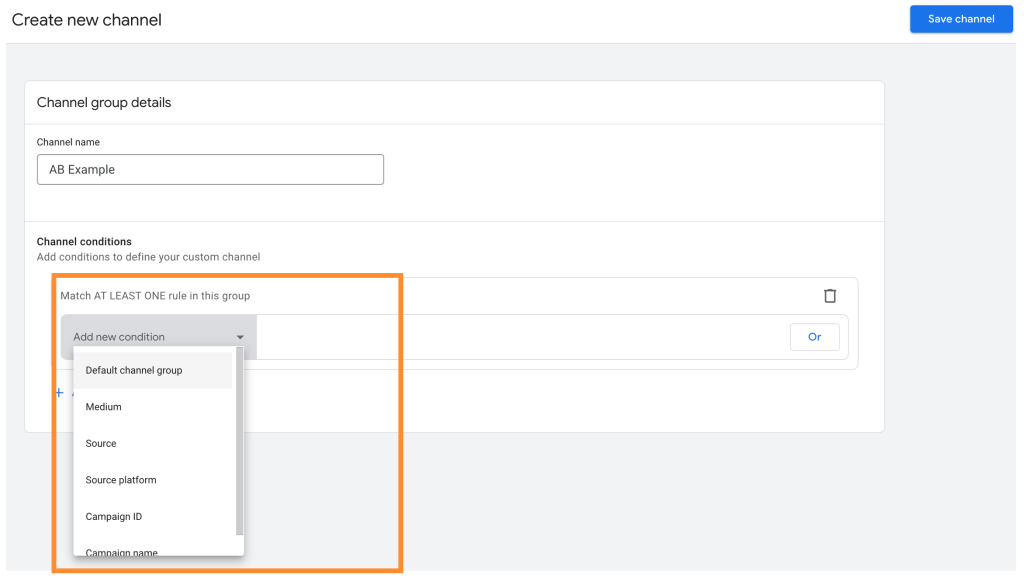
Create Custom Channel Groupings in GA4
Custom channel groups let you organize your channels based on your specific reporting needs, such as separating brand vs. non-brand or prospecting vs. remarketing traffic. You can group them based on criteria that matter to your attribution analysis, such as brand vs. non‑brand, prospecting vs. remarketing, or upper‑funnel vs. lower‑funnel campaigns. This helps you identify which channels deliver the highest conversion rate, lowest cost per conversion, or best ROAS for goals like leads, online sales, or trial signups.
When you create these custom groupings, you can quickly identify the channels with the highest ROAS or lowest CPA. You can then give more budget into the channels that bring you the most value.
Use GA4’s Source Platform Dimension
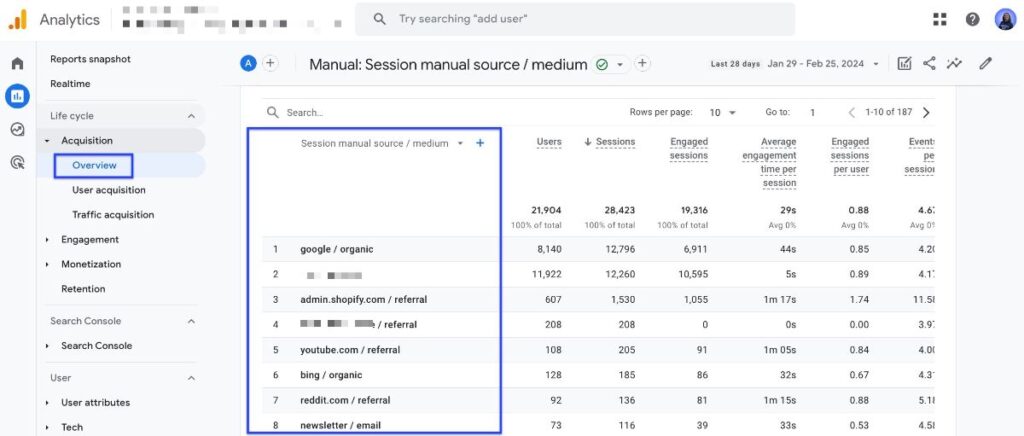
GA4 has a source platform feature that shows you exactly where your traffic comes from. It breaks down results by each individual platform. This lets you compare metrics such as sessions, conversions, and revenue for each individual platform.
You can see which platforms drive the most engaged sessions and the highest conversion rates at different stages of your customer journey. You can also spot the ones that need optimization. This helps you create better-targeted campaigns.
Use Complementary Analytics Tools for Multi-Touch and Offline Attribution
GA4 covers many standard attribution scenarios, but it may not support complex requirements such as multi-touch attribution across offline and online channels. Using other analytics tools helps you measure marketing performance more precisely, including multi-touch influence on conversions, cross‑device behavior, and offline sales impact.
CRM systems to track individual customers across touchpoints with identifiable data, such as email address or customer ID, rather than only anonymous events. Advanced attribution software can model user journeys across multiple channels and devices, estimating how many additional conversions each touchpoint generates compared with a scenario where that touchpoint is absent. Business intelligence platforms help you dig deeper into your performance data.
These supplementary tools provide capabilities such as persistent user‑level tracking across channels, detailed cohort analysis, and automatic import of call‑center or in‑store conversions that GA4 does not natively offer. They give you clearer insights into individual customer journeys and isolate each campaign’s incremental impact on conversions.
Test Different Attribution Models
You are not limited to GA4’s default data-driven attribution model. You can experiment with alternative attribution models to see which one aligns most closely with your sales cycle and decision-making process.
Attribution Model | How Credit Is Assigned |
Last-Click | All conversion credit goes to the final touchpoint before conversion. |
First-Click | All conversion credit goes to the first touchpoint in the journey. |
Linear | Conversion credit is spread evenly across all touchpoints. |
Time Decay | More credit is given to recent touchpoints; earlier touchpoints get less. |
Testing different models helps you find what matches your customer journey best. This helps you decide which channels and campaigns should receive increased or reduced budget based on their true contribution to conversions.
Benefits of GA4 Cross-Network Channel Grouping
Cross-network grouping in GA4 offers several practical benefits for SEO specialists, including a unified view of paid traffic and easier comparison with organic performance. It can help your marketing analysis in several important ways.
Consolidated Multi-Platform Campaign Overview
Cross-network grouping shows you traffic from multi-platform Google Ads campaigns in one consolidated view. You can see the total impact of your ads across different platforms. This includes Google Discover, Performance Max campaigns, and Google Shopping campaigns.
This consolidated view reduces the number of separate reports you need to review to understand overall Google Ads performance. You don’t have to switch between separate reports for Display, Discover, Shopping, and YouTube to see combined results. You save time and make fewer mistakes when analyzing your performance data.
Simplified Campaign Management Workflows
Running campaigns across multiple Google platforms at the same time can be complex, especially when you’re managing budgets, creative variations, and targeting separately. Cross-network grouping makes it simpler to manage. You can see all your campaigns in one unified view.
You can track ads on Google Display, Discover, Gmail, and YouTube all at the same time. This makes it easier to spot drops in click-through rate, conversion rate, or ROAS and then adjust bids, budgets, or targeting in response.
When you see all platforms together, you can verify that every campaign supports a clearly defined objective, such as lead generation or online sales. This helps your marketing strategy work more effectively.
Cross-Platform Synergy Analysis
Cross-network grouping shows how different Google platforms interact within a user journey, such as Discover driving initial awareness and YouTube contributing to conversion later. You can see how they work together in your customer journey and attribution path.
Some platforms may deliver higher conversion rates or lower acquisition costs when used in combination than when run in isolation. You might miss how platforms work together if you only look at them one by one.
This consolidated view helps you make smarter choices about your budget allocation. You can find the best combinations of platforms. You can allocate more budget to platform combinations that generate the highest incremental conversions or revenue.
How Cross-Network Differs from Other GA4 Default Channels for Attribution and Reporting
It’s important to know how cross-network is different from other GA4 channels.
Cross-network groups traffic from many Google ad platforms. Other channels usually show one traffic source or campaign type.
This difference affects how accurately you can attribute conversions and revenue to specific platforms. It also changes how you prioritize optimization efforts, such as which placements to scale or which creatives to test.
Channels like Paid Search or Display show clearer paths. But cross-network needs more digging to see what each platform really adds.
Best Practices for Analyzing Cross-Network Performance in GA4
Use these tips to get more value from cross-network data in GA4:
Segment Cross-Network Traffic in GA4 Explorations
Use GA4 exploration reports to split cross-network traffic by source. This helps you see each platform’s contribution to sessions, engagement, and conversions.
Create GA4 Custom Dimensions to Add Context to Cross-Network Data
Configure custom dimensions (for example, campaign goal, funnel stage, or audience type) to add more context to cross-network tracking and attribution.
Test Different Attribution models to Evaluate Cross-Network Performance
Check how cross-network traffic performs with different models. This helps you identify the attribution model that most closely matches your actual sales cycle and decision-making process.
Review and Optimize Landing Pages Receiving Cross-Network Traffic
Look at how landing pages work for cross-network visits. Improve the landing pages that have low conversion rates or high bounce rates for cross-network traffic.
Test Budget Allocation Across Cross-Network Campaigns
Test different budget allocations across cross-network campaigns to increase conversions, revenue, or ROAS.
Frequently Asked Questions
What is Cross-Network in Google Analytics 4?
Cross-network in Google Analytics 4 (GA4) is a default channel that groups traffic from Google Ads campaigns designed to run across multiple Google properties at the same time.
Instead of assigning traffic to a single source like Search or Display, GA4 attributes these sessions to the cross-network channel based on campaign type and placement rules.
What Traffic Is Included in the Cross-Network Channel?
Cross-network traffic typically includes sessions from:
- Performance Max campaigns
- Google Discover ads
- Google Shopping and Smart Shopping campaings
- Google Display Network placements
- Gmail ads
- YouTube ads
Any Google Ads campaign eligible to serve across multiple Google platforms can be classified as cross-network.
Why Does GA4 Group These Networks Together?
GA4 groups these networks because campaign types like Performance Max intentionally run across multiple placements within a single campaign.
Rather than splitting traffic by platform (e.g. Discover vs YouTube), GA4 treats these placements as one combined channel to reflect how the campaign is managed and optimized inside Google Ads.
How Does GA4 Handle Attribution for Cross-Network Traffic?
GA4 uses a data-driven attribution model, which distributes conversion credit across touchpoints in the user journey.
When cross-network campaigns are involved, this means:
- Credit may be shared across multiple Google platforms
- You cannot easily see how much value each individual network contributed
- Platform-level ROAS and conversion attribution becomes less precise
How Can I See Individual Platform Performance (Discover vs YouTube, etc.)?
To break down cross-network traffic by platform, you can:
- Use the source platform dimension in GA4
- Build Exploration reports and segment cross-network traffic
- Create custom channel groupings that separate placements by platform or intent
These approaches help you regain visibility into sessions, conversions, and revenue by individual Google property.
How Is Cross-Network Different From Paid Search or Display?
Most GA4 channels represent a single traffic source or placement type, such as:
- Paid Search → Google Search ads
- Display → Google Display Network
Cross-network is different because it represents multiple platforms working together within one campaign. This makes reporting simpler at a high level, but less granular for optimization without custom analysis.
Is Cross-Network Data Useful for SEO Analysis?
Cross-network data focuses on paid traffic, not organic search. However, it can still inform SEO decisions by showing:
- Which landing pages convert best across Google properties
- How paid users engage with content before converting
- Content formats and topics that perform well across Discover, YouTube, and Display
For direct SEO performance tracking, use GA4’s Organic Search channel alongside these insights.
Should I Avoid Using Cross-Network Campaigns?
No. Cross-network campaigns can be highly effective for reach, automation, and incremental growth.
The key is not to avoid them—but to measure them correctly using:
- Custom channel groups
- Source platform analysis
- Attribution model comparisons
This ensures you keep the benefits of cross-network campaigns while maintaining decision-ready performance data.
Conclusion: How to Optimize Cross-Network Performance and Reporting in GA4
Cross-network grouping in GA4 is highly relevant for today’s SEO specialists and digital marketers because it affects how paid traffic is attributed and reported. It shows you all your Google advertising traffic in one consolidated place. It makes tracking your ads easier across different platforms.
This approach helps you manage multi-platform campaigns more efficiently by centralizing performance data from multiple Google properties. This matters even more when you run ads on Display, Gmail, and YouTube at the same time.
Cross-network grouping shows you how your campaigns work together. This helps you make better decisions about where to spend your marketing budget.
Yes, it has attribution challenges. Data attribution can get confusing when platforms are consolidated. But the solutions we discussed can help you fix these issues.
Custom channel groups give you more granular control. The source platform feature shows you more detailed attribution data. These tools help you work around the consolidation problems.
In the end, cross-network grouping can streamline your marketing analysis by consolidating data, provided you also use custom groupings and source-platform breakdowns to regain detail. It helps you make smarter attribution decisions. It can help you allocate budget to the platforms and campaigns that deliver the highest measurable returns, such as conversions or revenue.
If you manage Google Ads campaigns across properties such as Search, Display, Discover, Gmail, and YouTube, you need to understand what cross-network can and can’t show. Use smart workarounds to track results better and spend your budget more wisely.
Do you want to unlock the full potential of your SEO efforts? Then try SEOTesting.
Sign up for a free 14-day trial and experience our seamless integration with GA4. Track how specific SEO changes affect key GA4 events, such as purchases, lead submissions, or scroll-depth, to base optimizations on measured results rather than assumptions. Use these insights to refine your SEO strategy, for example, by prioritizing pages and queries that show measurable increases in clicks, impressions, and conversions.
Start your free trial today at SEOTesting!
Testimonials
-

"Can totally recommend! It’s not only full of reports to easily identify low hanging fruit opportunities but also, the most straightforward platform to help run SEO tests"
Aleyda Solis, Intl SEO Consultant, Speaker & Author.
-

"SEOTesting.com has become one of my go-to SEO tools because it does so much with all the valuable data hidden in Google Search Console. It's the only thing that gives us the ability to use that data for keyword tracking, SEO tests, and quality testing."
Ruben Gamez, DocSketch