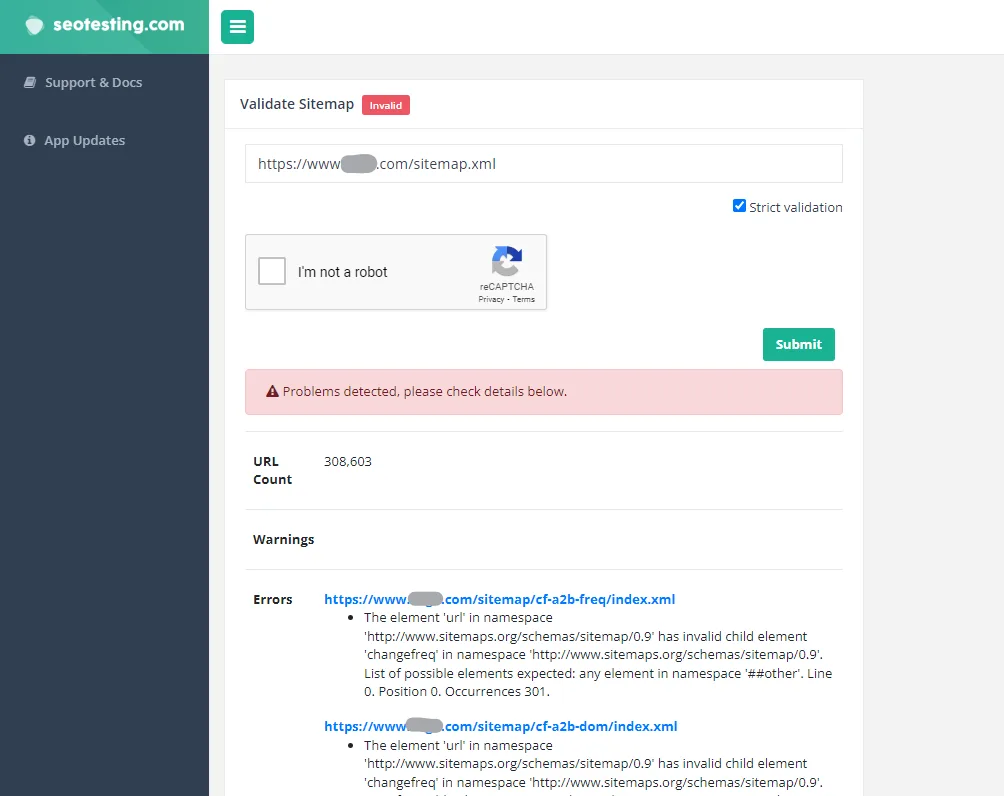
Check, test and verify your XML sitemap or sitemap index online. Enter the public URL of your sitemap, choose strict or non-strict validation, and find issues that could prevent search engines from processing the file.
Our free XML sitemap validator downloads your sitemap and checks whether the file can be read correctly.
https://example.com/sitemap.xml.The sitemap must be available at a public URL. It should not require a login or be blocked from being fetched.

| Validation mode | What it checks | When to use it |
|---|---|---|
| Non-strict validation | Attempts to read the sitemap and extract its URLs without enforcing every sitemap schema rule | Use this first when you want to know whether the sitemap can be parsed |
| Strict validation | Checks the XML file against the official sitemap specification | Use this to find formatting and standards-compliance errors |
A sitemap may pass non-strict validation but fail strict validation. This means the URLs can be read, but the file does not fully comply with the sitemap specification.
The validator checks the sitemap file itself. Depending on the validation mode, it can identify problems such as:
The validator does not perform a full crawl of every page listed in the sitemap. A sitemap can be valid XML while still containing redirected, broken, non-canonical, blocked or non-indexable URLs.
| Error | What it usually means | What to check |
|---|---|---|
| The sitemap cannot be fetched | The sitemap URL cannot be downloaded | Check the HTTP status, server availability, login requirements, firewall rules and whether the exact URL is correct |
| The sitemap returns an HTML page | The submitted URL points to a normal webpage or error page rather than a supported sitemap file | Open the URL directly and confirm that it returns XML rather than HTML |
| Invalid XML | The file is not well-formed XML | Look for unclosed tags, incorrect nesting, duplicate declarations and invalid characters |
| Missing sitemap namespace | The opening sitemap element does not declare the expected namespace | Use xmlns="http://www.sitemaps.org/schemas/sitemap/0.9" on the <urlset> or <sitemapindex> element |
Missing <loc> element |
A URL or child sitemap entry does not include its location | Add one complete URL inside a <loc> element |
| Relative URL used | The sitemap contains a path such as /example-page/ rather than a full URL |
Use an absolute URL such as https://example.com/example-page/ |
| Invalid URL | A URL contains spaces, unsupported characters or invalid escaping | Check the URL and escape characters that have a special meaning in XML |
Invalid <lastmod> value |
The modification date is in an unsupported format | Use a valid date or datetime, such as 2026-10-09 |
| Unescaped special characters | Characters such as & appear directly in XML values |
Replace them with the correct XML entity, such as & |
| Too many URLs | A sitemap contains more than 50,000 URLs | Split the URLs across multiple sitemap files and use a sitemap index |
| File too large | The uncompressed sitemap is larger than 50 MB | Split the file into smaller sitemaps and use a sitemap index |
| Invalid sitemap index | The index or one of its referenced sitemap files cannot be processed | Validate the sitemap index, then test each child sitemap individually |
A sitemap can be structurally valid and still produce an error in Google Search Console if Google cannot fetch it. Validation checks the file; accessibility checks whether Googlebot can retrieve it.
<?xml version="1.0" encoding="UTF-8"?>
<urlset xmlns="http://www.sitemaps.org/schemas/sitemap/0.9">
<url>
<loc>https://example.com/</loc>
<lastmod>2026-10-09</lastmod>
</url>
<url>
<loc>https://example.com/example-page/</loc>
<lastmod>2026-10-01</lastmod>
</url>
</urlset>
In a standard XML sitemap:
<urlset> element uses the sitemap protocol namespace.<url> element.<url> must contain a <loc> element.<lastmod> is optional, but should only be used when it accurately reflects a significant page update.Google ignores the <priority> and <changefreq> values, so including them is optional and will not influence how Google ranks or crawls a page.
A single sitemap can contain up to 50,000 URLs and can be no larger than 50 MB when uncompressed.
If your sitemap exceeds either limit, split it into several sitemap files and list them in a sitemap index. Each sitemap URL should be fully qualified, including the protocol and hostname.
For example:
https://example.com/products-sitemap.xml
https://example.com/blog-sitemap.xml
https://example.com/categories-sitemap.xml
You can then reference those files from a sitemap index:
<?xml version="1.0" encoding="UTF-8"?>
<sitemapindex xmlns="http://www.sitemaps.org/schemas/sitemap/0.9">
<sitemap>
<loc>https://example.com/products-sitemap.xml</loc>
<lastmod>2026-10-09</lastmod>
</sitemap>
<sitemap>
<loc>https://example.com/blog-sitemap.xml</loc>
<lastmod>2026-10-08</lastmod>
</sitemap>
</sitemapindex>
A sitemap validator checks whether the sitemap file can be read and whether its XML structure is valid.
A full sitemap audit goes further by crawling the URLs listed in the sitemap and checking whether they:
noindex directiveThis validator checks the sitemap file rather than performing a full crawl of every listed URL.
To export the URLs for a separate crawl or audit, use our free Sitemap URL Extractor.
Once your sitemap is valid:
You can reference a sitemap in robots.txt like this:
Sitemap: https://example.com/sitemap.xml
Submitting a sitemap helps Google discover your preferred URLs, but it does not guarantee that every URL will be crawled or indexed.
Use our other free sitemap tools:
An XML sitemap validator checks whether a sitemap can be read and whether its XML follows the sitemap specification. It helps identify structural and formatting errors before you submit the sitemap to a search engine.
Enter the full public URL of the sitemap into the validator. Run non-strict validation to check whether the URLs can be read, then use strict validation to check the file against the official sitemap specification. Fix any reported errors and test the sitemap again.
These terms are often used for the same basic task: checking whether a sitemap can be fetched, read and parsed correctly. This tool acts as an XML sitemap validator, checker and tester.
Non-strict validation attempts to read the URLs from the sitemap without enforcing every schema rule. Strict validation checks the XML against the official sitemap specification and reports files that do not meet it exactly.
Yes. Enter the URL of the sitemap index file. The index file will be validated, along with each XML sitemap that it references.
No. The validator checks the sitemap file itself rather than crawling every URL listed inside it. A sitemap can pass validation while still containing broken, redirected, non-canonical or non-indexable URLs.
XML validity and accessibility are separate checks. A sitemap can contain valid XML but still be unavailable to Google because it requires authentication, is blocked, returns an HTTP error, uses the wrong URL or is temporarily unavailable.
Test the exact sitemap URL, confirm that it is public, and use live URL inspection in Google Search Console to check whether Googlebot can fetch it.
No. Validation only checks the sitemap. Once the sitemap is valid, submit its URL through the Sitemaps report in Google Search Console or reference it in your robots.txt file.
No. A valid sitemap helps Google discover your preferred URLs, but submission is only a hint. Google makes separate decisions about crawling, canonicalisation and indexing.
A single sitemap can contain up to 50,000 URLs and must be no larger than 50 MB when uncompressed. Larger sets of URLs should be divided across several sitemap files and managed through a sitemap index.
Common sitemap locations include:
https://example.com/sitemap.xml
https://example.com/sitemap_index.xml
You can also check your website’s robots.txt file. Sitemap URLs are often listed there using a Sitemap: directive. Your CMS or website platform may use a different location.
The validator currently checks a sitemap from a public URL rather than accepting a direct file upload. Upload the sitemap to an accessible location on your website, then enter its full URL into the tool.
Yes. XML validation confirms that the sitemap file can be processed correctly. It does not confirm that every listed URL is indexable, canonical, useful or returning a successful response.
Paste in the public URL of your sitemap or sitemap index and get an error report in seconds. No account needed.