Google Search Console RegEx filters give SEOs and digital marketers advanced ways to analyze search data. This feature allows you to build custom filters for queries and URLs, uncovering insights that basic filters can’t find. With Regular Expressions (RegEx), you can match complex patterns, group keywords, and segment your website data in minutes.
This guide explains how to use RegEx in Google Search Console with practical and clear steps.
Article Summary (TL;DR)
- Google Search Console RegEx filters let you match complex query or URL patterns, going beyond basic “contains” filters.
- You can use RegEx to group keywords, separate branded vs. non-branded terms, find question queries, or identify pages with specific URL structures.
- Common metacharacters include | (OR), ^ (start), and $ (end of string). Example: word$ finds URLs ending with “word.”
- Only Query and Page filters in the Search Results Performance Report support RegEx.
- Use RegEx to save time, discover trends, clean data, and uncover SEO opportunities directly in Search Console, no spreadsheet exports needed.
- The guide includes practical RegEx examples, FAQs, and learning resources from Google and RegEx experts.
Table of Contents
- What is RegEx in Google Search Console?
- What Are Regular Expressions?
- Benefits of RegEx in Google Search Console
- How to Use RegEx in Google Search Console
- Why Use RegEx Instead of Other Filters?
- What Useful Data Can RegEx Provide?
- Useful RegEx Examples for SEOs
- Where to Learn RegEx Queries
- Frequently Asked Questions
- Final Thoughts
What is RegEx in Google Search Console?
RegEx in Google Search Console allows SEOs to filter and analyze data more efficiently. Before this feature existed, users were limited to basic filters such as “equals” or “contains.” Those filters made it difficult to uncover patterns across large datasets.
With RegEx filters in Google Search Console, you can create expressions that match multiple search terms or URLs at once. This enables deep query analysis for content strategy, technical SEO, and performance insights. While there’s a small learning curve, RegEx saves hours of manual filtering and provides powerful visibility into your search data.
What Are Regular Expressions?
Regular Expressions (RegEx) are sequences of characters that define search patterns in text. They were first developed by Stephen Cole Kleene in the 1950s and are now used in search engines, code editors, and analytics tools like Google Search Console.
RegEx uses two main character types:
- Metacharacters: Special symbols that define search rules. Example: \s matches whitespace.
- Literal characters: Regular letters or numbers with no special meaning. In .Tesla., “Tesla” is the literal part.
All query data in Google Search Console appears in lowercase, meaning RegEx is not case-sensitive in this context. Many tools support RegEx, including VS Code, Microsoft Word, and search engines like Google.
Example expression: (?i)^(Google Search Console|Search Console|GSC)
This matches “Google Search Console,” “Search Console,” or “GSC” (the | means “or”).
Benefits of RegEx in Google Search Console
RegEx provides SEOs and data analysts with advanced control over query and URL filtering. Instead of exporting thousands of rows to spreadsheets or using the Search Console API, RegEx lets you analyze all available data directly within the interface.
- Custom Analysis: Create filters that standard options can’t replicate.
- Trend Spotting: Identify patterns in user search behavior.
- Data Cleanup: Group keyword variations and remove noise.
- Complex Queries: Define advanced logic using metacharacters.
- Segmentation: Filter by query types, countries, or devices.
- Competitor Research: Discover search queries mentioning competitors.
How to Use RegEx in Google Search Console
Here’s how to use RegEx for search within your Google Search Console account:
Sign in to Google Search Console:
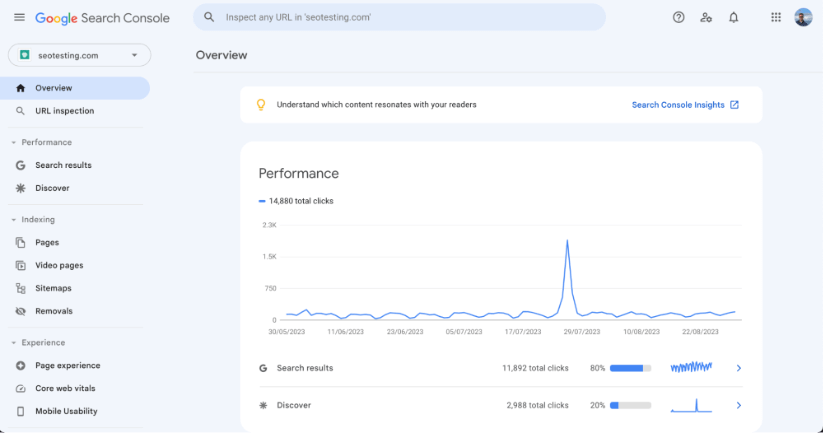
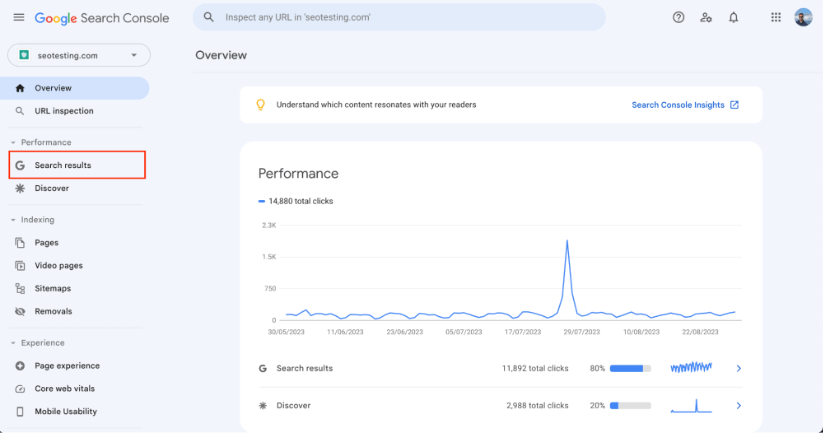
Go to the Search Results Performance Report under the “Performance” tab:
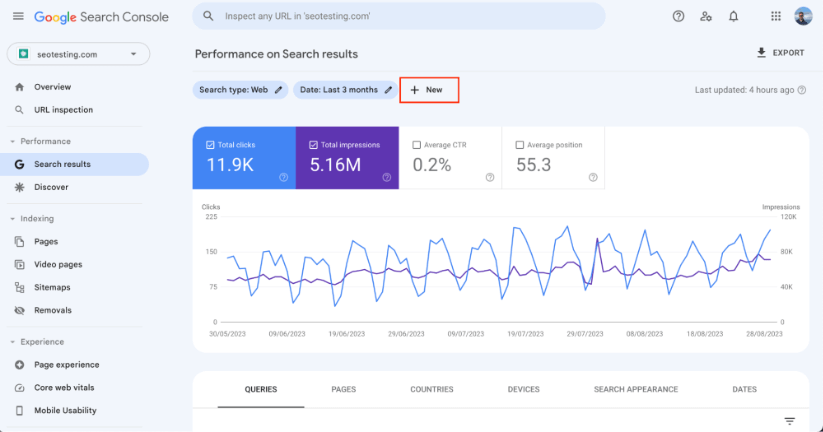
Click “+New” to create a new filter:
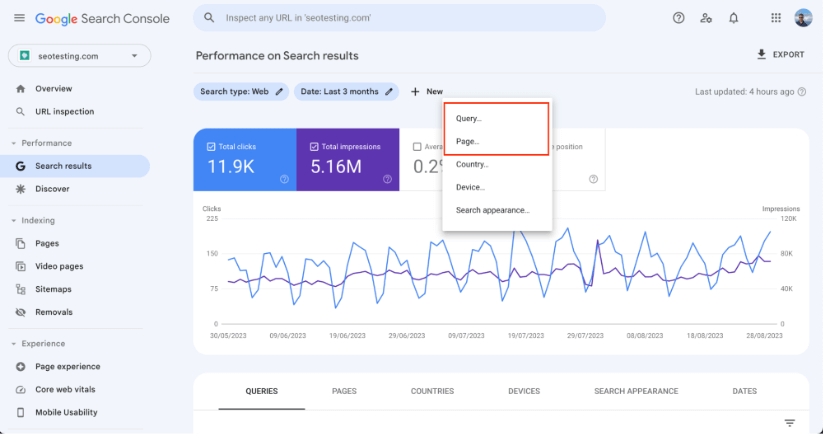
Select either “Query” or “Page” as your filter type:
Choose “Custom (RegEx)” from the filter options:
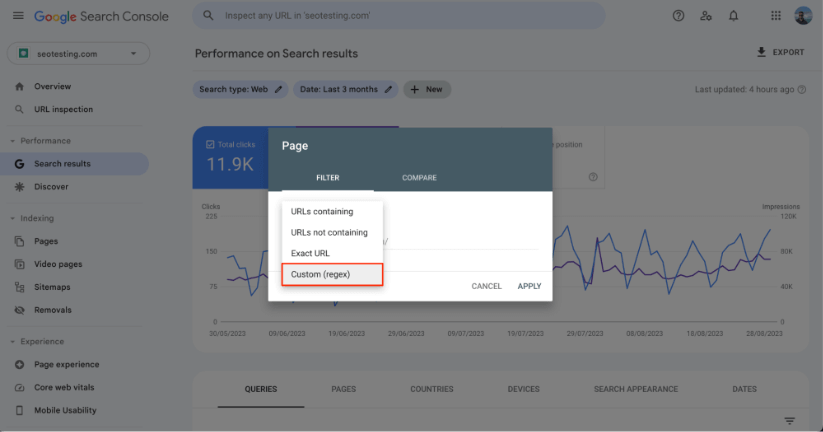
Enter your RegEx pattern in the input box (only Query and Page filters support RegEx):
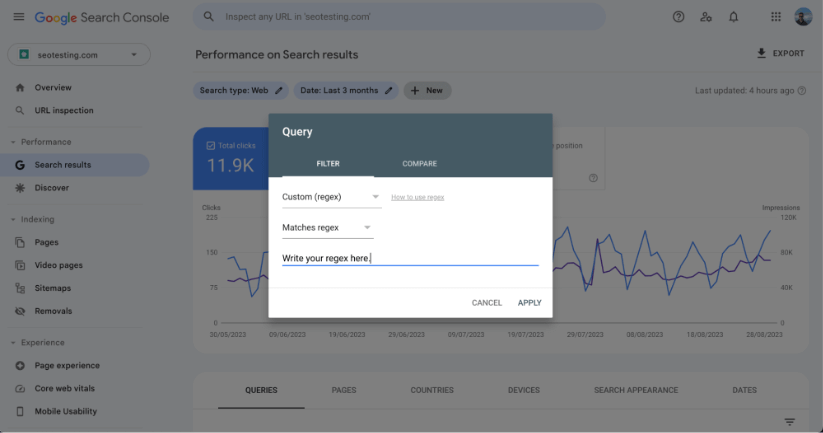
This method lets you apply complex patterns across thousands of search terms instantly. It’s the most efficient way to explore your SEO performance inside the GSC interface.
Why Use RegEx Instead of Other Filters?
Standard Google Search Console filters can only match a single keyword, URL, or country. RegEx filters remove this limitation by letting you define advanced expressions for broader analysis.
For example, you can group similar queries, identify non-brand vs. brand keywords, or isolate URLs matching a specific structure. However, note that RegEx does not support special characters such as accented or non-Latin letters in URLs.
What Useful Data Can RegEx Provide?
RegEx filters allow you to extract valuable SEO data directly from your search reports. Here are common use cases:
- URL Analysis: Filter URLs based on keyword patterns or directory paths.
- Keyword Insights: Identify recurring themes or search intent signals.
- Error Detection: Find URLs with specific error codes (e.g., 404 or 500).
- Content Opportunities: Detect missed keyword groups for new or updated pages.
Useful RegEx Examples for SEOs
Goal | RegEx Pattern | Description |
Find long-tail keywords questions. | ([^" "]*s){7,}? | Matches queries with 8 or more words. Adjust the number for different lengths. |
Find URLs ending with a keyword. | word$ | The $ symbol means “end of the string.” For example, what does '$' mean in regex, it anchors your match at the end. |
Compare brand vs. non-brand traffic. | .*domainName.* | Replace “domainName” with your brand to group branded queries. |
Find post-purchase queries. | b(clean|broken|wash off|repair|manual|fix|warranty)b | Find queries that show product-related issues or usage intent. |
Understand search intent. | Informational: (who|what|where|when|why|how) Navigational: .*brand.* Commercial: .*(best|vs|review).* Transactional: .*(buy|price|order).* | Segment your queries by intent for SEO planning. |
Where to Learn RegEx Queries
To master how to use RegEx in Google Search Console, practice and reliable learning sources are key. Here are recommended resources:
- RegexLearn and RegexOne for interactive tutorials.
- Google Search Console Help Center for official documentation.
- Courses from Udemy, Coursera, or LinkedIn Learning.
- Communities like Stack Overflow and Reddit SEO forums for real-world examples.
Frequently Asked Questions
Does RegEx work in Google Search?
Yes. RegEx works within Google Search Console filters for “Query” and “Page.” It helps you search large datasets efficiently without exporting them.
Is RegEx case-sensitive in Google Search Console?
No. All data in Google Search Console appears in lowercase, so RegEx patterns are not case-sensitive.
What does the “$” mean in RegEx?
The $ symbol anchors the pattern to the end of a string or line. For example, word$ matches URLs or queries that end with the word “word.”
How do I use OR logic in RegEx?
Use the pipe symbol (|) to separate terms. Example: buy|purchase|order will match any of those terms.
Can I find question queries with RegEx?
Yes. Use this pattern: ^(what|how|why|when|where|who|which) to capture all question-type queries.
How do I exclude brand terms?
Use a negative RegEx filter such as -.*yourbrand.* to remove branded terms from reports.
Can RegEx help find featured snippet opportunities?
Yes. Use patterns like what is|how to|definition of to identify definition-style search queries.
Can I use RegEx for seasonal keyword research?
Yes. Try patterns like (christmas|holiday|winter) or (summer|vacation|beach) to find seasonal trends.
Final Thoughts
RegEx in Google Search Console unlocks advanced ways to understand your website’s search performance. By mastering pattern matching and expressions, you can extract insights that basic filters miss, from keyword clustering to error detection.
Tools like Regex101 and resources from other experts make it easier to practice and test expressions safely before applying them in GSC. Over time, using RegEx will become a key part of your SEO workflow.
SEOTesting helps automate RegEx-based reporting within Google Search Console. You can run SEO tests, track page performance, and connect your work to real results. Try SEOTesting free for 14 days, no credit card required, and start growing your organic traffic today.
Testimonials
-

"Can totally recommend! It’s not only full of reports to easily identify low hanging fruit opportunities but also, the most straightforward platform to help run SEO tests"
Aleyda Solis, Intl SEO Consultant, Speaker & Author.


-

"SEOTesting.com has become one of my go-to SEO tools because it does so much with all the valuable data hidden in Google Search Console. It's the only thing that gives us the ability to use that data for keyword tracking, SEO tests, and quality testing."
Ruben Gamez, DocSketch