Keyword Cannibalization Tool
- Find every page competing for the same keyword using your own Search Console data
- Run an SEO test on your fix and measure the lift in clicks
- Built for SEOs who need to prove cannibalization fixes moved the needle
When multiple pieces of content target the same keyword, they end up competing with each other instead of helping you rank higher. Every cannibalization tool shows you the problem. SEOTesting is the only one that lets you ship the fix and prove it recovered the clicks - using your own Search Console data.




Every cannibalization tool can point at the problem. SEOTesting is the only one that lets you fix it, test the fix, and prove the clicks increased – using your own Search Console data
Real Search Console data, not third-party estimates
Cannibalization is surfaced using your own first-party clicks, impressions, and positions – not scraped keyword databases that guess at competing URLs.
Brand vs non-brand cannibalization split
Filter out overlap on your own brand terms and focus on the keywords where consolidation actually recovers traffic and revenue.
Test your fix with a built-in URL Switch Test
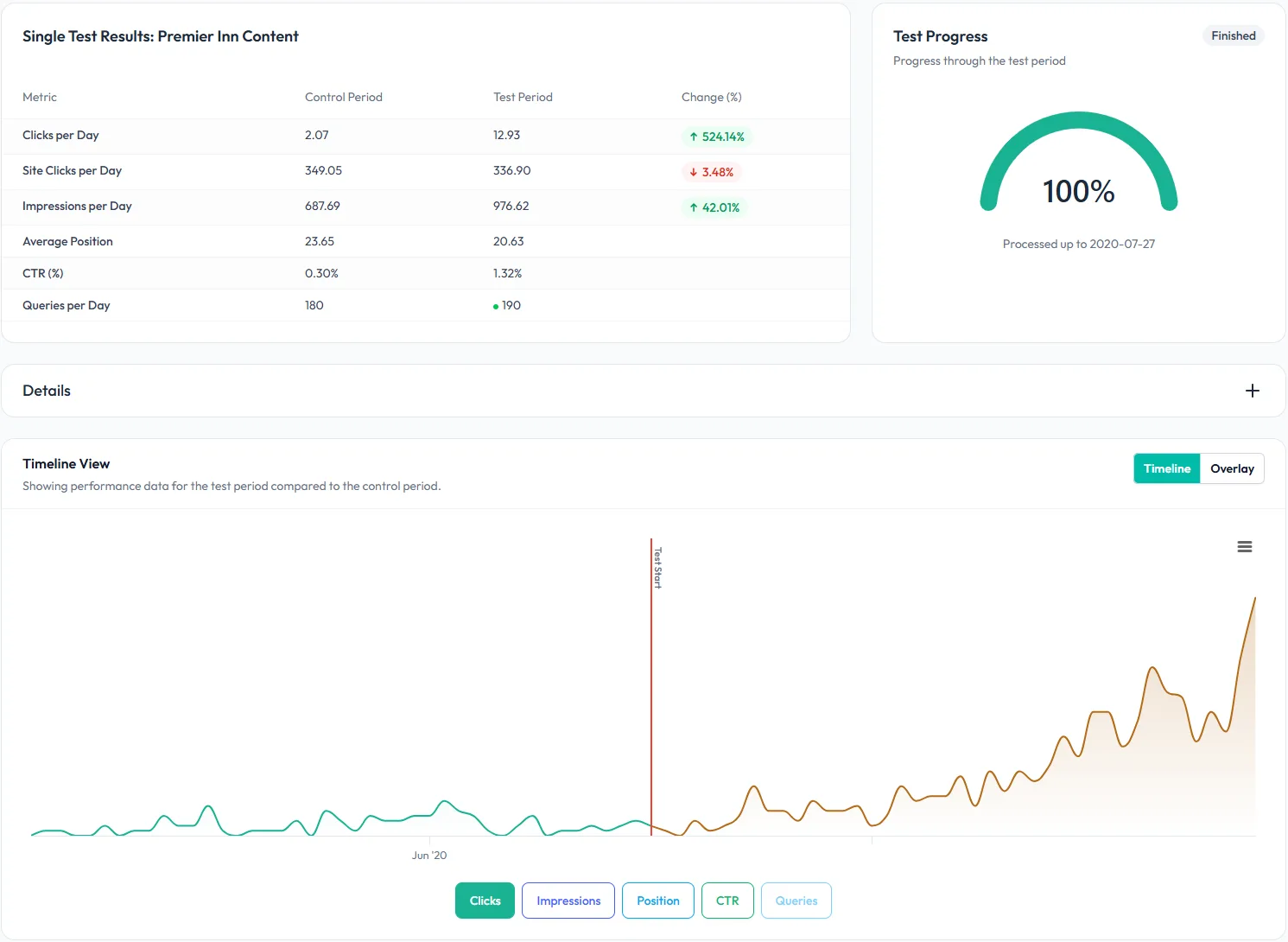
Once you’ve consolidated, redirected, or rewritten, launch a URL Switch Test and measure the lift — so the fix is proven, not assumed.
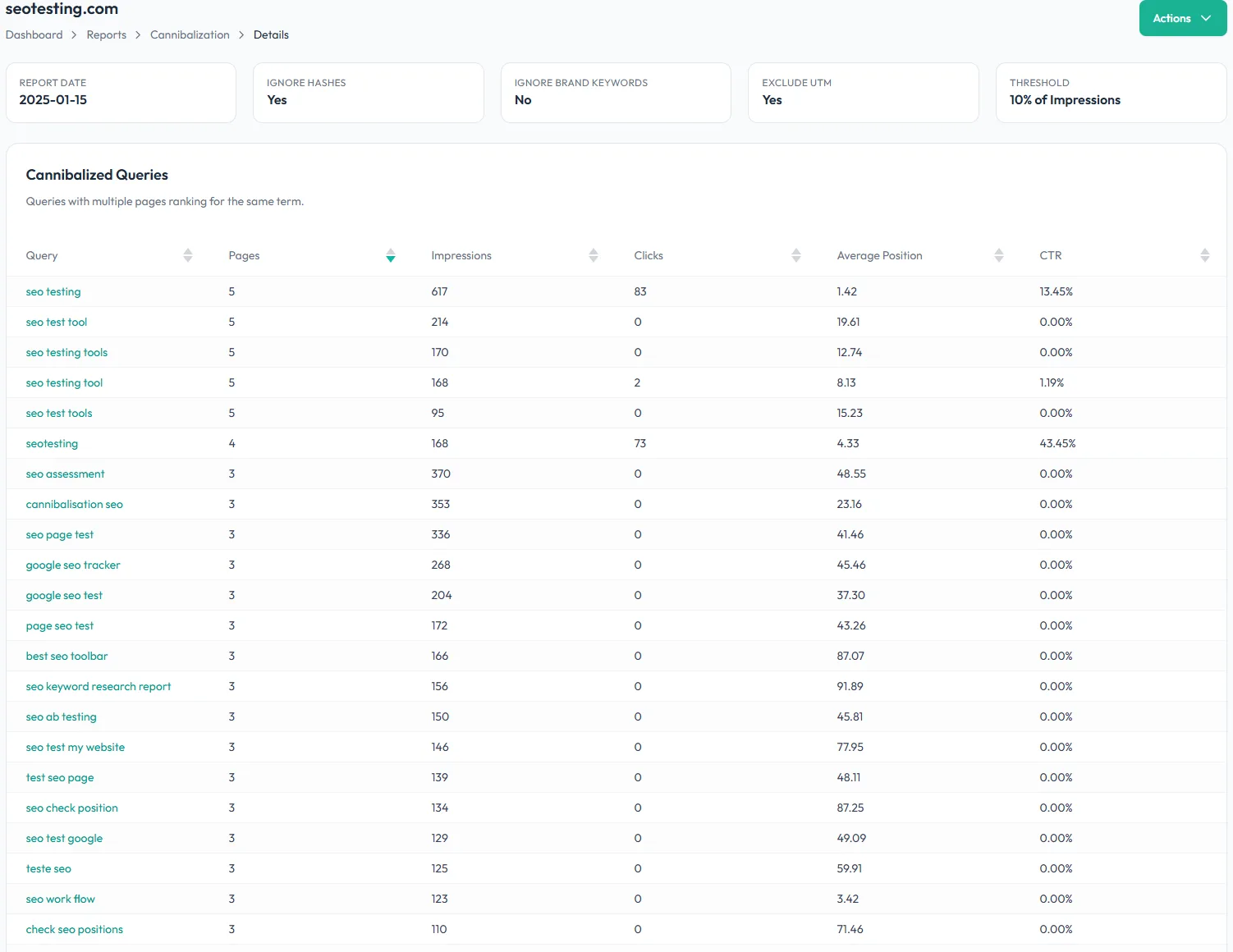
In-house SEOs: Prioritize the cannibalization fixes that will actually recover traffic – not the ones that feel biggest. Pull real Search Console data into a report you can take straight to engineering or content with a clear recommendation.
SEO agencies: Hand clients a report that says “these two URLs are competing, this is the fix, and here’s the lift the test delivered.” Replace half a day of spreadsheet work per client with a one-click audit, and prove your retainer’s worth every month.
Content-heavy sites: When you’re publishing hundreds of articles, cannibalization is inevitable. Surface the overlapping URLs automatically, consolidate the ones that matter, and stop link equity leaking between near-duplicate pages.

Nothing to install on site
No code to add to pages
2 clicks to integrate SEOTesting with Google Search Console
Try free for 14 daysQ1. What is keyword cannibalization?
Keyword cannibalization is when two or more pages on the same site target and rank for the same search query, competing against each other instead of helping a single URL rank higher. It splits clicks, dilutes link equity, and leaves Google uncertain which page to show – so often both underperform.
Q2. How do you find keyword cannibalization in Google Search Console?
Manually, you’d export Search Console data, filter by query, and spot queries where more than one URL has impressions.
SEOTesting automates it: the Keyword Cannibalization Tool pulls your Search Console data, and counts how many URLs are ranking for each keyword – no spreadsheets.
Q3. How is SEOTesting different from Ahrefs or Semrush’s cannibalization report?
Ahrefs and Semrush estimate cannibalization from scraped third-party keyword and traffic data. SEOTesting uses your own first-party Search Console clicks, impressions and positions – so you see what’s actually happening in Google, not an inference. And once you’ve shipped a fix, you can SEO test it inside SEOTesting to prove it improved the clicks.
Q4. How do I fix keyword cannibalization once I’ve found it?
The right fix depends on the content and keyword. Options include consolidating pages into one and 301-redirecting the weaker URL, adding a canonical tag to point to the stronger page, rewriting one page to target a related but distinct query, or updating internal links to favour the URL you want to rank. SEOTesting lets you run a URL Switch Test on whichever fix you choose and measure the lift.
Q5. Does the tool separate brand from non-brand cannibalization?
Yes. Overlap on your own brand terms rarely matters – Google almost always resolves it in your favour. SEOTesting lets you filter brand queries out of the report so you can focus on the non-brand keywords where consolidation actually recovers traffic and revenue.
Q6. How do I know if resolving a cannibalization issue actually helped?
Every other tool stops at finding the problem. SEOTesting lets you launch a built-in SEO Test on the fix – whether that’s a redirect, a canonical, or a content change – and measures the lift in clicks and rankings. You’ll know within weeks whether the fix worked, with statistical confidence.
Q7. Do I need to install anything on my site?
No. SEOTesting connects to Google Search Console with two clicks – no code to add, no tracking script, no plugin. The SEOTesting Keyword Cannibalization Tool starts populating as soon as your account is connected, with a free 14-day trial.

“The automation gained from SEOTesting didn’t just save time – it transformed our approach to SEO entirely. It turned weeks of manual work into hours of actionable insights driving measurable, bottom-line results for our clients.”
Josh Willet, Digital Marketing Consultant

“The most significant impact of using SEOTesting has been stakeholder buy-in. We can now use data from tests to demonstrate the impact of SEO changes, enabling us to deliver SEO projects at scale.”
Thomas Chetwyn, BT Group

“Clients are impressed that we are able to quantify and forecast SEO results prior to full-scale implementation. We were immediately able to action recommendations found from the tests with a much greater degree of certainty around results!”
Jack Chambers-Ward, Candour

“Using SEOTesting, we now have ready-made graphs and statistical data that can be used to tell compelling stories about the work we do. Budget buy-in from management is now easier. Setting up a test takes a couple of minutes and saves hours of reporting later on.”
Ivan Stamenković, Better Collective
Read all our customer case studies, and check out our G2 and Capterra reviews.