Free SEO Back Test Tool

See whether a page change you’ve already made worked, using your own Google Search Console data.

  • Compare clicks, impressions, CTR and position for the weeks before and after the change
  • Check whether the lift in daily clicks is statistically significant, not just noise
  • No account, no install, read-only access to Search Console

Find out if your page change worked

You rewrote a title tag, refreshed the content or added internal links a few weeks ago. Did it make a difference? The back test compares the page’s Google Search Console performance before the change with its performance after, so you can answer with data instead of a hunch.

  1. Connect Google Search Console
    Sign in with the Google account that can see the site. Access is read-only.
  2. Describe the change
    Enter the page URL, the date you changed it, and whether to compare 2, 4, 6 or 8 weeks either side.
  3. Read the results
    The tool pulls both periods straight from the Search Console API and shows you the before and after side by side.

Run a free back test

Find out if your page change worked
The same results our customers get

The same results our customers get

The free back test runs the same before-and-after analysis as a paid SEOTesting time-based SEO test.

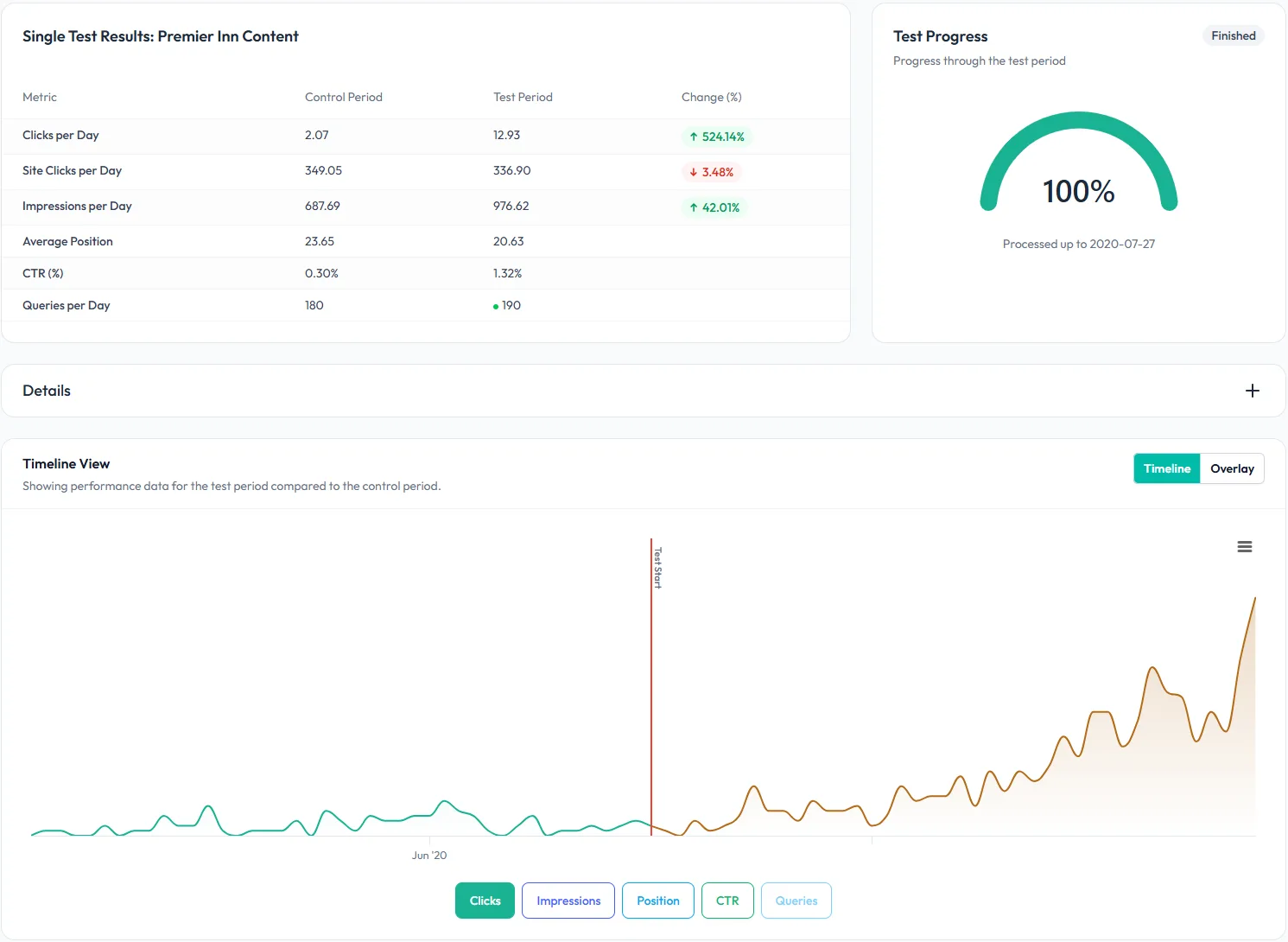
  • Before and after summary: Clicks, impressions, CTR, average position and queries per day for the page, with the percentage change between the two periods.
  • Site-wide context: Site clicks per day for the same periods, so you can tell a page-level lift from a site-wide trend.
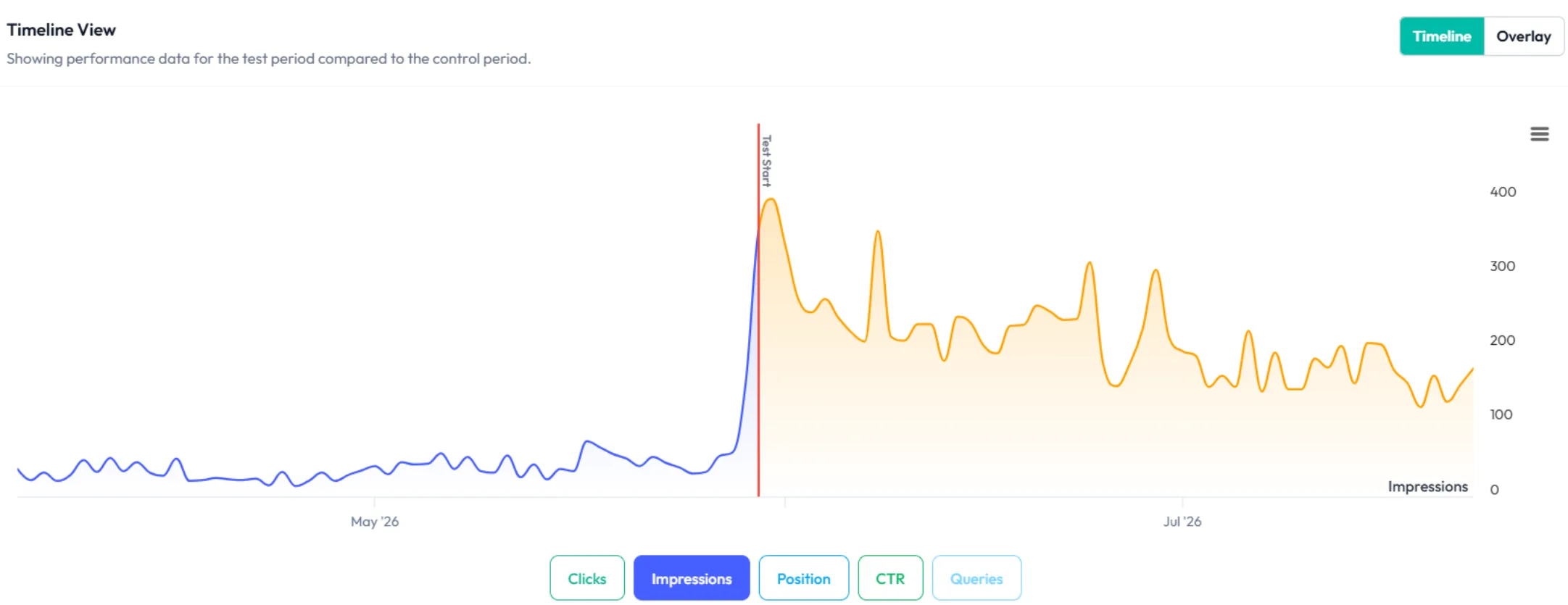
  • Timeline and overlay charts: See daily performance either side of the change date, or lay the two periods on top of each other.
  • Statistical significance: A t-test on daily clicks tells you whether the difference is likely to be real or just noise.
  • CSV and PDF export: Download the numbers, or a PDF report to share with your team or client.

Read-only access to Search Console

The back test only asks Google for read-only access, so it can’t change anything in your Search Console account.

Frequently asked questions

What is an SEO back test?

An SEO back test measures a change you have already made. You give the tool a page URL and the date the page changed, and it compares the page’s Google Search Console performance for the weeks before that date with the same number of weeks after it. It is the same before-and-after method as a time-based SEO test, run on a change from the past.

Is the back test tool free?

Yes. The back test is free and you don’t need an SEOTesting account or a credit card. All you need is a Google account with access to the site’s Search Console property. Connect it, enter the page and the change date, and the results appear on the page.

How soon after a change can I run a back test?

You can run one as soon as Search Console has data for the days after the change, which is usually about three days later. If the after period hasn’t fully happened yet, the tool shortens it and tells you. For a fair comparison, wait until the full 2, 4, 6 or 8 weeks have passed, then run it again.

How far back can I test?

Search Console keeps around 16 months of data, so the before period has to start within that window. A change made a year ago with 8 weeks either side works. A change from two years ago does not, because Google no longer has the before data to compare against.

How do I know if the result is statistically significant?

The tool runs a Welch’s t-test on the page’s daily clicks in the two periods and reports the p-value. A low p-value means the difference is unlikely to be random variation. The test needs at least 7 days with Search Console data in both periods. If there isn’t enough data, the tool explains why instead of showing a number.

What happens to my Search Console data?

The tool asks for read-only access. Your Google token is held in an encrypted cookie in your browser and is never written to our database. No test is saved. The results are calculated when you run the test and shown in your browser tab. You can click Disconnect Google at any time to clear the cookie.

What is the difference between the free back test and SEOTesting?

The free back test looks backwards at one page at a time and doesn’t keep the results. With SEOTesting, you log a change the day you ship it, and it measures the change from then on, saves the result and emails you when the test finishes. It also adds group tests, SEO split tests and a monthly report written to forward. Plans start at $50 a month for one site, with a 14-day free trial and no card needed.


Want to run this forward, not just backwards?

Want to run this forward, not just backwards?

The free test answers you. SEOTesting answers whoever asks you whether SEO is working: a monthly report in plain English, written to forward.

Log a change the day you ship it, and SEOTesting measures it from then on and emails you when the test finishes. Group tests, split tests and annotations are included.

$50 a month for one site, as many people as you like

Free for 14 days, no card needed

Try free for 14 days

Why SEO experts recommend SEOTesting

Josh Willett

“The automation gained from SEOTesting didn’t just save time – it transformed our approach to SEO entirely. It turned weeks of manual work into hours of actionable insights driving measurable, bottom-line results for our clients.”

Josh Willett, Digital Marketing Consultant

Thomas Chetwyn

“The most significant impact of using SEOTesting has been stakeholder buy-in. We can now use data from tests to demonstrate the impact of SEO changes, enabling us to deliver SEO projects at scale.”

Thomas Chetwyn, BT Group

Jack Chambers-Ward

“Clients are impressed that we are able to quantify and forecast SEO results prior to full-scale implementation. We were immediately able to action recommendations found from the tests with a much greater degree of certainty around results!”

Jack Chambers-Ward, Candour

Ivan Stamenković

“Using SEOTesting, we now have ready-made graphs and statistical data that can be used to tell compelling stories about the work we do. Budget buy-in from management is now easier. Setting up a test takes a couple of minutes and saves hours of reporting later on.”

Ivan Stamenković, Better Collective

Read all our customer case studies, and check out our G2 and Capterra reviews.