Seeing the Blocked Due to Other 4xx Issue error in Google Search Console? This SEO issue occurs frequently on sites that use security plugins, CDNs, or strict server rules and can prevent Google from crawling specific URLs on your site. When important pages can’t be crawled, they can drop out of the index entirely or lose visibility for their target keywords. In this guide, we’ll show you exactly how to find and fix these errors to increase the number of your pages that appear in Google’s search results for relevant queries.
Watch our step-by-step video tutorial:
Article Summary (TL;DR): What Blocked Due to Other 4xx Issue Means and How to Fix It
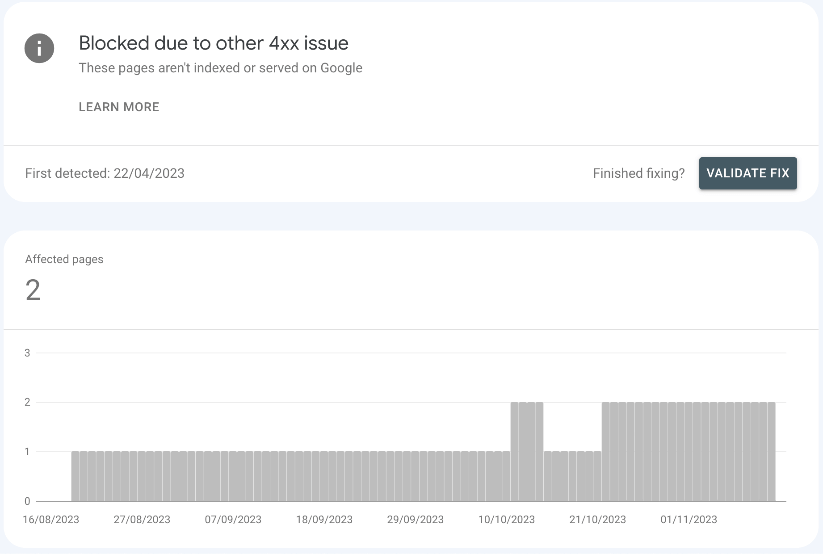
Blocked due to other 4xx issue in Google Search Console means Googlebot receives a 4xx HTTP status (other than 404 or 410) when requesting a URL, so those specific URLs can’t be crawled or indexed.
Typical 4xx status codes that trigger this issue include:
- 410 (unauthorized)
- 403 (forbidden)
- 422 (unprocessable entity)
- 429 (too many requests)
And are often triggered by:
- Security plugins
- Authentication requirements
- Server rules
- Rate limiting
To fix it: find affected URLs in the Page Indexing report, identify the exact status code, apply the correct server or security fix, test access with the URL Inspection tool, and request reindexing or update your sitemap.
If you don’t resolve these issues, affected URLs typically won’t appear in Google’s search results until they return a successful status (such as 200). Fixing them restores crawl access, improves indexing, and helps protect rankings and organic visibility.
What Blocked Due to Other 4xx Issue Means in Google Search Console and How It Affects SEO
A Blocked due to other 4xx issue in Google Search Console means Googlebot can’t crawl specific URLs on your site. This occurs because the server returns a 4xx HTTP status code (other than 404 or 410) when Googlebot requests the URL. These errors block Google from crawling and indexing your content. The 4xx family of status codes point to client errors, not server errors. With these errors, the problem stems from the request itself. When Googlebot tries to access your pages and gets a 4xx response, it marks those pages as blocked.
This impacts your SEO because:
- Pages Google can’t crawl won’t appear in the SERPs at all.
- Even comprehensive, well-optimized content won’t show in Google’s search results while the 4xx response persists.
- Important landing pages can temporarily drop out of the index until the error is resolved.
Common Server and Configuration Causes of Blocked Due to Other 4xx Issue Errors
Most SEO professionals encounter these errors at some point, especially when working on larger or more complex sites. Understanding the specific error code helps you fix the problem faster.
403 Forbidden Error
This error appears when a server refuses to grant access to a requested resource and returns a 403 status to Googlebot. Your server might restrict access to certain pages or block crawlers. A 403 error often happens because of:
- Security plugins that block bots
- Server configurations that limit access
- Content protection measures
- IP address restrictions
For example, some WordPress security plugins can be the cause. They can block unusual access patterns, which can include Googlebot.
401 Unauthorized Error
This error shows up when a page needs login details to access. Googlebot cannot enter passwords, so it cannot crawl protected content. On most sites, 401 errors for Googlebot occur when pages are behind:
- Member-only content areas
- Password-protected pages
- Login-required resources
- Authentication barriers
If you have a membership site or content behind a paywall, this can impact you.
422 Unprocessable Entity
This error means the server accepts the request as syntactically valid but rejects it because the data in the request doesn’t meet the server’s validation rules. The server recognizes what Googlebot wants but cannot fulfill the request. This happens when:
- Form submissions lack required fields
- Request syntax is correct but semantically wrong
- Server can’t follow the contained instructions
- API endpoints receive incomplete data
This error is less common but still creates crawling issues.
429 Too Many Requests
This error happens when Googlebot exceeds the request rate limit configured on the server (for example, more than X requests per second or minute, depending on your settings). Shared hosting platforms often set these limits to manage server load. Rate limiting occurs due to:
- Budget hosting with strict resource limits
- DDoS protection measures
- Server-side request throttling
- Traffic management systems
Large sites on small hosting plans frequently face this issue during crawl attempts.
Other 4xx Status Codes
In addition to the codes above, Googlebot can also encounter less common 4xx responses such as:
- 405 Method Not Allowed (when the HTTP method is wrong)
- 407 Proxy Authentication Required
- 408 Request Timeout
- 413 Payload Too Large
- 414 URI Too Long
- 415 Unsupported Media Type
Each indicates a different client-side problem blocking Googlebot.

How to Find URLs Blocked by Other 4xx Issues in the Google Search Console Pages Report
To find the affected URLs, follow these steps in Google Search Console:
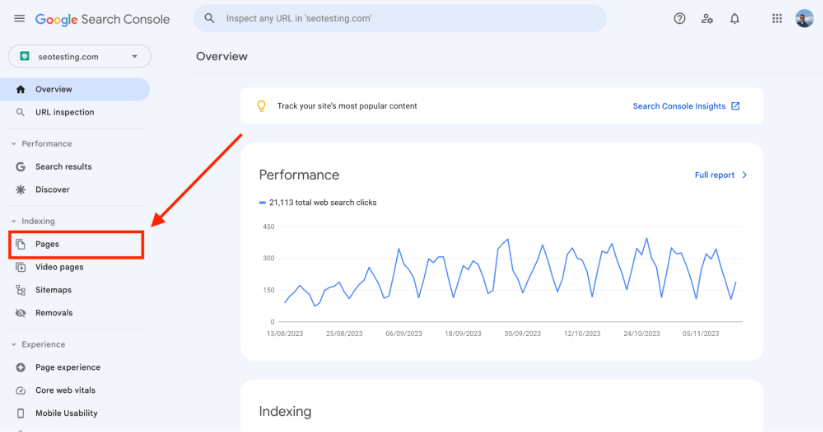
Open your Google Search Console dashboard, then click “Pages” under the “Indexing” section in the left menu.
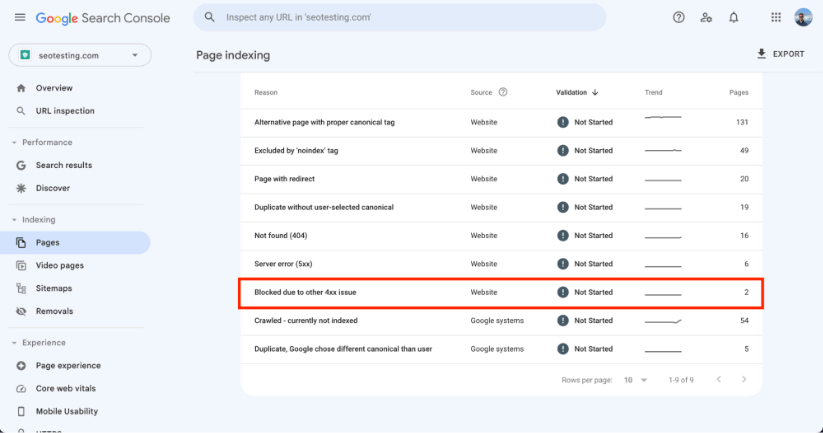
Scroll down to find the Blocked Due to Other 4xx Issue section.
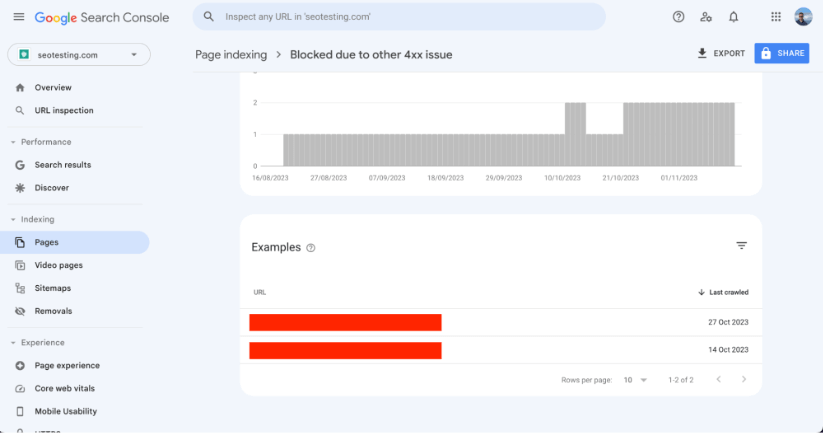
Click on this section to see all affected URLs.
Step-by-Step Fix for Blocked Due to Other 4xx Issue Errors in Google Search Console
Fixing these issues is easiest if you follow a clear sequence: identify the status codes, fix the causes, then re-test and request indexing. Follow these steps to restore proper crawling access.
Identify the Specific 4xx HTTP Status Code for Each Affected URL
Check each URL with browser tools or SEO crawlers like ScreamingFrog. Make a list of URLs and their status codes. You can use these methods:
- Visit each URL in Chrome Developer Tools (Network tab)
- Run a site crawl with technical SEO tools such as Screaming Frog, Sitebulb, or similar crawlers
- Use online HTTP status code checkers
- Check server logs for Googlebot access attempts
Create a spreadsheet that maps each URL to its specific error code for easier tracking.
Fix the Issue Based on Each 4xx Error Type (401, 403, 422, 429, etc.)
Different error codes need different solutions. Here’s how to address each type: For 401 Errors and 403 Errors:
- Check server permissions in your .htaccess file
- Review robots.txt to ensure you’re not blocking Googlebot
- Disable security plugins temporarily to test if they cause the issue
- Check if your CDN blocks bot access
- Ensure your web application firewall allows search engines
- Verify IP whitelisting doesn’t exclude Google’s IP ranges
Many hosting control panels have security settings that might block crawlers. Look for bot protection features and make exceptions for Googlebot. For 422 Errors:
- Check for form validation issues
- Review API requirements for affected endpoints
- Fix any data formatting problems
- Update server-side validation rules
These errors often need developer input to resolve. For 429 Errors:
- Adjust rate-limiting settings in your server configuration
- Analyze server logs to see how often Googlebot visits
- Upgrade hosting if you consistently hit resource limits
- Put in place crawl rate settings in Google Search Console
- Optimize your site structure to reduce unnecessary crawling
- Add more server resources during peak crawl times
For WordPress sites, try caching plugins. This can help reduce server load and prevent rate limiting.
Test Your Fixes with the Google Search Console URL Inspection Tool
Use the URL Inspection tool in Google Search Console to check if Googlebot can now access your pages.
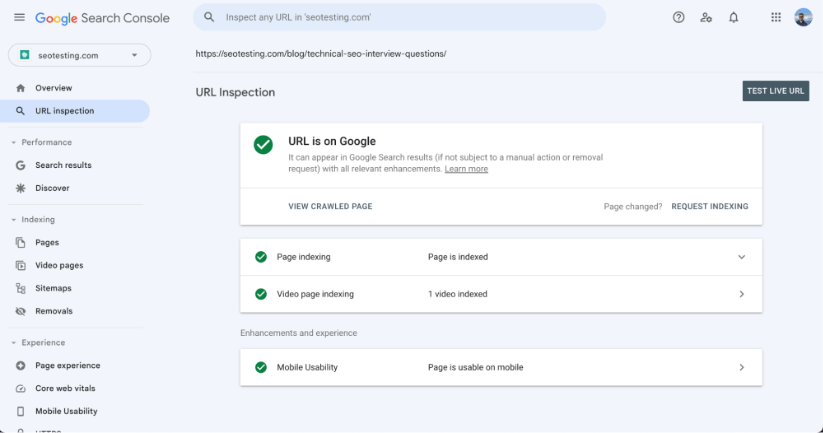
The URL Inspection tool lets you:
- Request a live test of Googlebot access
- View rendered page content as Google sees it
- Check indexability status
- Identify remaining crawl issues
Test each fixed URL before moving to the next step.
Submit Fixed URLs for Reindexing via URL Inspection and Updated XML Sitemaps
Once fixed, submit URLs for re-indexing. Remember that Google limits this to 10 URLs per day. For more URLs, make sure they’re in your sitemap. Focus on high-value pages for manual submission:
- Important landing pages
- Product pages with high conversion rates
- New content that needs immediate indexing
- Pages with significant backlinks
For bulk reindexing, these methods help:
- Update your XML sitemap with fresh timestamps
- Create a new sitemap section for fixed URLs
- Use the sitemap index file to highlight changes
- Add internal links to fixed pages from high-crawl areas
Track Indexing Improvements and New 4xx Issues in the Page Indexing Report
Keep an eye on your Page Indexing Report to see if the number of blocked pages decreases. Set up a monitoring system:
- Create a weekly schedule to check GSC reports
- Set up email alerts for new crawl errors
- Track fixed URLs to ensure they stay accessible
- Track server logs for recurring patterns
Log and document all fixes for future reference. This creates an error resolution playbook for your site.
Why Fixing Blocked Due to Other 4xx Issue Errors is Critical for SEO and Organic Traffic
Fixing these issues helps Google crawl and index your site. This impacts your search rankings and visibility. When Google can access all your content, it can rank your pages for relevant searches. The SEO benefits include:
- More pages in Google’s index
- Better crawl budget usage
- More accurate site representation in search
- Improved ranking potential
- Higher organic traffic
- Better user experience metrics
Sites with clean crawl paths often outperform competitors with similar content. Technical SEO forms the foundation of organic success.
How to Prevent Future Blocked Due to Other 4xx Issue Errors with Monitoring and Deployment Checks
After fixing current issues, put in place these preventive measures:
- Set up regular crawl monitoring
- Test security configurations before deployment
- Create a pre-launch SEO checklist
- Implement proper staging environments
- Document server configurations that work
- Train team members on basic technical SEO
Proactive monitoring catches new issues before they impact your rankings.
Action Plan: 5 Key Steps to Resolve Blocked Due to Other 4xx Issue Errors
Fixing Blocked Due to Other 4xx Issues is vital. It will help improve your site’s visibility in search results. The process takes time but delivers lasting SEO benefits. Here is the process:
- Find affected URLs
- Determine the specific error codes
- Apply the right fixes
- Test your solutions
- Submit fixed pages for reindexing
Frequently Asked Questions
What does Blocked due to other 4xx issue mean in Google Search Console?
It means Googlebot tried to crawl a page but received a 4xx client-side HTTP status code that isn’t a 404 or 410. Because of this, Google cannot crawl or index the page, so it will not appear in search results.
Is Blocked due to other 4xx issue an indexing problem?
Yes. Pages affected by this issue cannot be indexed until Googlebot can successfully crawl them. Even if the page contains high-quality content, it will remain excluded from search results while the 4xx error persists.
Which HTTP status codes cause Blocked due to other 4xx issue?
Common status codes that trigger this issue include:
- 401 Unauthorized – login or authentication required
- 403 Forbidden – access blocked by server or security rules
- 422 Unprocessable Entity – request understood but cannot be processed
- 429 Too Many Requests – rate limiting or server throttling
Other 4xx codes like 405, 408, or 413 can also cause pages to be marked as blocked.
Why are my pages suddenly marked as blocked by 4xx errors?
This often happens after security changes, hosting limits, CDN rules, or plugin updates. Common triggers include web application firewalls blocking bots, new authentication requirements, aggressive rate limiting, or server configuration changes that prevent Googlebot access.
How do I fix Blocked due to other 4xx issue errors?
First, identify the exact HTTP status code for each affected URL. Then fix the root cause — such as adjusting security rules, removing authentication barriers, easing rate limits, or correcting server validation issues. Once fixed, test the page with the URL Inspection tool and submit it for reindexing.
Better crawling means better indexing, which leads to improved search performance. Take time to fix these issues to help your site reach its full potential in search results. Want to use Google Search Console data to improve your SEO? Try SEOTesting with our 14-day free trial – no credit card needed. Our platform helps you identify quick wins and track progress after implementing technical fixes like these.
Testimonials
-

"Can totally recommend! It’s not only full of reports to easily identify low hanging fruit opportunities but also, the most straightforward platform to help run SEO tests"
Aleyda Solis, Intl SEO Consultant, Speaker & Author.


-

"SEOTesting has become one of my go-to SEO tools because it does so much with all the valuable data hidden in Google Search Console. It's the only thing that gives us the ability to use that data for keyword tracking, SEO tests, and quality testing."
Ruben Gamez, DocSketch