Google Search Console has long been the go-to tool for tracking website performance in Google Search, but it has its limits. Many SEO teams quickly find they need more features than GSC offers.
This guide covers six alternative tools that solve different problems. Some extract better insights from your existing GSC data, while others provide competitor research options, and a few tools offer market intelligence or cross-platform monitoring.
Table of Contents
- What Google Search Console Is (and What It’s Not)
- Why People Look for Alternatives
- How We Picked These Six Tools
- 1. SEOTesting – Best for Extracting Insights from GSC
- 2. Bing Webmaster Tools
- 3. Search Analytics for Sheets
- 4. Ahrefs Webmaster Tools
- 5. Semrush
- 6. Similarweb
- Comparison: Which Tool Should You Choose?
What Google Search Console Is (and What It’s Not)
If you want to jump straight into the tool comparison, click here.
Google Search Console tracks your website’s performance in Google Search. It shows which queries bring traffic to your site, and it also shows you which pages appear in Google’s search results.
GSC also has some technical monitoring features. It reports indexing issues, identifies where your website has crawl errors, and highlights where Google’s search crawlers cannot properly access your pages.
But Google Search Console has some clear gaps.
The first glaring flaw is that it doesn’t show competitor data. You can’t see what keywords your competitors are ranking for. You also can’t track their backlinks or estimate their traffic volume.
GSC also has limited dashboard customization. The interface completely restricts how you view and export data. As a result, building reports for clients or stakeholders within your own business requires additional time and effort.
It also only covers Google. Bing has its own Webmaster Tools, and so does Yandex. You need separate platforms for each search engine.
Why People Look for Alternatives to Google Search Console
Most teams don’t actually “replace” GSC. Instead, they add tools that extend GSC’s functionality.
Data Export Limitations
Google Search Console’s interface only shows 1,000 rows of query data. Given that your site likely already ranks for thousands (or even tens of thousands) of keywords, getting the complete dataset for your business or client sites requires API access or third-party tools.
Reporting Friction
GSC doesn’t have the functionality to create client-ready reports, so you’ll need to do this manually. This requires you to export CSV files, paste data into spreadsheets, and manually build charts. This process can waste hours every week or every month.
Multi-Site Management
Managing multiple properties in GSC takes time. Each site needs separate verification, and switching between properties means constant clicking. Not to mention the fact that if you want to standardize reports across different sites, you’ll need your own custom workflows.
Competitor Research Needs
SEO teams need to understand the competitive landscape and not view their site/s in isolation. To get a better understanding of how your site is performing, you also need to know:
- What keywords competitors are targeting.
- Which pages rank well for your competitors.
- What your competitor’s backlink profile looks like.
GSC doesn’t provide answers to any of these questions.
Non-Google Search Engines
While Google is undoubtedly the web’s number one provider of search traffic, it isn’t the only platform out there. Bing drives a lot of traffic, too. And it’s not only Bing driving traffic in isolation. Yahoo and DuckDuckGo both use Bing search data, and if you ignore these platforms, you’re missing opportunities to grow your business through search. Google Search Console gives you no data about any of these alternative search engines.
How We Picked The “Top 5”
To identify the six best Google Search Console alternatives, we first needed to explore the main issues people have with GSC. The tools we have covered within this article all focus on one (or more) of these things:
- They make GSC data more usable.
- They provide competitor research tools that GSC doesn’t.
- They expand and provide a more comprehensive traffic/landscape context.
- They allow you to monitor non-Google properties, such as Bing.
- They focus on giving you a realistic “stack” approach.
By focusing on these key issues, we believe we have identified a strong list of Google Search Console competitors.
1. SEOTesting – Best for Extracting Insights from GSC, and Running SEO Tests
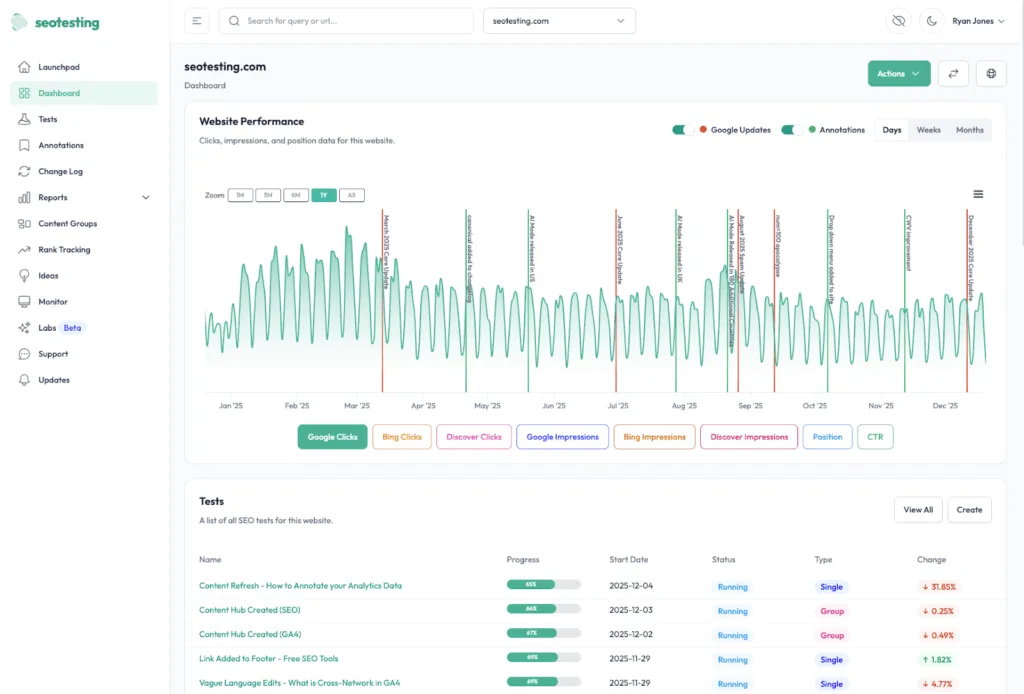
We will be a little biased here! We believe SEOTesting is one of the best Google Search Console alternatives on the market today.
SEOTesting is a platform built to help in-house teams and agencies grow search traffic through testing and experimentation. It uses data from Google Search Console, GA4, and Bing Webmaster Tools.
SEOTesting helps to transform raw Google Search Console data into data-backed decisions. It bypasses Google’s 1,000-row data limit and delivers that data in multiple formats, assisting businesses to run SEO tests to identify what works and quickly win with their GSC data.
Features
SEOTesting comes with a range of out-of-the-box features so you can start seeing value for money straight away, from time-based testing, split testing, and LLM testing, to automated reports built with your GSC data.
Time-Based Testing, Split Testing, and LLM Testing
With SEOTesting, you can turn your GSC data into data-driven SEO tests to help you prove the impact of your SEO work.
There are three test types to choose from:
- Time-Based Tests
- Split Tests
- LLM Tests
With this feature, you can log a change you have made to your website, and then track the impact of that change on your website in terms of clicks, impressions, click-through rate, and average position. Not only that, though, but with SEOTesting’s GA4 integration, you can also track events and show the business impact of your SEO work.
SEOTesting also allows you to back-test changes. If you made a change to your site 3 months ago and want to report on its impact, setting up an SEO test and moving the date the change was made back 3 months is super easy.
Automated Reports with GSC Data
SEOTesting includes a range of prebuilt reports designed to save you time and eliminate the need to export raw GSC data and enter it into spreadsheets.
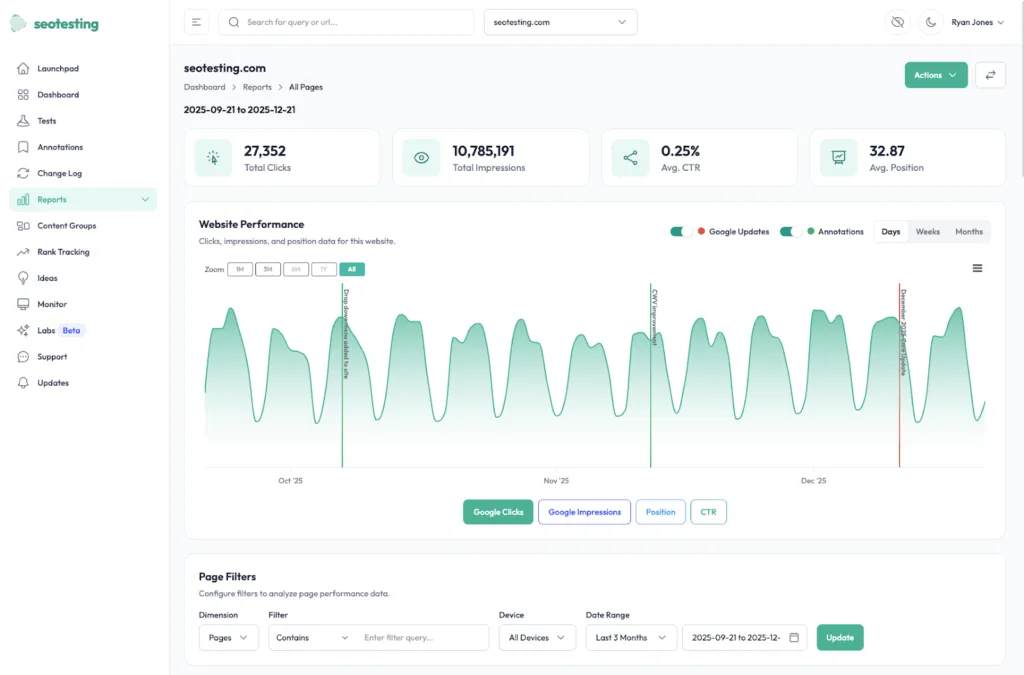
Within SEOTesting, you can use reports to identify which pages are growing or declining, how content decay is affecting your site, which pages users visit when referred from LLMs, and how keyword cannibalization is impacting your keywords.
Content Groups
SEOTesting also includes a content grouping feature that lets you segment your site and monitor those segments independently using your GSC data (similar to GA4’s content grouping).
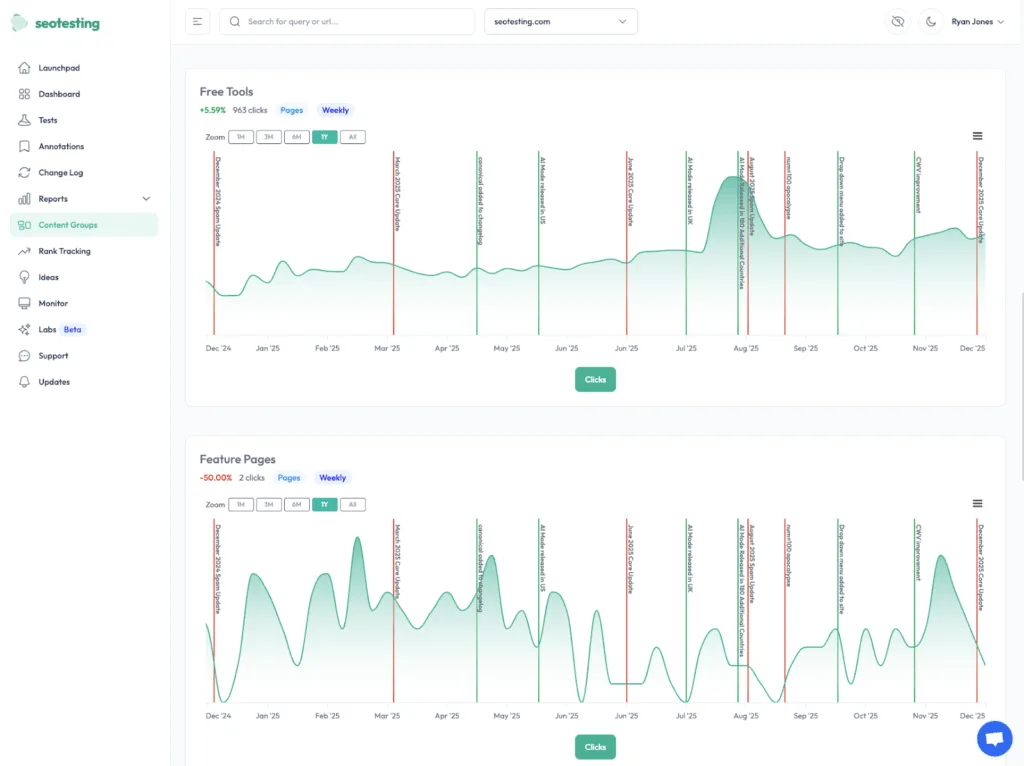
You can use this feature to monitor different parts of your site, like:
- Content hubs
- Specific authors
- Site sections
- Key pages that matter to your business
Google Search Console recently added Query Groups, which cluster similar search terms. SEOTesting’s content groups work differently; they let you define and track your own sections of content, so you can measure how specific parts of your site perform over time, rather than grouping search queries.
Easy Annotations and Site Changelogs
SEOTesting makes it easy to annotate your Google Search Console data to track changes that affect your site or individual pages.
You can add annotations for holiday periods, industry events, or any other changes that may affect your traffic. These can be set at the site level, where they appear across your dashboards, or at the page level, where they only show on specific page reports.
Google Search Console has also recently added its own annotation feature, but it’s more limited. GSC annotations are site-wide only and offer less flexibility for annotating specific pages or isolating the impact of individual changes.
Multi-Site Support
You can house multiple GSC properties inside of SEOTesting, allowing you to switch between sites easily.
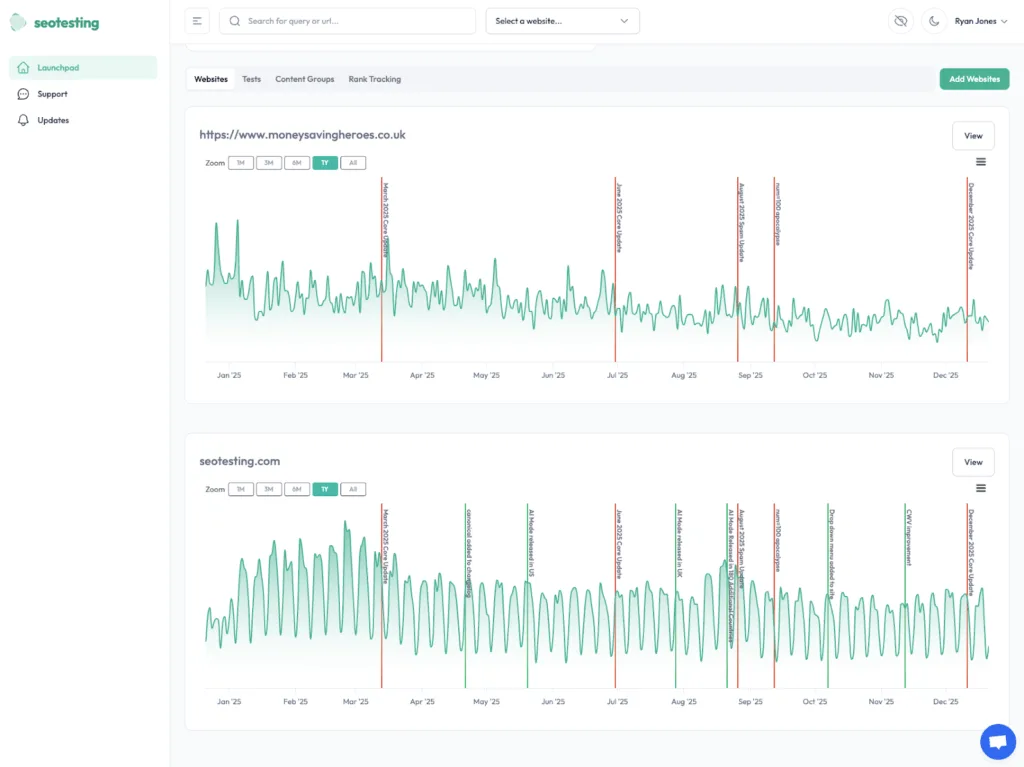
SEOTesting’s Launchpad allows you to get a bird’s-eye view of all of the properties you have within SEOTesting, and you can quickly switch between sites when looking at reports thanks to in-context switching.
Unlimited User Seats on All Subscriptions
SEOTesting does not charge for additional user seats, regardless of the subscription level you choose. With any SEOTesting subscription, you can add as many users as you like to your account, with no additional cost. This makes it unique, especially in the SEO tool market.
Easy Report Sharing with Magic Links
You can easily share reports and SEO test results with SEOTesting using Magic Links. These links are used to share specific views in SEOTesting with users who do not have an SEOTesting account.
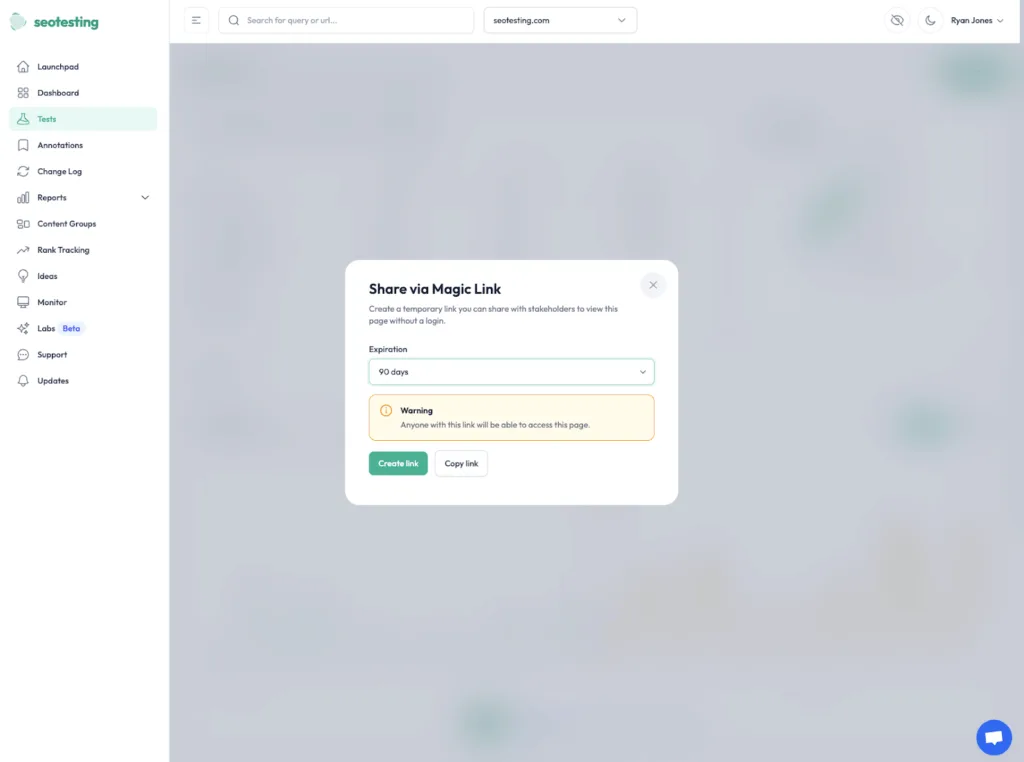
Magic Links can be created to share with stakeholders, other team members, or executives, and will only be active for the period of time selected:
- 1 Day
- 7 Days
- 30 Days
- 90 Days
You can also create a Magic Link with no expiration date.
Free Tools
SEOTesting also includes a range of free tools to help you save time with your day-to-day SEO work. The list of these tools is:
- Rank Tracker
- Google Search Console Data Downloader
- Sitemap Validator
- Sitemap Generator
- SEOTesting Chrome Extension
Pricing
Single Site: $50 per month for one website. You get unlimited users and 25 Internal Linking credits.
Medium: $125 per month for up to five websites. This includes unlimited users, 75 Internal Linking credits, and a 1:1 onboarding call.
Large: $375 per month for up to 20 websites. You get unlimited users, 300 Internal Linking credits, and quarterly training sessions.
Enterprise: Custom pricing for higher site limits. This includes unlimited training and dedicated support.
All plans support unlimited users. Every plan includes a 14-day free trial. No credit card required. Plans bill monthly. We also provide annual options, so get in touch if you’re interested in hearing more about those.
Reviews
Platform | Rating |
G2 | 4.8/5 |
Capterra | 4.9/5 |
Software Advice | 4.9/5 |
Many users praise SEOTesting for making Google Search Console data more usable and practical. A few reviews on these sites note that it pulls 10 to 50x more query data than GSC’s standard limits allow.
Users also appreciate that SEOTesting makes it easier to track content changes and run SEO tests.
SEOTesting features like the GSC reports and the content group feature are favorites. The clear dashboards help to simplify measuring SEO’s impact over time. And SEOTesting’s customer support is often praised for its responsiveness and helpfulness.
Who Is SEOTesting Best For?
SEOTesting works best for in-house SEO teams, but it also suits agencies that rely on GSC data and want faster and more granular insights.
You should choose SEOTesting if you need SEO testing capabilities, better reporting, and more effective ways to measure the impact of SEO on your websites.
If you want to take SEOTesting for a 14-day test drive, click the link below. You won’t even need to use your credit card!
Sign-Up for a 14-Day Free Trial of SEOTesting.
2. Bing Webmaster Tools
Bing Webmaster Tools is Microsoft’s version of Google Search Console. It tracks your performance in Bing’s search results and provides technical diagnostics (much like Search Console does) for Bing.
Lots of SEO teams ignore Bing, which can leave opportunities on the table. Bing not only handles millions of searches every day but also powers Yahoo and DuckDuckGo search results.
Features
Bing Webmaster Tools offers several useful features for monitoring a site’s performance on Bing.
Sitemaps and Indexing Visibility
You can submit your sitemap to Bing Webmaster Tools via its interface and see which pages Bing has indexed.
Much like Google Search Console, you also have the ability to track your indexing status over time to see if new pages get discovered and/or indexed.
Bing Webmaster Tools’ dashboard will also show you how many URLs you have submitted vs how many Bing has actually indexed.
Crawl Diagnostics
Bing Webmaster Tools also provides valuable data on crawl diagnostics. It reports errors that Bingbot encounters when crawling your site’s pages. Within the report, you can see:
- 404 errors.
- 500 server errors.
- Timeout issues.
- Blocked resources.
Bing Webmaster Tools shows you the exact URLs that are experiencing these issues, so you can fix the technical issues that are blocking indexing before they begin to hurt your rankings.
You will find that many of these issues appear in both Google and Bing, so fixing them for one platform will help improve your technical SEO overall.
Search Performance Reporting
Bing’s search performance reporting shows you all of the relevant metrics that you need for your site in Bing search. You can track:
- Clicks
- Impressions
- Click-through rate
- Average position
Apart from search metrics, Bing also allows you to filter out your data by:
- Country
- Device type
- Date range
Easy Setup
If you’re already using Google Search Console for your website, setting up Bing Webmaster Tools takes only a few minutes. Bing’s site verification uses the same methods as GSC, so you can either add a meta tag to your Homepage or upload an HTML file to your server. Alternatively, you can verify your site using your DNS records.
You’ll find Bing Webmaster Tools’ dashboard clean and easy to navigate, with the interface feeling pretty similar to that of GSC. You don’t need technical expertise to get started, and you can complete the setup and see your first batch of performance data within 24 hours.
Pricing
Bing Webmaster Tools is completely free.
Reviews
Platform | Rating |
G2 | 4.3/5 |
Capterra | 4.4/5 |
Software Advice | 4.4/5 |
Users consistently highlight Bing Webmaster Tools as a handy tool to use side-by-side with Google Search Console.
Commonly praised features include:
- Bonus SEO insights beyond Google.
- Fast, simple setup.
- Clean, approachable dashboard.
- Indexing reports.
- Crawl error alerts.
- Bing-specific keyword research.
Who Is Bing Webmaster Tools Best For?
Anyone who wants to monitor search performance beyond Google should be using Bing Webmaster Tools. And for any site that receives meaningful traffic from platforms like Bing, Yahoo, and DuckDuckGo, it becomes an almost mandatory tool.
If you’re using SEOTesting, you can also pull Bing Webmaster Tools data directly into your SEOTesting dashboard to report alongside Google Search Console data.
Enable this tool by default, because even small amounts of Bing traffic deserve monitoring.
3. Search Analytics for Sheets (Chrome Plugin)
Search Analytics for Sheets is a Google Sheets add-on that acts as a great alternative to Google Search Console. This tool pulls data directly from Google Search Console into spreadsheets and allows you to pull performance data and indexing information without constantly switching between Google Sheets and Google Search Console.
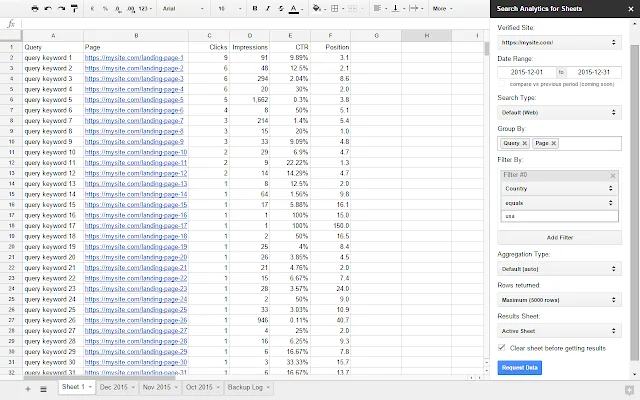
Search Analytics for Sheets solves GSC’s row limit problem, because while GSC caps exports at 1,000 rows of data, this tool retrieves far more by default.
Features
Search Analytics for Sheets gives users powerful data extraction and analysis capabilities within Google Sheets.
Multi-Dimension Grouping
Search Analytics for Sheets lets you drill down into your GSC performance data directly within Google Sheets. You can group multiple dimensions at once, and you can see queries by:
- Page
- Device
- Country
GSC’s interface only allows one or two dimensions at a time whereas Search Analytics for Sheets removes that limitation.
You can create complex views within your spreadsheets, like “mobile queries from the UK for blog posts.” This deeper segmentation can give you insights that you simply cannot find through GSC’s standard interface. You can also answer specific questions about traffic patterns without manually exporting and pivoting your data, saving you a lot of time.
Extended Row Limits
Google Search Console only shows you a small portion of your real data.
With this add-on, you can pull way more than the default interface allows. The free version of Search Analytics for Sheets lets you retrieve up to 25,000 rows per request, and the paid version increases that limit to 100,000.
That means you’re seeing 25 to 100 times more queries than you usually would.
For bigger sites that rank for tens of thousands of keywords, this is a game-changer. Instead of guessing what’s missing, you can finally get the full picture, including long-tail queries that never surface in standard GSC reports or exports.
These hidden queries are often where your easiest growth opportunities live.
URL Inspection Integration
Instead of jumping between reports and tools, Search Analytics for Sheets puts everything in one place.
It pulls your Search Console performance data and lines it up with URL inspection insights, so you can see how your traffic and technical health stack up side by side.
That makes it much easier to spot why a page isn’t performing the way you expected. In the same spreadsheet you’re not just looking at clicks and impressions, you’re also seeing things like:
- Indexing status.
- Crawl info.
- Mobile usability issues.
This means you can quickly identify pages that should be performing well but aren’t because a technical issue is preventing them from doing so.
And instead of guessing what to fix first, you can prioritize changes based on real traffic potential and real technical impact, without bouncing between five different tools.
Pricing
Free Tier: $0 forever. The core Google Sheets add-on is free to install, and you’ll get up to 25,000 rows of data per pull. You can connect unlimited sites, and the free tier still includes most features, such as query data, backups, and filters.
Pro Tier: $16 per month. This monthly subscription increases capacity to 100,000 rows per API request, and you’ll also get up to 1,000 URL inspection results per request. Pro users also receive priority support.
Unlimited: $41 per month. This includes all available rows of Search Analytics data. You can get up to 2,000 rows of URL inspection data per request, unlimited requests with all verified properties, and all dimension groups and filtering options are included.
Reviews
Platform | Rating |
G2 | None |
Capterra | None |
Software Advice | None |
The three leading software review platforms don’t provide information on Search Analytics for Sheets. However, the Google Workspace Marketplace shows a 4.2 star average rating.
The user base for Search Analytics for Sheets is smaller because this is a niche tool. Advanced filtering and dimension grouping need the paid plans to become active.
Who Is Search Analytics for Sheets Best For?
Search Analytics for Sheets suits SEOs and website owners who need to analyze Google Search Console data beyond the 1,000-row limit.
If you are comfortable with Google Search Console data and Google Sheets, and need to automate GSC data pulls or build custom reports, this might be the tool for you.
4. Ahrefs Webmaster Tools
Ahrefs Webmaster Tools is the free version of Ahrefs. It provides limited access to:
- Site audits.
- Backlink analysis.
- Keyword data.
So you can get a taste of their full platform without paying.
Keep in mind, however, that with Ahrefs Webmaster Tools, you can only see this data for your own verified sites. If you want to see competitor data within Ahrefs, you’ll need a paid plan.
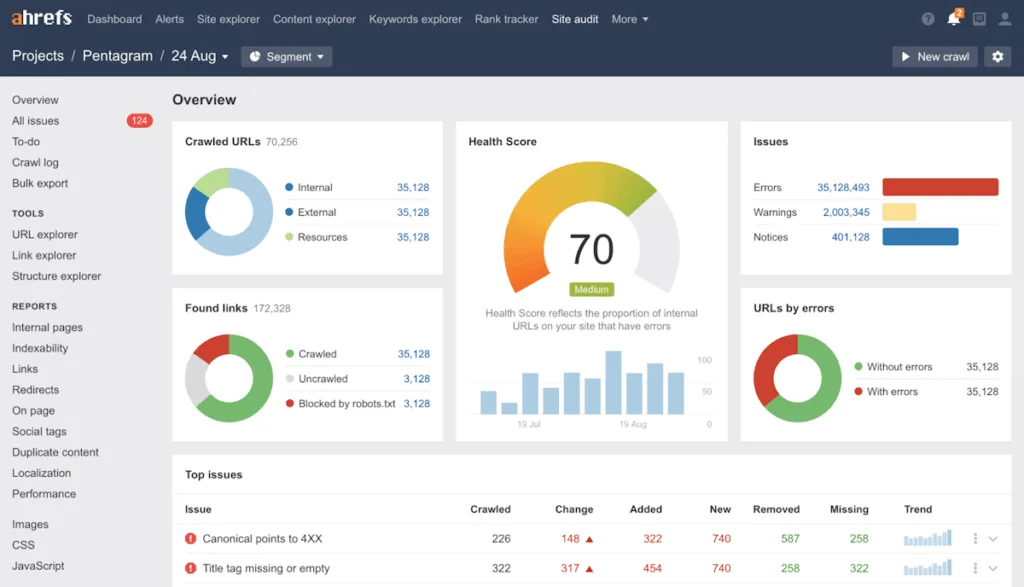
The tool focuses primarily on technical SEO and link intelligence for your sites. You start by verifying your domain ownership, allowing Ahrefs to crawl your site, and reviewing any issues and opportunities it identifies.
Features
Ahrefs Webmaster Tools gives free access to three main features that can help you understand your site’s technical health and backlink profile better.
Web Analytics
Ahrefs Webmaster Tools gives you a handy bird’s-eye view of your organic traffic with its Web Analytics feature.
You can see how much search traffic your verified domains are getting, which pages bring in the most visits, and how things are trending over time. This makes it easy to spot growth, drops, or patterns across different sections of your site.
It also breaks down which landing pages are driving results and lets you compare time periods to see what’s changed.
Site Audit
Ahrefs Webmaster Tools’ Site Audit feature crawls your website for technical issues. It will find:
- Broken links.
- Missing meta tags.
- Slow pages.
- Mobile usability.
- HTTPS implementation.
- Structured data errors.
The Site Audit feature covers more than 100 technical checks.
You also get a simple “Health Score” for your whole site, so you can quickly see how things are looking overall.
The tool automatically sorts issues by how serious they are, with the most critical problems pushed right to the top of your report.
You can see exactly which pages are affected, what’s wrong with them, and you’ll get clear, specific recommendations on how to fix each issue.
The crawler follows your robots.txt and crawl rules, and you can run audits manually or set them to run automatically on a schedule so problems don’t slip through the cracks.
Site Explorer
Site Explorer is where Ahrefs focuses on backlink analysis.
It shows you exactly who’s linking to your site, which pages they’re linking to, and how strong those links are, using Ahrefs’ Domain Rating to give you a quick sense of link quality.
You can also see which of your pages attracts the most links, so it’s easier to spot the content that naturally earns backlinks (and the stuff worth doubling down on).
It tracks metrics such as anchor text and referring domains over time and helps you identify toxic or spammy links that could quietly drag your rankings down.
If you want to dig deeper, Ahrefs Webmaster Tools lets you export all this backlink data and run your own analysis.
Pricing
Ahrefs’ pricing is split out between Ahrefs Webmaster Tools and the main Ahrefs platform. Ahrefs Webmaster Tools is free, and Ahrefs’ main platform offers four pricing tiers.
Ahrefs Webmaster Tools (Free): No credit card required. Access to five verified websites per account. Data updates weekly or biweekly. No access to advanced tools like Content Explorer, Rank Tracker, or full Keyword Explorer.
Lite: $99 per month for one user and five projects. This includes core features like Site Explorer, Keywords Explorer, and the backlink index. You get 500 monthly credits for data exports.
Standard: $199 per month for one user and up to 20 projects. Expanded limits and content tools included. Common choice for in-house SEO teams.
Advanced: $399 per month for one user and 50 projects. Higher usage limits. API access included, suited for agencies and large sites.
Enterprise: $1,199 per month. Annual contract required. Three or more users. Unlimited projects. Custom limits and support.
Reviews
Platform | Rating |
G2 | 4.5/5 |
Capterra | 4.7/5 |
Software Advice | 4.7/5 |
N.B. These ratings cover the complete Ahrefs platform, not just Ahrefs Webmaster Tools.
Ahrefs receives strong ratings for keyword research and backlink analysis reports while the platform is expanding its feature set in the LLM visibility space.
Recent negative reviews focus on the refund policy. Ahrefs has a no-refund-for-non-use policy. Other reviews note that platform data can be inaccurate for smaller sites or newer domains.
Who Is Ahrefs Webmaster Tools Best For?
If competitor research and backlink tracking are high priorities, Ahrefs Webmaster Tools is worth a look.
It helps you uncover opportunities you simply won’t see inside Google Search Console, especially when it comes to what your competitors are ranking for and how they’re earning links.
The free version is great for basic site health checks and monitoring your backlinks. But if you’re serious about competitor analysis, you’ll want to step up to a paid plan to really unlock what Ahrefs can do.
5. Semrush
Semrush is an all-in-one digital marketing platform that covers:
- SEO
- PPC
- Content marketing
- Social media
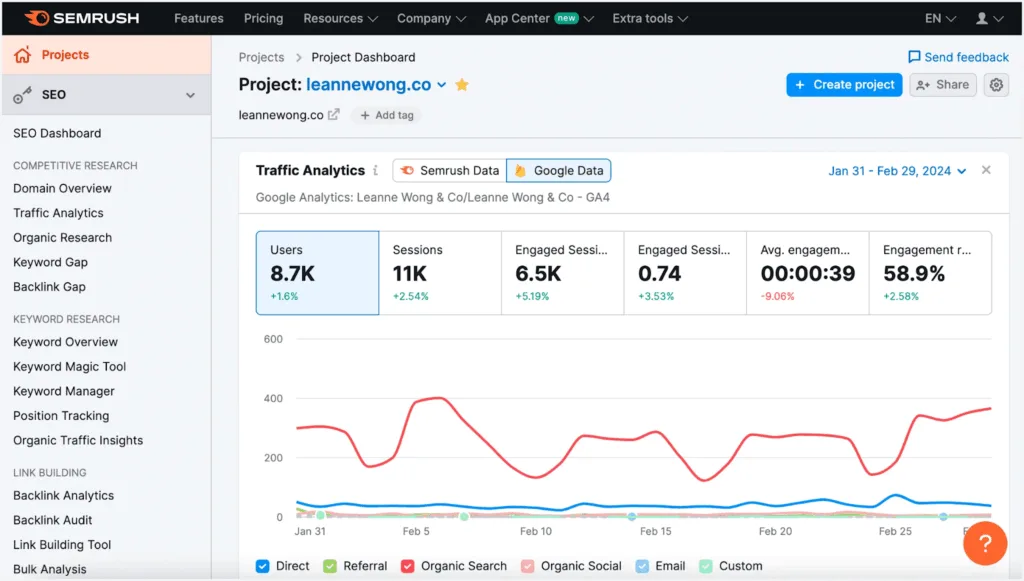
You may hear SEOs call Semrush a Swiss army knife, and it’s easy to see why.
It pulls a lot of your marketing work into one dashboard, so you can plan campaigns, keep an eye on competitors, and track your results all in one place. It’s designed to be an all-in-one toolkit rather than a single-purpose SEO tool.
Features
Semrush offers a comprehensive suite of marketing tools that extend well beyond basic SEO monitoring.
Keyword Discovery
One of Semrush’s strongest features is its keyword discovery toolkit.
You can start with a single keyword, and Semrush will spin that out into hundreds of related ideas, including:
- Questions
- Variations
- Long-tail keywords
For each term, you can see search volume across different countries, plus difficulty scores that give you a quick idea of how hard it’ll be to rank.
You can also check which SERP features show up for each keyword, such as Featured Snippets, AI Overviews, and Knowledge Panels, so you know what you’re really competing with.
On top of that, Semrush shows 12-month keyword trends and lets you filter by things like:
- Search volume
- Difficulty
- Keyword length
Making it much easier to narrow down your best opportunities.
Competitive Research
Semrush includes a wide set of competitor research features.
You can enter a competitor’s domain to see which keywords they rank for and which pages appear in search results for those terms. The tool also provides estimated organic traffic and traffic value based on its own data sources.
You can review backlink profiles, including newly discovered and lost links, and view referring domains and anchor text distribution.
Semrush also allows you to compare up to five competitors at once. This makes it easier to spot keyword gaps (where competitors rank and you don’t) and to review which of their pages appear to perform best in search results.
These features can help identify potential content opportunities, though the estimates are based on third-party data rather than Search Console data.
Content Planning Workflows
Semrush includes a set of content planning tools designed to help teams organize and manage content work.
You can compare your site with competitors to spot content gaps. It can also suggest related topics through semantic analysis, helping you expand your content ideas.
Within the platform, you can assign tasks to team members and move content through stages from early ideas to published pages. Semrush also has an SEO Content Template feature that gives recommendations for new content, covering things like:
- Readability
- Keyword usage
- Potential backlink targets
Team Reporting
Semrush also includes reporting tools aimed at teams and stakeholders.
You can build custom dashboards that aggregate data from different parts of the platform into a single view, and set up automated reports to be sent weekly or monthly. Reports can also be branded with your logo and colors, which can be useful for client or stakeholder updates.
Reports can include things like:
- Charts
- Graphs
- Executive summaries
You can create different report templates for different audiences. For example, more detailed reports for your team, and higher-level summaries for stakeholders who just want the big picture.
Social Media Scheduler
Not that relevant to Google Search Console, but within Semrush’s toolset, you also have a social media scheduler. You can plan posts across platforms, including:
- X (Previously Twitter)
Within the scheduler, you can write posts, add images, and schedule them weeks in advance. Once they’ve been posted, you can also track engagement metrics like likes, shares, and comments.
AI Search Visibility with Semrush One
Semrush One is Semrush’s higher-tier toolset and includes features focused on AI-driven search visibility.
With these tools, you can track how often platforms like:
- ChatGPT
- Perplexity
- Claude
- Gemini
- Microsoft Copilot
Reference your content. It also monitors mentions across multiple AI tools, so you can see which of your pages tend to get picked up most often.
You can compare your AI visibility with competitors and use the data to gain a clearer view of how AI-driven search is affecting your overall visibility. This can help inform how you approach content for both traditional search results and newer AI-powered search experiences.
How does Semrush compare with Ahrefs?
Both Semrush and Ahrefs offer strong keyword and backlink data. Most users will find that Semrush has broader features, including:
- PPC Analysis
- Social Media Tools
- Content Marketing Workflows
Ahrefs focuses more narrowly on SEO and link intelligence, but it has a cleaner UI that most people find easier to use. Semrush has more features, but it can feel overwhelming, especially to beginner users.
Pricing is similar at comparable tiers, and both tools complement Google Search Console rather than replace tools like Google Analytics or GSC. In fact, many agencies use both Ahrefs and Semrush because they excel at different tasks.
Pricing
Semrush’s pricing is relatively complicated due to the breadth of the platform. For this article, we’ll stick to the most direct alternatives to Google Search Console: SEO Classic and Semrush One.
SEO Classic Plans:
Pro: $139.95 per month (billed monthly). Five websites. 500 tracked keywords. Includes core SEO tools and limited historical data.
Guru: $249.95 per month. 15 websites. 1,500 keywords. Content marketing toolkit. Integration with Google Looker Studio.
Business: $499.96 per month. 40 websites. 5,000 keywords. API access. Share of Voice reports. All advanced features.
Semrush One Plans:
Pro: $199 per month (billed monthly). Five projects. 500 tracked keywords. Includes core SEO tools and limited historical data.
Guru: $299 per month. 15 projects. 1,500 keywords. Content marketing toolkit. Integration with Google Looker Studio.
Business: $549 per month. 50 projects. 5,000 keywords. API access. Share of Voice reports. All advanced features.
Annual plans offer discounts up to 17%, while there is also a free plan that includes one website, 10 analytics report requests per day, and tracking of 10 keywords.
Reviews
Platform | Rating |
G2 | 4.5/5 |
Capterra | 4.6/5 |
Software Advice | 4.6/5 |
Many users consider Semrush a good, comprehensive tool. Reviews highlight its breadth. The platform covers:
- Keyword research.
- Technical site audits.
- Rank tracking.
- PPC analysis.
- Social media tools.
Cost is the most common complaint in the reviews. Reviewers from smaller businesses find that the pricing is a little high. And many of Semrush’s advanced features are locked behind higher-tier plans. Extended reports and additional user seats incur additional costs.
Several consumer reviews mention billing and cancellation issues. Some users report difficulty stopping auto-renewals. Others describe unexpected charges after free trials.
Who Is Semrush Best For?
If your team needs a single platform for competitor insights and planning, consider Semrush. You can conduct research in Semrush and then validate the results on your site using Google Search Console or SEOTesting.
Semrush works well for agencies managing multiple client campaigns, as the whitelabel reporting feature saves agency account managers and SEO execs time.
6. Similarweb
Similarweb provides market intelligence and competitive benchmarking. It estimates traffic from any website and reveals audience demographics, showing where visitors come from.
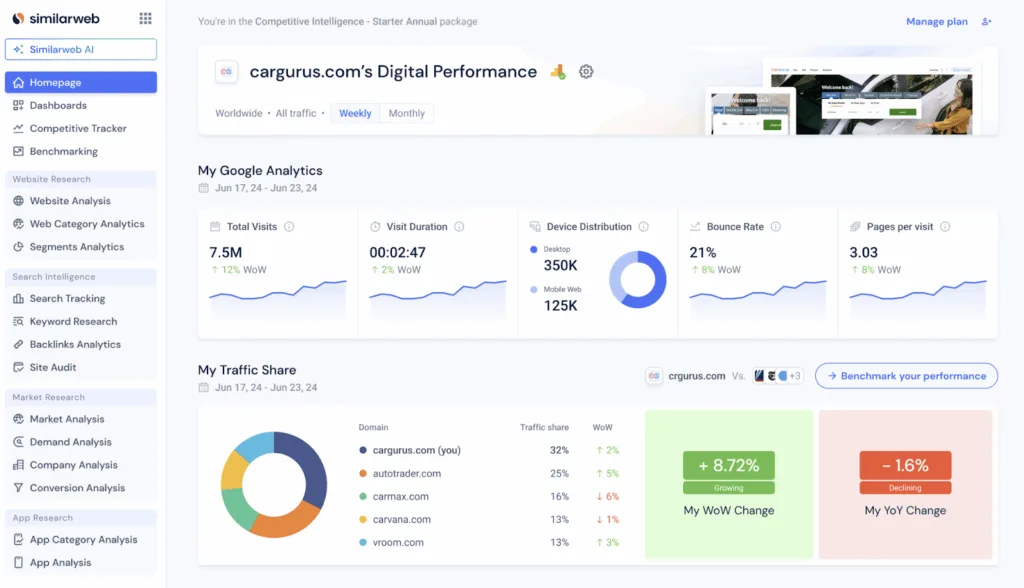
Similarweb describes itself as providing a holistic view across all digital channels. It’s arguably the least SEO-focused tool on the list, covering far more than search performance.
Features
Similarweb focuses on competitive intelligence and market analysis rather than direct site monitoring.
Competitor Discovery and Category Context
Similarweb is primarily used for competitor discovery and understanding the broader market you operate in.
You can enter a domain, and it will surface other sites in the same space, ranked by similarity. This helps you see your competitive landscape beyond just the obvious, direct competitors.
It also gives you a broader view of who’s competing for your audience and lets you explore related categories, which can be useful if you’re thinking about expanding into new areas.
Traffic Share and Visibility Context
Similarweb also provides a clearer view of where you stand in your market.
You can see roughly what share of the overall traffic each competitor is getting, which helps you put your own visibility into context. It also shows how those positions change over time, so you can spot which competitors are growing, which ones are slipping, and how the landscape is shifting.
Keyword Intelligence (Organic and Paid)
Similarweb provides visibility into both organic and paid keywords, which can be useful if you want a broader view of how competitors drive traffic.
You can see which keywords appear to be driving organic visits to other sites, along with Similarweb’s traffic estimates for those terms. It also provides insight into competitors’ paid search activity, including ad and spend estimates.
Looking at both sides together can help you spot gaps in your keyword strategy by examining how others in your space approach organic and paid search.
Pricing
Similarweb offers multiple products, and the most comparable to Google Search Console is Web Intelligence. This is one of the most expensive tools on this list.
Some free data is available, but report drilldowns require a paid plan.
Competitive Intelligence: $199 per month (or $125 per month billed annually). One user login. Includes core Web Traffic Intelligence features. You get traffic and engagement metrics for any site. Audience demographics included. Referral and search channel data. Three months of historical data.
Competitive Intel + SEO: $399 per month (or $335 per month annually). One user. Adds the complete SEO module on top of base features. This includes organic keyword research, rank tracking, site audit, and backlink analytics.
Comp. Intel + SEO + Ads: $649 per month (or $540 per month annually). This bundle is coming soon. It will include Digital Ads Intelligence. Historical data extends to six months. Paid search and display ad analytics included. Creative analysis and advertiser spend data.
Reviews
Platform | Rating |
G2 | 4.5/5 |
Capterra | 4.6/5 |
Software Advice | 4.6/5 |
Many of Similarweb’s users describe it as intuitive and easy to use for competitive analysis, while praising the clean interface and easy-to-understand visuals.
There are also many reviews that highlight the accuracy of the data for estimating competitor traffic and engagement, often outperforming alternative tools.
The biggest downside for many users is Similarweb’s cost at scale. Accessing all features becomes expensive, and the more valuable insights are available only at higher tiers.
Some users report billing transparency concerns. Examples include being charged after a trial. Others explicitly mention needing to downgrade to avoid fees.
Who Is Similarweb Best For?
Marketing teams and SEOs who need competitive intelligence data should consider Similarweb because you get broader market context that Google Search Console isn’t able to provide.
Choose this tool if you need to benchmark against competitors. Pick it if you want to understand traffic sources and audience demographics across your market.
Comparison: Which Tool Should You Choose?
Here’s the reality… No single tool will replace Google Search Console… and we’d suggest you’re better off trying to get more from the data provided by layering additional tools on top of it.
For deeper insights from Google Search Console data, SEOTesting is (in our humble opinion!) the best choice. It allows you to run SEO tests and experiments, save time with pre-built reports, utilize more of GSC’s data, and show the impact of the work your SEO team has done. It works exceptionally well for in-house teams and agencies that use GSC daily.
For in-depth competitor research, specifically on keywords and backlinks, Ahrefs is the best option. The free Ahrefs Webmaster Tools covers basic site audits, but serious competitor research will need a paid plan. Ahrefs complements GSC data by highlighting opportunities beyond your site.
For a broader market and traffic landscape context, Similarweb is your best choice. It provides competitor intelligence that Google Search Console lacks, helping you understand your market position and identify new opportunities.
For viewing search performance outside Google, Bing Webmaster Tools is the most useful. It’s free, and setup takes minutes. Even a small amount of Bing traffic should be monitored for the insights it provides.
Search Analytics for Sheets works well if you’re comfortable working with Google Sheets. It pulls more data than the standard GSC interface allows, and you can automate backups and build custom reports.
Semrush suits teams who want a single platform covering SEO, PPC, and content. It handles multiple marketing channels. The white-label reporting helps agencies.
The most successful SEO teams use GSC plus two or three specialized tools.
Our best advice is to start with the problems you need to solve and then pick tools that address those specific gaps.
Get Started With SEOTesting
Want to give SEOTesting a try? You can run SEO tests to prove the impact of your SEO strategy, measure the impact of every change you make to your site, access pre-built reports that have been created to save you time, and bypass GSC’s 1,000-row data limit.
The platform includes a 14-day free trial. No credit card required. You connect your Search Console account. You start seeing insights within minutes.
Testimonials
-

"Can totally recommend! It’s not only full of reports to easily identify low hanging fruit opportunities but also, the most straightforward platform to help run SEO tests"
Aleyda Solis, Intl SEO Consultant, Speaker & Author.
-

"SEOTesting.com has become one of my go-to SEO tools because it does so much with all the valuable data hidden in Google Search Console. It's the only thing that gives us the ability to use that data for keyword tracking, SEO tests, and quality testing."
Ruben Gamez, DocSketch