SEO tools are integral to our work as marketers, helping us drive more search traffic. That’s irrespective of whether we work in-house, agency-side, or whether we run SEO consultancies.
But enterprise SEO can be a different beast. What’s required for small businesses (or smaller websites) isn’t necessarily what works for enterprise SEO.
We’ve done a deep dive into 22 of the best SEO software to help enterprise teams. We’ve covered tools that help you get more from Google & Bing data, a handful of “all-in-one” tools, whilst also including crawlers, rank trackers, and content optimization tools.
Table of Contents
- Best tools for getting more from Google & Bing Data
- Best “all-in-one” tools
- Best for SEO market & competitor research
- Best “all-in-one” tools built for enterprise companies
- Best SEO crawlers & technical SEO tools
- Best for rank tracking
- Best for content optimization
- Summary
Best tools for getting more from Google & Bing data
1. SEOTesting
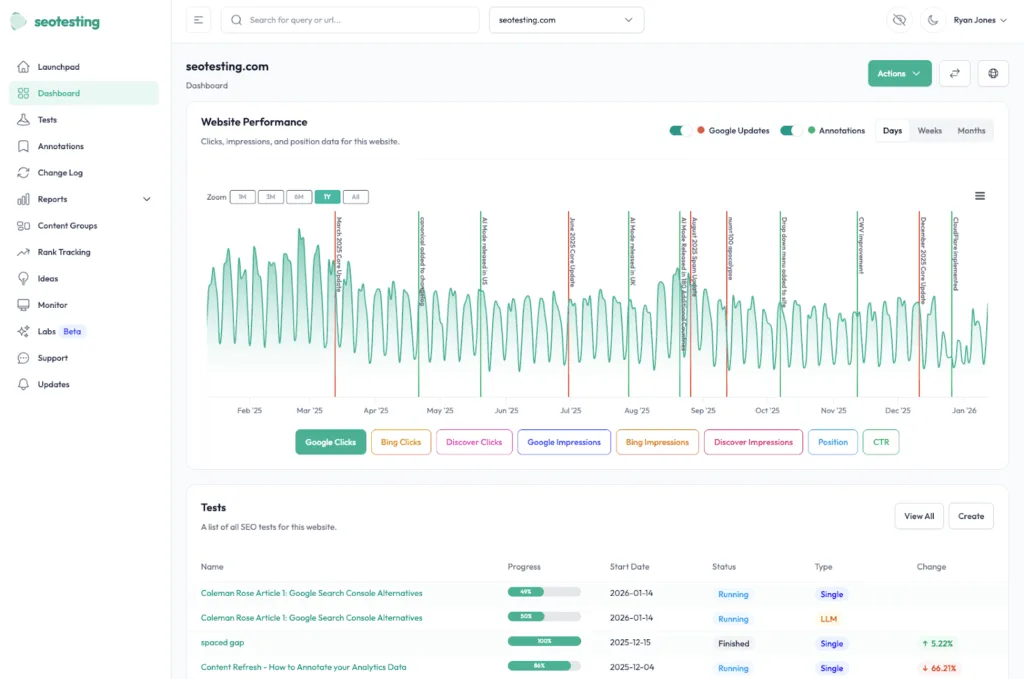
SEOTesting (that’s us!) is a platform built to help agencies and in-house SEO teams grow search traffic through testing and experimentation. It uses data from:
- Google Search Console
- Google Analytics
- Bing Webmaster Tools
SEOTesting helps to transform the raw data you get from Google Search Console into data-backed decisions. It bypasses Google’s 1,000-row limit and delivers that data in multiple helpful formats. This helps enterprises run SEO tests to identify what works, identify quick-win opportunities on their website, and demonstrate their impact during reporting cycles.
What’s more is that generally (but not always!), enterprise sites get more traffic, which means there’s usually a greater opportunity to run statistically significant experiments.
Features
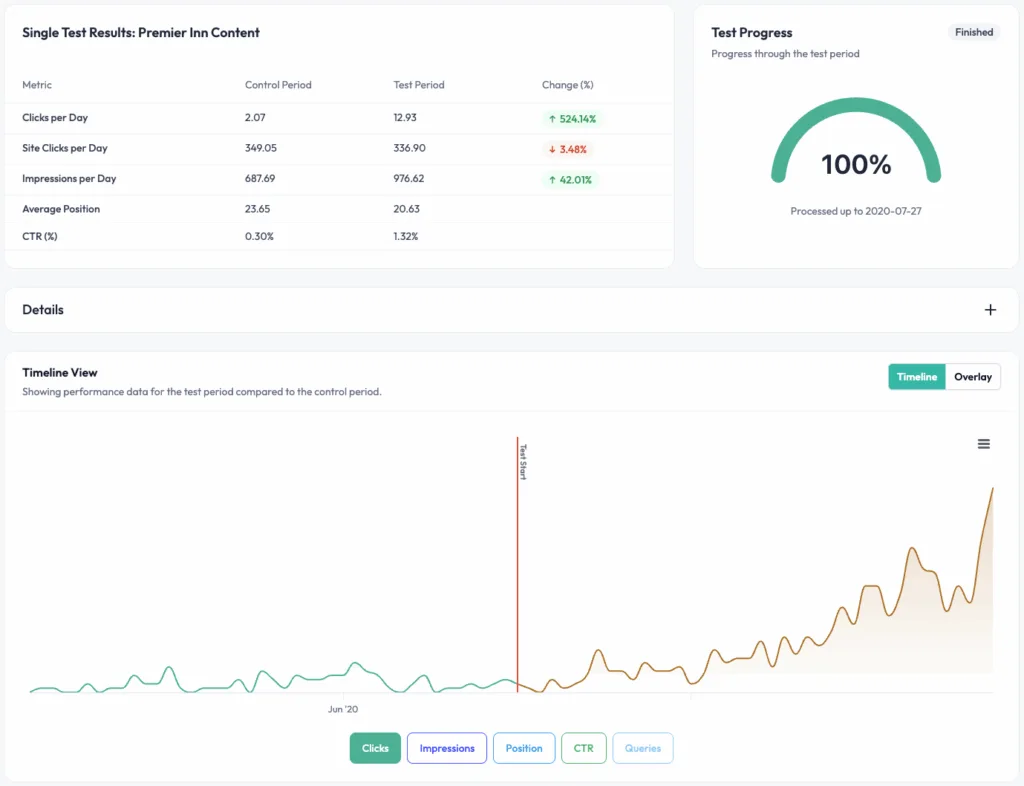
SEOTesting’s bread and butter is its time-based SEO testing, helping teams prove the impact of changes through structured “before vs. after” testing workflows. With this functionality, you can run tests on almost any change you make to your website, including:
- Content updates
- Internal & external linking work
- Keyword cannibalization fixes
- URL redirection
- Schema implementation
SEOTesting will then collect data from before the change and compare it with the same period after you have made changes to your site.
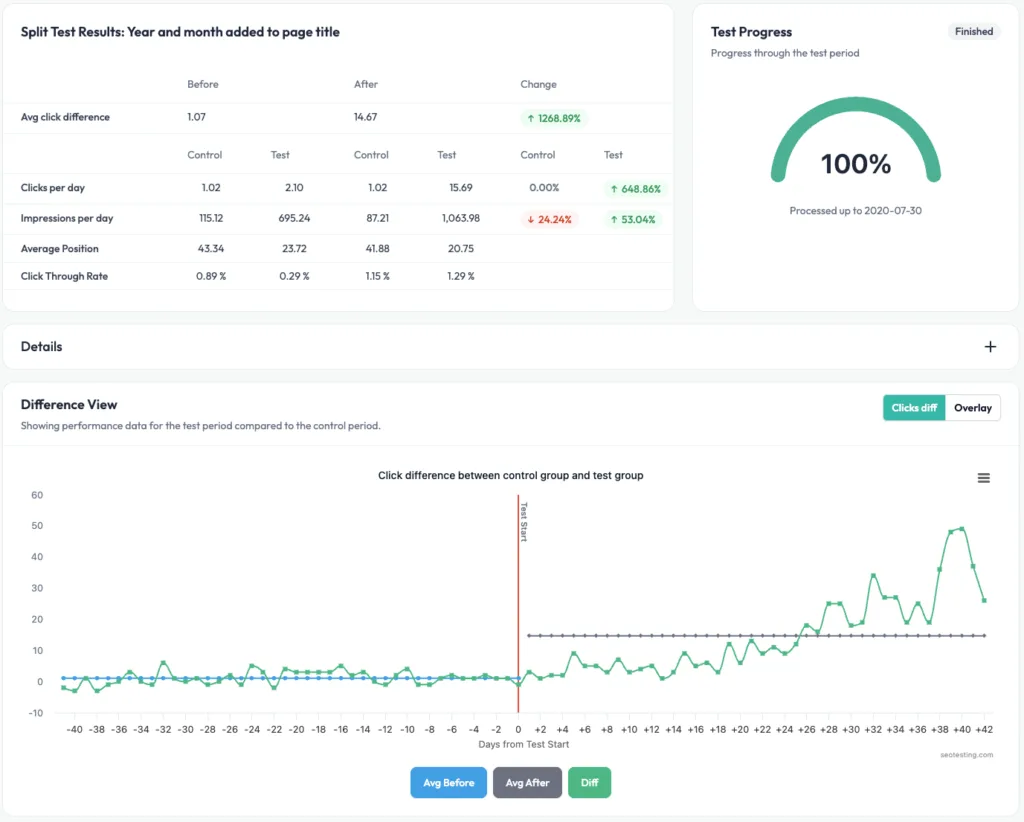
Expanding on SEOTesting’s time-based tests, it also offers SEO split testing on all plan levels. This test type allows you to compare test and control URL groups over the same time period. This will help you to isolate the impact of changes and be more confident in what will happen to your site once changes are deployed sitewide.
SEO split tests are great use cases for:
- Page template changes
- Title tag and meta description changes at scale
- Page speed and Core Web Vitals improvements
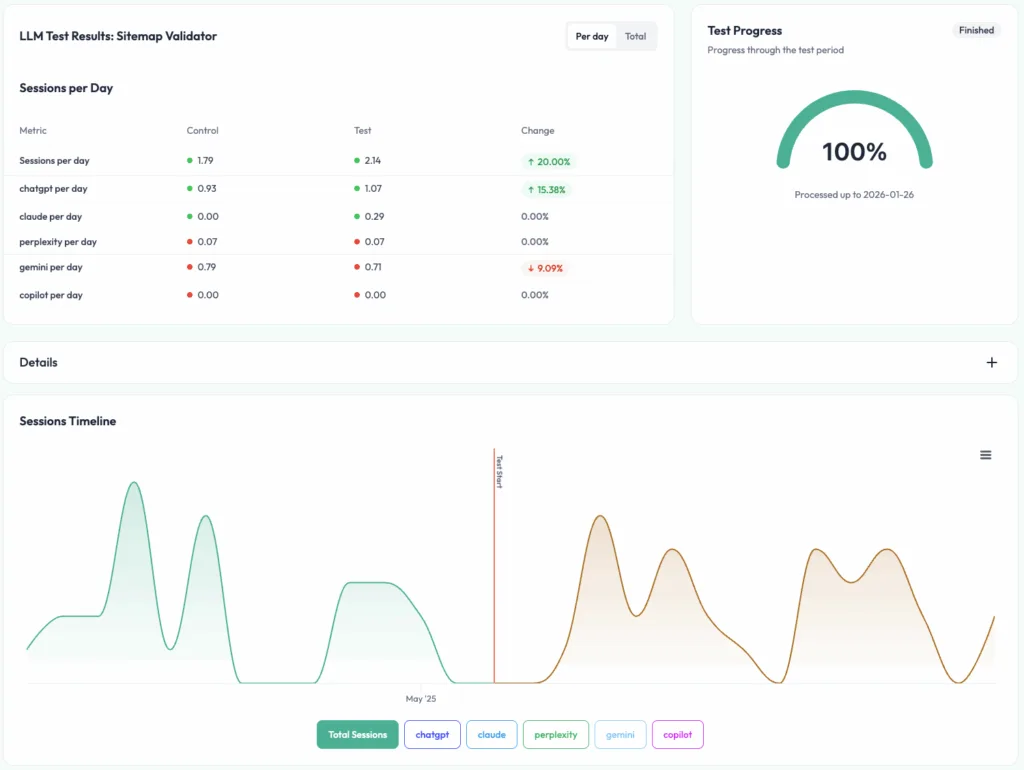
Given where SEO is heading now, SEOTesting also allows customers to run LLM tests. These work in the same way as time-based SEO tests, but these tests track sessions from LLMs such as ChatGPT and Gemini, rather than organic traffic coming from search engines.
One of the key issues people have with Google Search Console data is that, to create reports for different things, the data almost always needs to be exported and moved to another platform. This is why SEOTesting has created a range of pre-built reports to help you make the most out of your GSC data.
These reports cover topics such as:
- Identifying content optimization opportunities
- Running better end-of-month reports for stakeholders
- Spotting keyword cannibalization
- Finding quick SEO wins
- Identifying which pages are receiving visits from LLMs
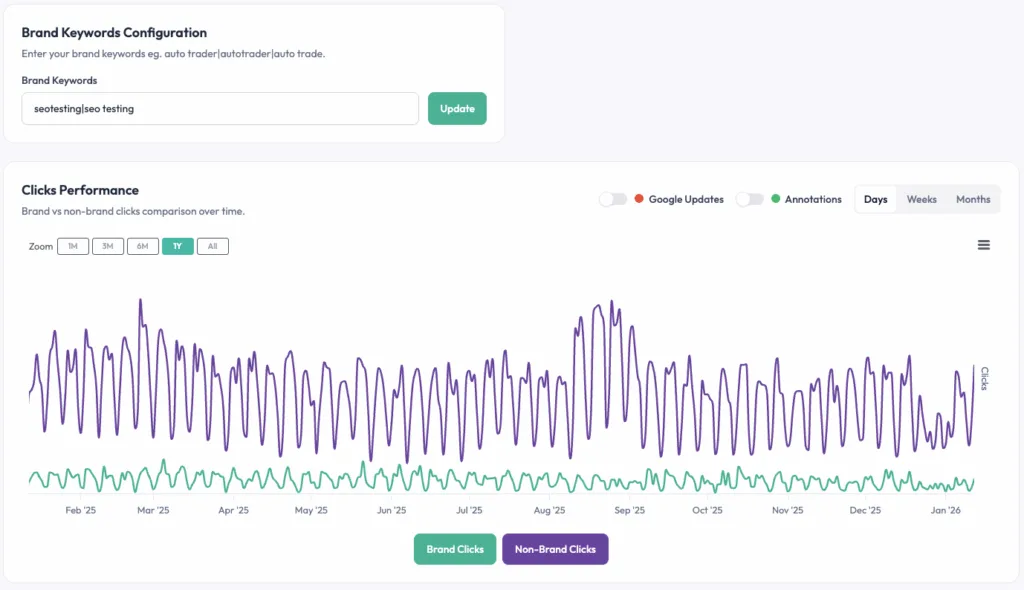
SEOTesting also offers a range of tools to help SEO teams with their on-site content. You can use the Content Decay Report to spot issues where your content’s performance is starting to decline, and we have lots of reports to help you spot opportunities to increase your CTR.
This means detecting keyword cannibalization becomes a quick 5-minute task rather than a job for the entire afternoon.
Features such as the Site Changelog, Content Groups, sitemap monitoring, and the ability to add filtering options for country/brand/etc. help SEO teams with their operations. Keeping track of completed work and its impact becomes a breeze.
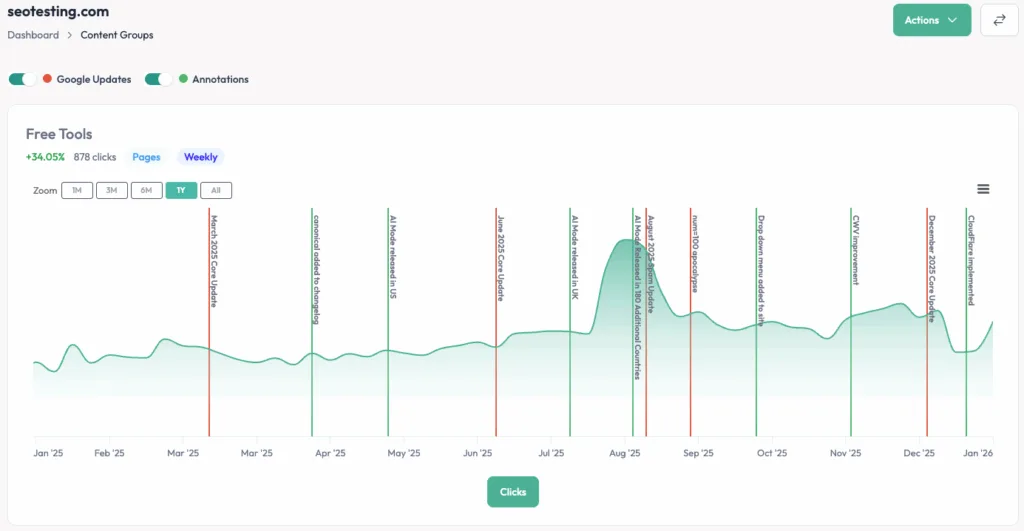
Finally, SEOTesting also offers a range of easy-to-use integrations to help you work faster and more simply. Some of these integrations include a Google Chrome Extension to help you surface your GSC data whilst browsing pages, and a Data Studio Connector to support end-of-month reporting.
Pricing
Enterprise: SEOTesting offers enterprise teams custom pricing for 20+ websites, which includes unlimited training from our expert team and dedicated support.
Single Site: $50 per month for one website. You get unlimited users and 25 Internal Linking credits.
Medium: $125 per month for up to five websites. This includes unlimited users, 75 Internal Linking credits, and a 1:1 onboarding call.
Large: $375 per month for up to 20 websites. You get unlimited users, 300 Internal Linking credits, and quarterly training sessions.
All plans support unlimited users. Every plan includes a 14-day free trial. No credit card required. Plans bill monthly. We also offer annual options; get in touch if you’re interested in learning more.
Reviews
Platform | Rating |
G2 | 4.8/5 |
Capterra | 4.9/5 |
Software Advice | 4.9/5 |
Who is SEOTesting best for?
In our (potentially slightly biased!) opinion, we think SEOTesting is best for enterprise SEOs who need a truly repeatable way to prove the impact of their work (which you get through their testing and reporting features), as well as those SEOs who need to make GSC data more actionable for stakeholders without living inside spreadsheets.
2. Google Search Console (GSC)
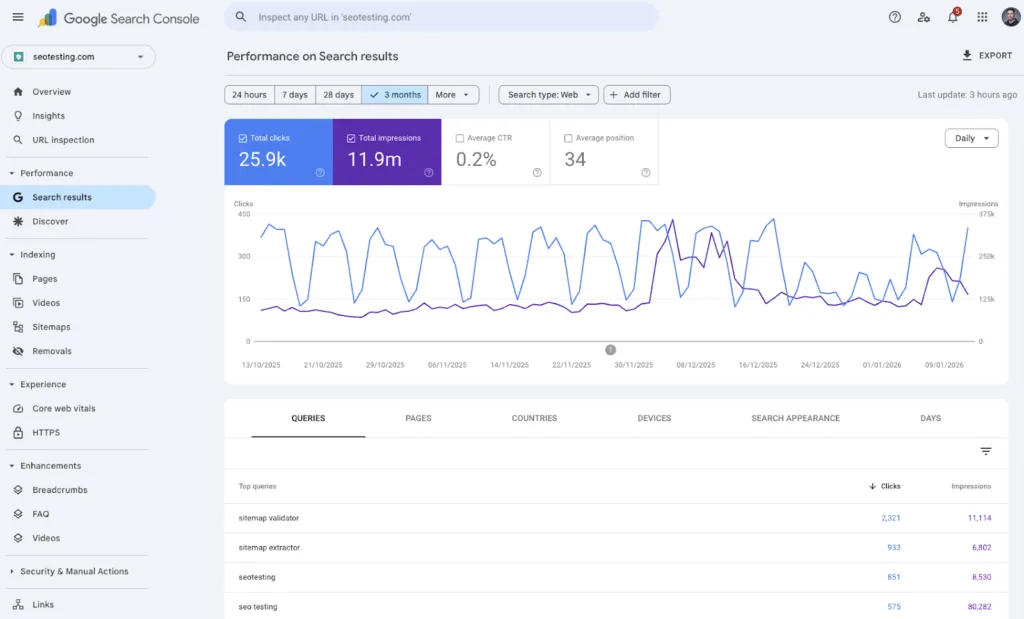
Google Search Console is the “OG” of SEO tools. It’s Google’s own tool that provides first-party data and insights into your search performance across Google platforms. That includes Google Search and Google Discover. It also points you in the right direction for fixing technical errors on your site that could be harming your site’s search performance.
Features
One of Google Search Console’s key features is its performance reports. These allow you to see what queries are bringing in users to your site through Google Search, but they also allow you to analyze associated metrics such as:
- Impressions
- Click-through rates
- Average position
Indexing is also a huge part of Google Search Console’s toolset. The tool allows you to submit sitemaps and individual URLs for crawling to help ensure your pages are indexed in Google search results. You can also:
- Review your index coverage
- Request URL removals
- Get technical information on why certain pages aren’t being crawled/indexed
Issue detection is also a huge part of GSC. You can set Google Search Console to send you email alerts when Google identifies issues. After receiving these email alerts, you can view all impacted URLs and confirm when fixes have been applied.
Google Search Console’s URL inspection tool allows you to pull detailed crawl, index, and serving information directly from the Google index for any given page on your website.
Core Web Vitals are an important part of ensuring your site is speedy and user-friendly. Within GSC, you can examine how your site performs from the lens of Google’s CWV, see what improvements need to be made, and you can do this across both mobile and desktop.
Google Search Console has recently added the option for users to add basic site-level annotations to their performance reports. This handy feature helps you track events that could affect your search performance, such as public holidays.
Note: SEOTesting also allows users to add annotations. However, we go a step further by allowing users to add annotations at the page, content group, and query levels, rather than just at the site level. There is also no maximum cap on the number of annotations you can add.
Google Search Console now also lets you view the performance of similar queries through its Query Grouping feature. This streamlines your performance analysis, but it applies only to sites with a significant amount of query data. If your site has a low number of queries, you’ll continue to see a simple list of queries.
Pricing
Google Search Console is completely free to use.
Reviews
Platform | Rating |
G2 | 4.7/5 |
Capterra | 4.8/5 |
Software Advice | 4.8/5 |
Who is Google Search Console best for?
Google Search Console is essentially a requirement for any enterprise SEO looking to improve their performance on Google Search. But it has some limitations, so people often look for alternatives to GSC.
3. Google Analytics (GA4)
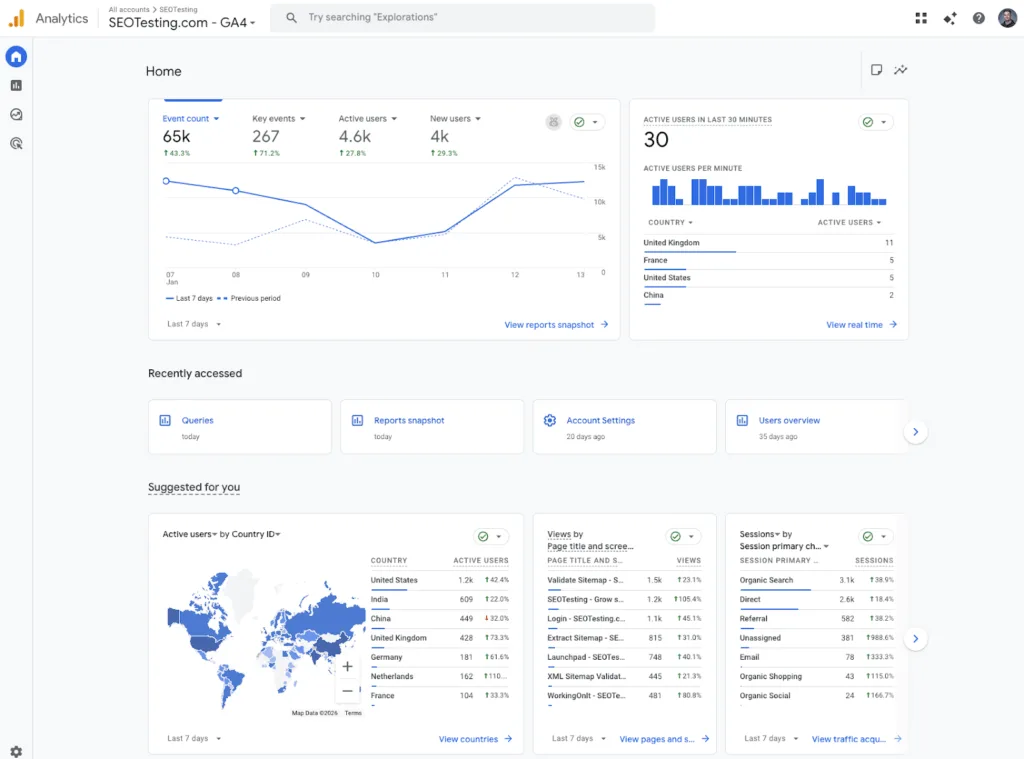
Google Analytics is Google’s own analytics platform, allowing you to get valuable insights into your site’s performance on:
- Search engines
- Social media platforms
- Referral traffic from other websites
- Direct website visits
It pairs this visitor information with event tracking, so you can see which pages on your site drive the most conversions and how traffic from different sources and platforms performs in generating revenue.
Features
Google Analytics 4 represents a shift from older analytics approaches, moving from Universal Analytics to an event-based model rather than the traditional session-first structure. This framework enables you to model user interactions seamlessly across web and app platforms, providing a clearer view of how users engage with your website.
One of GA4’s best features for SEO professionals is its organic search analysis, which is enhanced by its integration with Google Search Console. By linking a GA4 web data stream with a Search Console property, you unlock two great reports:
- Google Organic Search Queries
- Google Organic Search Traffic
These reports tie queries and landing pages directly to on-site behavior and outcomes, including key events. This helps you understand the full journey from the initial search that lands on your site to conversion.
Note: You cannot see queries that lead to key events directly in GA4. The closest you can get is to look at the directional relationship between your queries and landing pages. You can see the queries you’re getting search traffic from using the Google Organic Search Queries report, and then you can use that data to infer which landing page they’re arriving on, and see how those pages lead to key events using the Google Organic Search Traffic report.
It’s worth noting, however, that Google Search Console data in Google Analytics is capped at 16 months (the same as GSC itself) and appears in Google Analytics 48 hours after Google Search Console initially collects it.
Key event tracking is another one of Google Analytics’ great features. In Universal Analytics, conversions and key events let you track the actions that matter most to your business, helping you measure the ROI of your SEO efforts.
For enterprise teams with complex workflows, GA4 also offers data export via BigQuery, enabling you to integrate your analytics data into broader reporting systems rather than relying solely on Google Analytics.
Pricing
While the standard version of GA4 is free, you will need a paid subscription to use Google Analytics 360. This starts from around $50,000 per year, but the price varies by contract and usage.
Reviews
Platform | Rating |
G2 | 4.5/5 |
Capterra | 4.7/5 |
Software Advice | 4.7/5 (GA 360, not GA4) |
Who is Google Analytics best for?
Google Analytics is arguably essential for any enterprise SEO team that needs to connect organic search performance to on-site behavior and outcomes (unless you’re using something like Adobe Analytics instead). This is done through Search Console reports, embedded into GA4, and key event tracking.
4. Bing Webmaster Tools
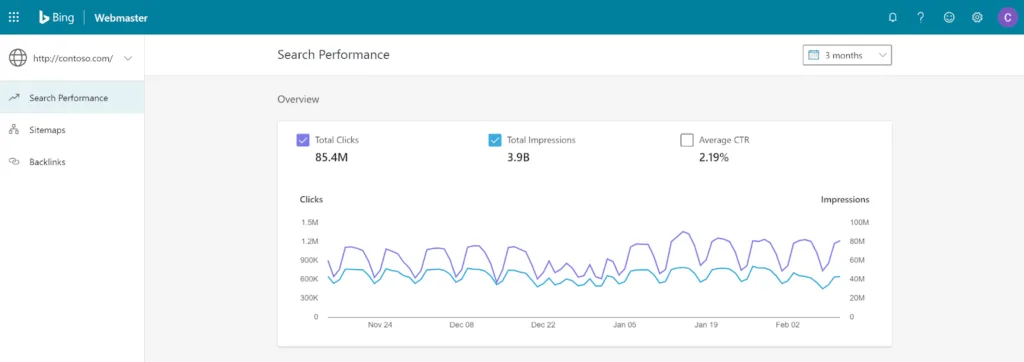
Bing Webmaster Tools is Microsoft’s version of Google Search Console. It tracks your performance in Bing’s search results and provides technical diagnostics for Bing.
Features
Bing Webmaster Tools offers IndexNow integration and URL submission capabilities, allowing you to instantly notify Bing when content is added, updated, or deleted. This is a much better solution than waiting for indexing to occur naturally, as it helps get your freshest content indexed quickly.
Like Google Search Console, Bing Webmaster Tools provides search query data to help you understand which queries are driving traffic to your site from Bing’s search results, along with other associated performance metrics.
One standout feature is Copilot in Bing Webmaster Tools. Copilot is Bing’s primary LLM, and the integration is designed to help you troubleshoot issues and surface useful insights from your data. This AI-powered helper can make understanding your site’s performance and technical health much more straightforward.
For any technical auditing you need to do, Bing offers a Site Scan feature that finds issues like:
- Broken links
- Duplicate tags
- Missing metadata
The platform also includes a robots.txt tester to help you verify whether your crawl directives are working as intended.
Crawl management is handled through Crawl Control, which lets you schedule Bingbot’s visits and manage crawl behavior to suit your site’s needs and server capacity.
For more advanced users, Bing Webmaster Tools provides submission APIs, including both a URL Submission API and a Content Submission API. These allow you to push updates programmatically for instant crawling and indexing, and include dedicated dashboards to track your submission and indexing statistics.
Pricing
Bing Webmaster Tools is free for all users.
Reviews
Platform | Rating |
G2 | 4.3/5 |
Capterra | 4.4/5 |
Software Advice | 4.4/5 |
Who is Bing Webmaster Tools best for?
Bing Webmaster Tools is best for any SEOs who want search performance and indexing diagnostic information beyond Google. This will be especially important if your site receives meaningful traffic from search engines that use Bing as their source, such as Bing, DuckDuckGo, and Yahoo.
Want to get more from your Bing & Google data?
Give SEOTesting a try today. We offer a 14-day free trial, with no credit card required to sign up. So you can get started and run your first test today.
Best “all-in-one” tools
5. Ahrefs
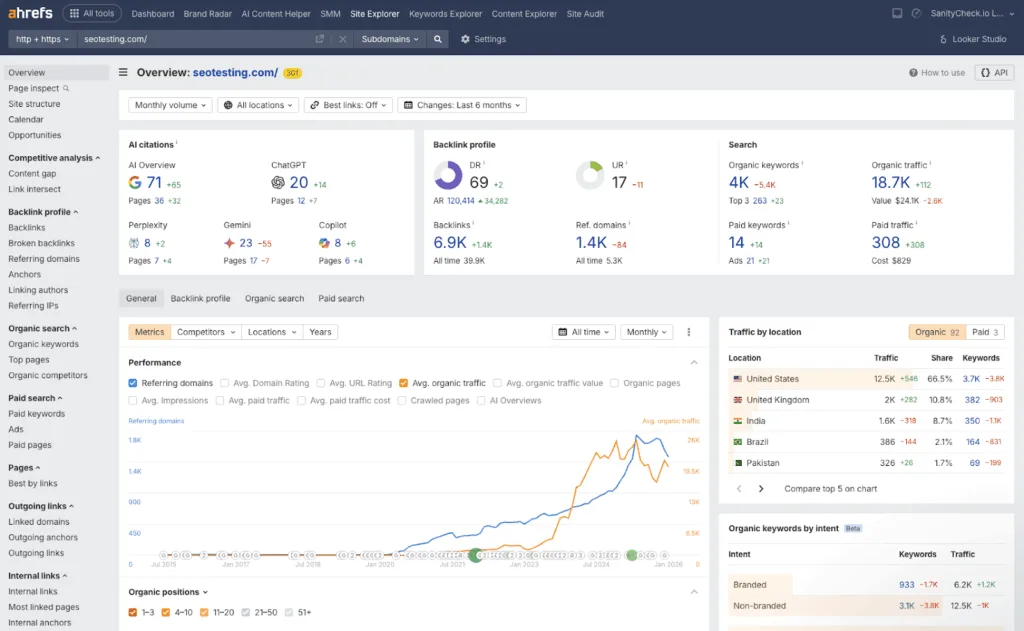
Ahrefs is an all-in-one SEO toolset focused on:
- Organic search visibility
- Competitor research
- Backlink analysis
Originally built around one of the industry’s largest backlink indexes, Ahrefs has moulded itself into a comprehensive platform covering:
- Keyword research
- Rank tracking
- Site auditing
- Content analysis
Features
Ahrefs’ Site Explorer is probably its flagship tool, offering comprehensive competitor and backlink research tools alongside SERP and visibility insights. This helps you understand your site’s link profile and see how both you and your competitors are performing and where opportunities might exist.
Keywords Explorer (naturally) helps with keyword discovery as well as clustering and intent features, though the availability of certain features depends on the subscription level you’re on. This tool helps you find valuable keyword opportunities and understand the search intent behind them.
Rank tracking is also available through Ahrefs’ Rank Tracker. This comes with a limit on the number of keywords you can track, and defaults to weekly updates. But if you need more frequent monitoring, you can upgrade to daily updates as a paid add-on.
For users who want/need to explore technical SEO further, Ahrefs offers Site Audit with monthly crawl limit credits and per-project caps. Site Audit helps you identify and resolve technical issues that may be limiting your site’s performance.
Ahrefs also includes a reporting layer featuring both a Dashboard and Report Builder to help you visualize your data and create reports for stakeholders.
Given how SEO is evolving, Ahrefs has also introduced Brand Radar. This tool is designed to track brand visibility in LLMs. This feature helps you monitor how your brand appears in AI-search, beyond traditional search engines.
Pricing
Free: Unlimited verified websites per account; verification required.
Lite: $129. Includes 5 projects, 6 months of historical data, 750 tracked keywords, 100,000 crawl credits, 500 credits per user, 1 user included, and allows adding up to 2 users at $40/mo each.
Standard: $249. Includes 20 projects, 2 years of historical data, 2,000 tracked keywords, 500,000 crawl credits, unlimited credits per user, 1 user included, and allows adding up to 5 users at $60/mo each.
Advanced: $449. Includes 50 projects, 5 years of historical data, 5,000 tracked keywords, 1,500,000 crawl credits, unlimited credits per user, 1 user included, and allows adding up to 10 users at $80/mo each.
Enterprise: $1,499 with annual commitment required; includes Enterprise controls + API access, SSO, access management/audit log, and “unlimited historical data” plus “personalized higher limits & data exports.”
It’s worth noting that you can receive up to 17% off your subscription when you pay annually.
Reviews
Platform | Rating |
G2 | 4.5/5 |
Capterra | 4.7/5 |
Software Advice | 4.7/5 |
Who is Ahrefs best for?
Enterprise SEO teams that need deep competitor and/or backlink intelligence, as well as site auditing and rank tracking in a single tool. Especially when you can operationalize it across multiple projects with clear usage limits.
6. Semrush
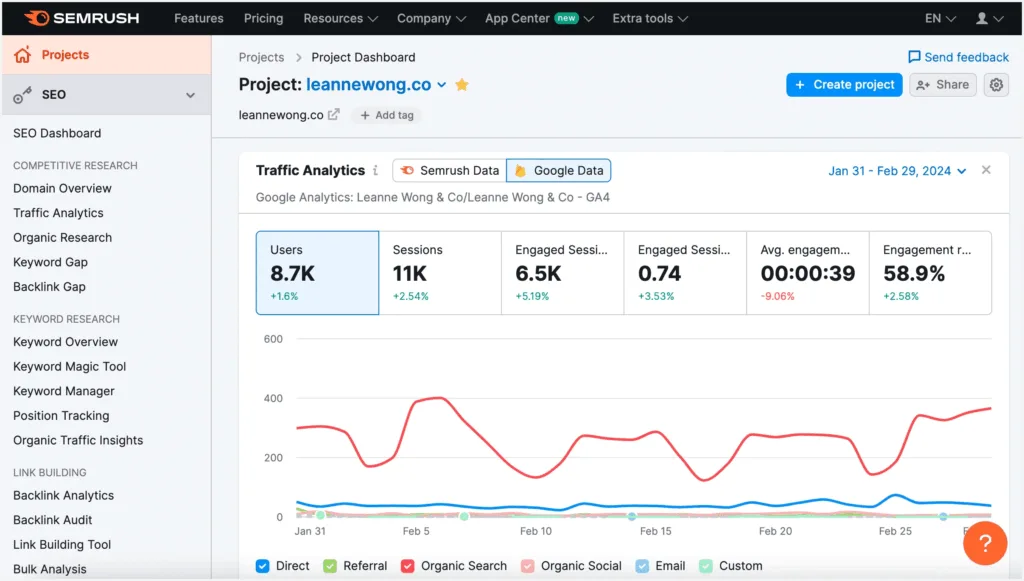
Semrush is a comprehensive SEO platform that covers a wide range of search marketing areas. Originally, it was known for its competitive intelligence capabilities, but over time, it has evolved into a comprehensive toolkit that can help enterprise teams manage:
- Keyword research
- Content optimization
- Technical audits
- Rank tracking
All in one place.
Features
Semrush’s Keyword Magic Tool is central to its keyword research functionality. It helps you:
- Find keyword opportunities.
- Analyze search volumes.
- Understand keyword difficulty
Across billions of keywords. The Keyword Magic Tool also groups related keywords together, making it much easier to find content opportunities at scale.
Content optimization is handled through Semrush’s SEO Writing Assistant and Content Marketplace tools. These help you create content that’s optimized for your target keywords while maintaining readability and originality. The platform provides real-time recommendations as you write.
One of Semrush’s key strengths is its competitor and market analysis capabilities. The SEO Toolkit helps you understand your competitors’ strategies by analyzing their:
- Organic search performance
- Paid advertising approaches
- Backlink profiles
This helps you identify gaps in your own strategy and spot opportunities your competitors might miss.
Rank tracking within Semrush lets you monitor your keyword positions across locations and devices. The platform gives you daily updates on your rankings and includes features (depending on your subscription) like Share of Voice reports to help you understand your visibility compared to competitors.
Semrush also offers a Site Audit tool that lets you assess your site’s technical health and do technical audits. This crawler finds issues that could be harming your site’s search performance, including broken links, crawlability issues, and on-page SEO issues. The tool provides prioritized recommendations to help you focus on fixes with the highest chance of delivering the best results first.
Seeing how search has been evolving over the past 12 months, Semrush has also introduced AI search visibility tracking. This feature helps you monitor how your brand and content appear in AI-powered search experiences, giving you insights beyond traditional search engine results.
Pricing
Semrush has a range of different pricing features, depending on the functionality you need.
Free: Includes access to a handful of tools, including Domain Overview, Keyword Research, and AI Visibility. Just keep in mind, however, that there are usage caps.
SEO Classic:
- Free: 1 website, 10 analytics report requests per day, track 10 keywords.
- Pro: $139.95 per month for 5 websites, 500 tracked keywords. Includes core SEO tools and limited historical data.
- Guru: $249.95 per month for 15 websites, 1,500 keywords, content marketing toolkit, and an integration with Google Looker Studio.
- Business: $499.95 per month for 40 websites, 5,000 keywords, API access, Share of Voice reports, and all advanced features.
Semrush One:
- Pro: $199 per month for 5 projects, 500 tracked keywords. Includes core SEO tools and limited historical data.
- Guru: $299 per month for 15 projects, 1,500 keywords, content marketing toolkit, and an integration with Google Looker Studio.
- Business: $549 per month for 50 projects, 5,000 keywords, API access, Share of Voice reports, and all advanced features.
Enterprise: Semrush Enterprise is almost like a separate product with completely custom pricing. In fact, there is no price listed for Semrush Enterprise on its official website.
Discounts of up to 17% are available on annual plans.
Reviews
Platform | Rating |
G2 | 4.5/5 |
Capterra | 4.6/5 |
Software Advice | 4.6/5 |
Who is Semrush best for?
Semrush is a good fit for enterprise teams looking for a single platform that covers multiple SEO disciplines. It’s especially useful if competitor research is a core part of your workflow, and you prefer having most of your SEO tools and data in one place rather than stitching together multiple different platforms.
7. Moz Pro

Moz Pro is Moz’s SEO suite that covers:
- Keyword research
- Rank tracking
- Site audits
- Competitive link analysis
Given that they created the widely-used Domain Authority metric, Moz has built a solid reputation over the years for providing reliable, straightforward SEO tools that help teams understand and improve their search performance.
Features
All keyword research and discovery stuff within Moz is handled through Keyword Explorer. This feature lets you:
- Research keywords
- Assess keyword difficulty scores
- Understand which SERP features are included for your target queries
It provides clear, actionable data to help you prioritize which keywords to target.
Rank Tracking allows you to monitor your keyword rankings over time across different locations and devices. Moz’s rank tracker also gives you access to historical data to help you find trends and measure the impact of your SEO work.
Your site’s health and technical audits are available through Moz’s site crawler, which finds technical SEO issues across your website. Much like Semrush’s Site Audit Tool, it helps you prioritize fixes based on severity, which makes it easier to address the most important issues first.
Moz’s Link Explorer powers all of their backlink analysis features. You can:
- Track new and lost links
- Assess link quality
- Understand how your backlink profile compares to competitors
This helps you find link-building opportunities and monitor the health of existing links that you’ve already acquired/built over time.
One of Moz’s most talked-about features is its Domain Authority and Page Authority metrics. These scoring systems (developed by Moz) have become de facto industry standards for benchmarking site and page-level authority. Many SEO professionals use these metrics in their reporting and competitive analysis, making them useful reference points when communicating with clients and stakeholders, in spite of the fact that neither of these metrics are used by Google or other search engines.
On-page optimization recommendations are provided based on your target keywords and SERP analysis. Moz analyzes the top-ranking pages for your keywords and suggests improvements to help your content compete more effectively.
Moz also has a range of competitor analysis tools that help you compare:
- Keyword rankings
- Authority metrics
- Link profiles
Against your competitors. This helps you find where you’re falling behind and where there are opportunities to gain ground.
Reporting and dashboards can also be customized to track performance and provide stakeholder updates. Moz offers flexible reporting options to help you better communicate the impact of your SEO work.
For teams that focus more on local search, Moz Local helps you manage:
- Local listings
- Citations
- Local search visibility
Across directories. This helps to ensure your business information is consistent and accurate wherever customers in the local area might find you.
Pricing
A free tier is available, but it won’t suit most enterprise teams.
- Starter: $49 per month. This includes 1 user, 1 tracked site, 50 tracked keywords per month, and a limit of 20,000 crawled pages per month.
- Standard: $99 per month. This includes 1 user, 3 tracked sites, 300 tracked keywords per month, and a limit of 400,000 crawled pages per month.
- Medium: $179 per month. This includes 2 users, 10 tracked sites, 1,500 tracked keywords per month, and a limit of 2,000,000 crawled pages per month. Also includes branded reporting.
- Large: $299 per month. This includes 3 users, 25 tracked sites, 3,000 tracked keywords per month, and a limit of 5,000,000 crawled pages per month.
A 20% discount is available on annual plans.
Reviews
Platform | Rating |
G2 | 4.3/5 |
Capterra | 4.5/5 |
Software Advice | 4.5/5 |
Who is Moz best for?
You will find that Moz is a good fit for most enterprise teams that want a reliable, easy-to-understand SEO tool rather than a heavy, “do it all” growth or automation platform. It works well for teams that place a focus on clean, trustworthy data. It’s also extremely useful if you happen to use Domain Authority as part of your reporting.
8. SE Ranking
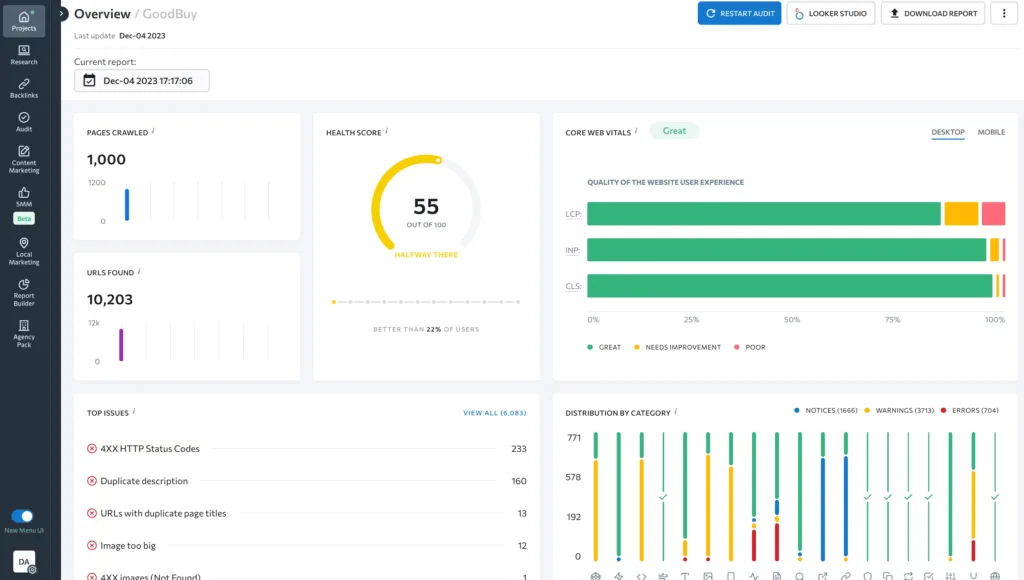
SE Ranking is an SEO platform built around the basics:
- Rank tracking
- Keyword research
- Site auditing
- Competitor insights
- Reporting
With integrations for Google Search Console and Google Analytics, plus optional add-ons for content and local SEO, SE Ranking has positioned itself as a comprehensive yet cost-efficient alternative to some of the more established enterprise SEO players.
Features
Rank tracking is one of SE Ranking’s core strengths. The platform tracks keyword positions (daily) across multiple locations, devices, and search engines. This provides detailed information on how your rankings fluctuate, helping you understand your performance over time.
SE Ranking also comes with a range of keyword research and discovery tools that help you:
- Research keywords
- Analyze difficulty scores
- Expand your existing keyword list with suggestions
SE Ranking’s keyword database gives you the data you need to find new opportunities and prioritize your content strategy.
Competitor and market analysis features offered by SE Ranking allow you to compare domains, learn more about competitors’ keyword strategies, and find gaps in your own approach. This competitive intelligence helps you understand where you’re winning and where you need to improve.
SE Ranking also allows you to crawl your websites to surface technical SEO issues across your site, and it provides prioritized recommendations that make it easier to focus on the fixes with the biggest impact.
You will also get access to a backlink monitor that helps you:
- Analyze your backlink profile
- Track new and lost links
- Assess link quality
This helps you maintain a healthy link profile for your site and identify potential issues before they become problems.
SE Ranking offers on-page and SERP analysis tools so you can evaluate your page-level optimization and assess your ability to compete in the SERPs for your target keywords. This helps you get a better understanding of what it takes to rank for specific queries, and where your pages need improvement.
You can also use SE Ranking to create customizable dashboards and reports thanks to its white-label options. This is massively useful for agencies or in-house teams that need to regularly present data to different stakeholders.
SE Ranking also offers optional add-ons for enterprise teams with specific needs. The content optimization add-on helps you:
- Build content briefs
- Optimize pages
- Score content using AI-assisted tools
And the local SEO add-on enables you to effectively manage:
- Local rankings
- Business listings
- Reviews
- Google Business Profile data
Pricing
- Essential: $65 per month. This is an entry tier with the core toolkit and lower limits included.
- Pro: $119 per month. This gives you higher limits and expanded capabilities, including more seats and projects, as well as added analysis features.
- Business: $259 per month. This is the highest tier with maximum limits and expanded data reach.
You can save approximately 20% by choosing annual billing.
Reviews
Platform | Rating |
G2 | 4.8/5 |
Capterra | 4.7/5 |
Software Advice | 4.7/5 |
Who is SE Ranking best for?
SE Ranking is a good option for enterprise teams that want a comprehensive tool for:
- Rank tracking
- Audits
- Competitor monitoring
Without paying for larger enterprise platforms like Ahrefs or Semrush. It covers the core SEO basics incredibly well and comes at a more accessible price point, making it a sensible choice for enterprise teams working with slightly tighter budgets.
Best for SEO market & competitor research
9. Similarweb

Similarweb is primarily focused on market and traffic insights for any site, with SEO add-ons available depending on the package you choose.
Unlike traditional SEO tools that focus mainly on your own site’s data (with some exceptions such as Ahrefs and Semrush), Similarweb provides an “outside in” view of your competitive landscape, helping you understand:
- Traffic patterns
- Audience behavior
- Market dynamics
Across your industry.
Features
The Competitive Intelligence platform is Similarweb’s foundation, offering:
- Traffic and engagement metrics
- Customer demographics
- Marketing channels overview
- Competitor alerts
These features help you understand how competitors are getting their traffic and which channels are driving their success.
For teams that need dedicated SEO functionality, the SEO Intelligence add-on modules are available at an additional cost. These modules include:
- Organic Search Overview to understand search traffic patterns.
- Keyword Research to find new opportunities.
- Rank Tracking to monitor your positions.
- Site Audit for all technical SEO health checks.
- Backlink Analytics to assess link profiles.
Ads Intelligence also appears as an additional module within the “Competitive Intelligence, SEO & Ads” bundle, although this is marked as “Coming Soon” on Similarweb’s pricing page. Once this becomes available, it will help with creative and campaign insights, paid search and display analysis, and publisher/advertiser research capabilities.
Pricing
- Competitive Intelligence: $199 per month. This includes 1 user seat, 3 months of historical data, and the Competitive Intelligence feature set.
- Competitive Intelligence + SEO: $399 per month. This includes 1 user seat, 3 months of historical data, and Competitive Intelligence, plus the SEO Intelligence modules.
- Competitive Intelligence + SEO + Ads: $649 per month. This includes 1 user seat, 6 months of historical data, and adds Ad Intelligence modules such as creative/campaign insights, paid search/display, and publisher/advertiser analysis. This pricing option is currently listed as “Coming Soon.”
Reviews
Platform | Rating |
G2 | 4.5/5 |
Capterra | 4.6/5 |
Software Advice | 4.6/5 |
Similarweb is best used as a complementary tool, and not a replacement for any first-party analytics tools you’re already using. It’s useful for marketing and SEO teams that want directional, outside-in views of markets and competitors. This is particularly useful when making higher-level decisions around:
- Positioning
- Competitive landscape
- Channel investment
Best “all-in-one” tools built for enterprise companies
10. BrightEdge

BrightEdge is a platform specifically designed for enterprise organizations. Unlike tools that are marketed to serve businesses of all sizes (think Ahrefs and Semrush here), BrightEdge focuses specifically on the needs of large-scale SEO operations, offering features like:
- Revenue attribution
- Forecasting
- Executive-level reporting
That helps tie SEO work directly to business outcomes.
Features
BrightEdge’s Data Cube supports keyword research and demand modelling at the enterprise level, helping teams understand search demand and identify content gaps across large markets.
Its rank tracking and share of voice features focus on your site’s overall visibility, so you can see how your brand performs against competitors beyond individual keyword rankings.
BrightEdge also includes content performance and optimization tools to help you assess how your existing content is performing and identify opportunities for improvement. It connects content metrics to search outcomes, making it easier to demonstrate the value of content investments.
Competitor and market analysis features included in your plan help provide strategic insights into how your competitors are approaching search, what topics they’re covering, and where there are opportunities to differentiate or capture untapped demand.
Of course, as with almost all SEO tools, BrightEdge also includes site health and technical SEO features to help you ensure your site’s technical foundation is solid. It identifies issues that could be limiting your:
- Crawlability
- Indexation
- Overall site performance
Now we come to where BrightEdge really stands out, with SEO forecasting and revenue attribution tools. These features help you project the business impact of your SEO work and connect organic search performance to actual revenue outcomes. This makes it so much easier to secure buy-in and future budget from leadership.
Executive dashboards and reporting have been built into BrightEdge specifically for communicating with senior stakeholders. Its reporting layer focuses on business metrics and strategic insight, rather than just technical SEO data, making it easier to demonstrate the impact you’re having on company goals.
BrightEdge also comes with native integrations with:
- Analytics platforms
- Content management systems
- Enterprise marketing stacks
To help ensure it can fit into your existing tech stack, rather than operating on its own as a standalone tool.
AI-driven insights provide automated recommendations based on large-scale search and content data. These insights help you find opportunities and action items without much manual analysis, making it easier to manage SEO at scale.
Pricing
Here is, perhaps, the downside of using enterprise-only tools… BrightEdge does not publish pricing directly on its website. Instead, it’s custom-quoted and typically based on the number of domains, keywords, and data access required.
Reviews
Platform | Rating |
G2 | 4.4/5 |
Capterra | 4.3/5 |
Software Advice | 4.3/5 |
Who is BrightEdge best for?
BrightEdge is well and truly best suited to large enterprise SEO teams that need executive-level reporting, forecasting, and clear alignment with revenue. It works well in organizations where SEO has to be tied directly to business impact, and where showing ROI clearly is essential for securing ongoing buy-in and investment.
11. Conductor

Much like BrightEdge, Conductor is an enterprise SEO and content performance platform focused on:
- Organic visibility
- Content optimization
- Stakeholder reporting
Conductor emphasized the connection between SEO strategy and content execution, helping large organizations align their SEO work with the business’s other marketing initiatives and goals.
Features
Conductor has a very good set of keyword and topic research tools that will help you discover keyword opportunities and topic coverage aligned to search intent and customer journeys. This sets them apart because, rather than just providing keyword data, Conductor contextualizes this information around how users search and what they’re trying to accomplish at different stages of their journey.
You also have access to a set of rank tracking tools that let you track:
- Keyword rankings
- Visibility trends
- Performance across different locations and devices
Conductor’s approach focuses on understanding your site’s overall visibility patterns, rather than fixating solely on individual keywords.
Naturally, you’ll also get access to some content performance and optimization tools that will help you identify content gaps, optimize existing pages, and measure performance against search demand. Conductor excels at showing which content is working, which isn’t, and where there are opportunities for you to create or improve pages.
Conductor also has a set of competitive analysis tools that allow you to compare:
- Keyword coverage
- Visibility
- Content performance
Against competitors. This helps you understand where your rivals are outperforming you and where your content strategy can be improved.
Of course, no SEO tool is complete without some functionality to help you monitor your site health, and Conductor has these features, too. With these, you can find technical SEO issues that impact performance, but it is worth keeping in mind that this functionality is lighter than what you’d find in dedicated technical crawlers like Screaming Frog or Sitebulb. Conductor provides enough technical insight for most enterprise needs without overwhelming teams with massive amounts of crawl data.
You’ll also get a range of AI-driven recommendations that provide automated insights to help you prioritize SEO and content-based jobs based on what will move the needle the most. These recommendations cut through the noise and help teams focus on what matters most, which is particularly useful when managing large-scale sites.
Conductor offers audience and intent insights that map keywords and topics to both user intent and funnel stages. This functionality helps you understand not just what people are searching for, but why they’re searching for it and where they are in their decision-making process.
As with BrightEdge, you will also get functionality that allows you to create executive dashboards and create reports designed for:
- SEO teams
- Content teams
- Leadership
Conductor’s reporting emphasizes clarity and business results, making it much easier to communicate the value of organic search to non-technical stakeholders.
Conductor makes it easy to share insights across your SEO, content, and wider marketing teams with collaboration functionality and workflows. This approach ensures everyone is working from the same data and working towards the same goals.
And, again, you also get access to integrations with:
- Analytics platforms
- Content management systems
- Enterprise marketing stacks
To ensure that Conductor fits seamlessly into your existing tech stack.
Pricing
Conductor does not publish pricing information on their website. Pricing is custom-quoted and is typically based on domains, keyword volume, users, and feature access.
Reviews
Platform | Rating |
G2 | 4.5/5 |
Capterra | 4.4/5 |
Software Advice | 4.4/5 |
Who is Conductor best for?
Conductor is best thought of as an enterprise SEO and content intelligence platform, rather than a deep technical crawling or log analysis tool. It will work well for larger organizations where SEO and content teams collaborate closely, and where showing the value of SEO means tying visibility data back to content strategy and audience insights.
Best SEO crawlers & technical SEO tools
12. Screaming Frog SEO Spider
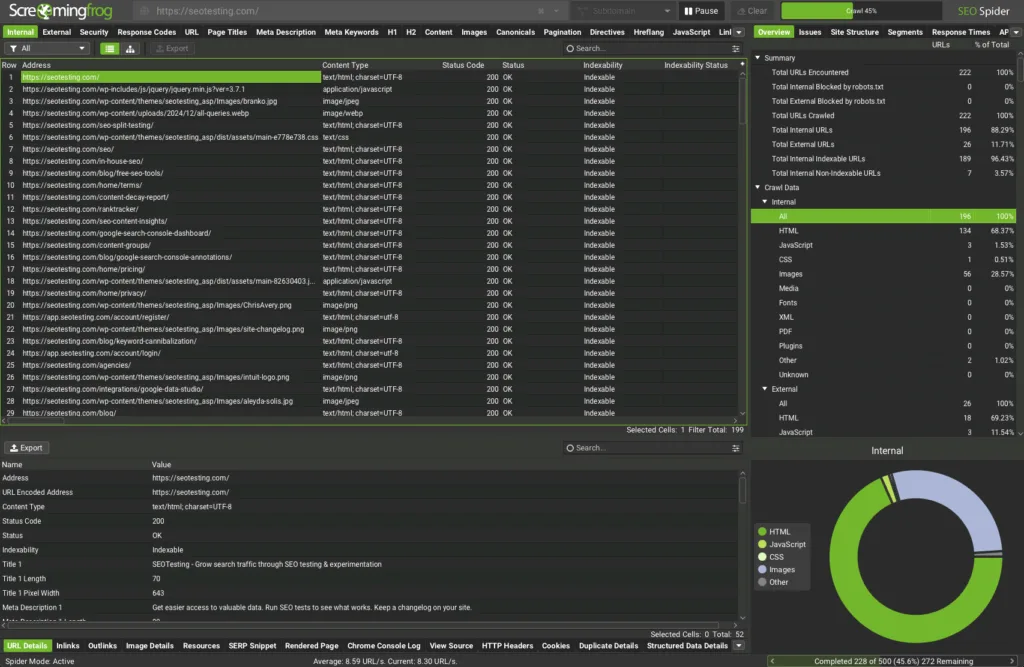
Screaming Frog SEO Spider is a desktop-based website crawler that’s used for technical audits that cover almost everything from the lens of technical SEO:
- Broken links
- Redirects
- Meta data
- Directives
- Hreflang
- Sitemaps
Unlike cloud-based platforms (more on that in the next section), Screaming Frog runs locally on your machine, giving you complete control over how and when you crawl your site/s.
Features
The absolute core of Screaming Frog’s tool is their technical audit features. The crawler examines broken links, errors, and redirects across your site, helping ensure users and search engine bots can navigate your pages properly. It also reviews your site’s titles and meta descriptions, meta robots and crawl directives, hreflang implementation, duplicate content issues, and XML sitemap configurations.
Screaming Frog also offers advanced crawling and extraction capabilities. JavaScript rendering allows the crawler to process dynamic content in the same way modern search engines do. Crawl comparison lets you see exactly what has changed between crawls. The tool also includes near-duplicate detection to help you find content that’s similar but not identical. Not only that, but Screaming Frog also comes with handy custom extraction and JavaScript tooling, giving you the flexibility to pull specific data points or run bespoke checks when needed.
It also has a Google Analytics integration that pulls through traffic and engagement data into your crawls, letting you cross-reference technical issues with your site’s actual performance. And the GSC integration surfaces:
- Crawl errors
- Index coverage issues
- Performance metrics
Alongside your technical audit. There’s also a PageSpeed Insights integration that highlights site speed issues without you needing to jump between tools, and their accessibility auditing features help you ensure your site works for all users. Finally (there’s a lot of integrations to talk about), the link metrics integration pulls in authority data from providers like Majestic or Moz, and the Looker Studio crawl report makes it simple to turn raw crawl data into shareable dashboards for stakeholders.
Pricing
Unlike a lot of other enterprise tools, Screaming Frog’s pricing is very simple:
- Free Version: Limited to crawling 500 URLs, which won’t be appropriate for enterprise teams.
- Paid Version: $279 per year, per license. The paid version is needed to crawl more than 500 URLs.
Reviews
Platform | Rating |
G2 | 4.7/5 |
Capterra | 4.9/5 |
Software Advice | 4.9/5 |
Who is Screaming Frog SEO Spider best for?
You’ll find that Screaming Frog SEO Spider is best for technical SEO teams working on enterprise sites that need a hands-on crawler for repeatable technical audits. It will also massively help if you’re comfortable turning crawl findings into tickets or actionable guidance. Screaming Frog is particularly valuable for teams that want complete control over how a website crawler moves through their sites and need flexibility to customize checks based on their site’s specific technical requirements.
13. Sitebulb Cloud

Sitebulb Cloud is a cloud-based (obviously) technical SEO auditing platform designed to help enterprise teams run comprehensive crawls and audits without the constraints of your hardware. While Sitebulb also offers a desktop version (akin to Screaming Frog), Sitebulb Cloud enables large-scale cloud crawling, making it easier to audit massive websites and collaborate across teams.
Features
Sitebulb’s cloud-based crawling lets you audit large, enterprise-scale websites without ever being limited by your own hardware. You can run massive crawls in the background without tying up your computer or hitting memory limits.
The technical SEO audits highlight issues around:
- Crawlability
- Indexation
- Rendering
- Performance
With clear prioritization. Instead of just listing out issues, it explains why they matter and what you need to do next.
There’s also a nice built-in JavaScript rendering feature that uses a headless Chromium browser to crawl modern, dynamic sites. That lets you audit pages as search engines actually see them.
Log file analysis adds another layer of insight by showing how search engine bots actually crawl your site. This helps uncover crawl budget waste (which is actually a problem for enterprise-scale sites) and confirms whether important pages are being discovered.
One of Sitebulb Cloud’s biggest strengths is its Hints system. Rather than overwhelming you with issues, it provides focused, actionable explanations that make audits easier to understand and easier to communicate to developers and stakeholders alike.
Visual crawl maps and internal linking diagrams make it easy to monitor technical SEO changes over time, verify fixes, and spot regressions after site updates.
And finally, collaboration, exports, and reporting features make it easy to share findings and integrate technical SEO insights into broader reporting workflows.
Pricing
It’s worth noting before going into pricing information that each Sitebulb Cloud plan includes:
- Unlimited projects
- Recurring audits
- Google Analytics/Google Search Console connections
With that being said, pricing is as follows:
- Mini: $125 per month. This includes 2 users with desktop licenses, up to 50,000 total URLs per month, and per audit.
- Small: $245 per month. This includes 5 users with desktop licenses, up to 1 million total URLs per month, and up to 250,000 per audit.
- Medium: $495 per month. This includes 10 users with desktop licenses, up to 2.5 million total URLs per month, and up to 1 million per audit.
- Enterprise: This is custom pricing to be spoken about with Sitebulb directly. 10+ users with larger URL allowances (such as 5 million+ total URLs per month, and 2.5 million+ per audit) and advanced user support.
Reviews
Platform | Rating |
G2 | 4.5/5 |
Capterra | 4.9/5 |
Software Advice | 4.9/5 |
Who is Sitebulb Cloud best for?
Sitebulb Cloud is best for enterprise SEOs who want a truly best-in-class technical SEO auditing tool, not an SEO suite. Sitebulb Cloud is particularly well-suited for teams that place a strong emphasis on technical excellence and need clear, actionable guidance to present to stakeholders.
14. Lumar (formerly Deepcrawl)

Lumar is an enterprise-grade technical SEO and website health platform that focuses on continuous:
- Crawling
- Monitoring
- Governance
For large, complex websites. Unlike tools that run occasional audits (think Screaming Frog SEO Spider and Sitebulb Cloud), Lumar operates as an always-on monitoring platform that helps enterprise teams catch technical issues before they can hurt search performance.
Features
What really sets Lumar apart is continuous technical SEO monitoring. Instead of relying on periodic crawls, it runs always-on checks that show you issues as soon as they appear. That means problems are caught immediately, not days/weeks/months later during the next audit.
The platform is built for scale, handling millions of URLs across complex, enterprise-level sites. This makes it suited to large organizations with multiple domains, regions, or highly dynamic site architecture.
Lumar covers the core technical SEO fundamentals, including:
- Crawlability
- Indexation
- Rendering
- Performance
- Accessibility
It provides a comprehensive view of anything that could block search engines or hurt your user experience.
Real-time change detection and alerts will notify teams when releases negatively impact SEO. In fast-moving enterprise environments, this allows issues to be fixed or rolled back before they lead to traffic loss.
Governance and compliance features help you enforce technical SEO standards across teams and regions, ensuring consistency even when multiple development teams work on the same site.
Support for JavaScript rendering enables Lumar to audit modern, JS-heavy frameworks and identify issues that only appear after content is rendered.
Custom segmentation lets you break issues down by:
- Template
- Folders
- Page type
Making it easier to prioritize fixes by business impact rather than the number of issues.
Finally, integrations and enterprise-level reporting features from Lumar help connect SEO insights to engineering workflows and executive dashboards. This helps technical issues be understood, prioritized correctly, and acted on across organizations.
Pricing
Lumar does not publish pricing on its website. Pricing is custom-quoted, typically based on crawl volume, domains, and feature requirements.
Reviews
Platform | Rating |
G2 | 4.6/5 |
Capterra | 4.3/5 |
Software Advice | 4.3/5 |
Who is Lumar best for?
Lumar is best seen as a technical SEO “control and monitoring” system, rather than a general SEO or keyword research platform. It’s ideal for large, complex enterprise sites where technical governance is crucial, and where catching issues immediately (rather than during monthly recurring audits) can prevent significant traffic and revenue loss.
15. Botify

Botify is an enterprise SEO platform that’s centered on crawl intelligence, log file analysis, and organic performance optimization. It’s been designed to help large organizations maximize search traffic on very large, very complex websites. Botify’s key strength lies in understanding how search engines crawl your site and how that affects your organic performance.
Features
Enterprise-scale crawling through Botofy Analytics allows you to crawl millions of URLs to analyze:
- Indexability
- Internal linking
- Site architecture
Botify is built specifically for websites where scale matters, so think of sites with hundreds of thousands or millions of pages that need technical analysis.
Log file analysis is one of Botify’s core capabilities. By combining crawl data with server logs, Botify can show you how search engines are actually crawling your site. This goes beyond what a crawler can traditionally “tell” you, showing you which pages search engines are prioritizing, which they’re ignoring, and where crawl budget might be being wasted.
Indexability and crawl budget optimization features help you identify wasted crawl paths and prioritize pages that matter for organic growth. For enterprise sites, ensuring search engines spend their limited crawl budget on your most important pages can have a huge impact on how quickly updates are seen and how well your content ranks.
Botify also has a range of technical SEO audit tools that diagnose:
- Crawlability
- Rednering
- Performance
- Duplication
Issues at scale. Botify’s approach is particularly well-suited to complex enterprise sites where technical problems can hide in subsections or pages that don’t get a huge amount of attention.
There is also a range of internal linking tools that can help you evaluate link distribution and authority flow to improve how easily your key pages are discovered. Understanding how authority flows through your site helps ensure that important pages receive enough internal link equity to rank well.
Botify Intelligence gives you AI-driven recommendations that surface high-impact SEO actions and opportunities. Rather than manually analyzing millions of data points, Botify’s AI helps you focus on the changes that will really move the needle.
Search performance and opportunity analysis connect your site’s technical data with:
- Rankings
- Traffic
- Buysiness outcomes
This helps you understand not just what’s technically wrong, but what fixing those issues might be worth to your site in terms of traffic and, more importantly, revenue.
Change monitoring detects site changes and releases that impact SEO performance. For enterprise sites where multiple teams often push changes regularly, this safeguard helps you catch problems before they become real issues.
Enterprise reporting and dashboards offer custom views for:
- SEO leads
- Technical teams
- Executives
Botify understands that different stakeholders need different perspectives on the same data.
And there are, obviously, integrations with analytics platforms, Google Search Console, and enterprise data stacks that ensure Botify fits well into the other tools that you’re using and doesn’t become a hindrance.
Pricing
Botify does not publish pricing publicly. Pricing is custom-quoted, typically based on crawl volume, log data usage, domains, and feature access.
Reviews
Platform | Rating |
G2 | 4.4/5 |
Capterra | 4.3/5 |
Software Advice | N/A |
Who is Botify best for?
Botify is best seen as a crawl and log intelligence platform for enterprise SEO, not a general-purpose or content tool. It’s particularly helpful for organizations with massive, complex websites where understanding how search engines interact with your site (and optimizing that interaction) is critical to maintaining and growing organic traffic.
Best for rank tracking
16. STAT Search Analytics
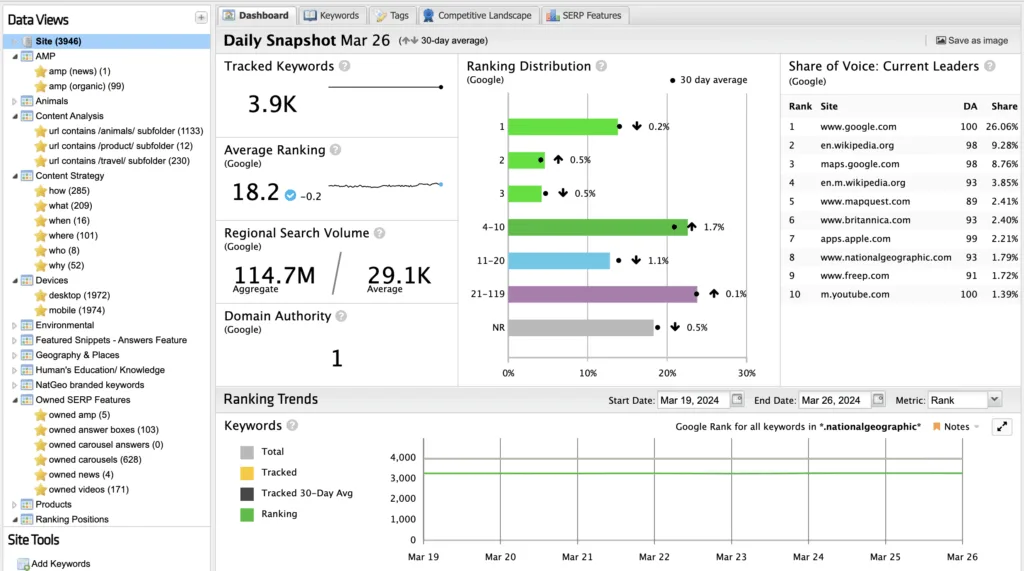
STAT Search Analytics is built for large-scale keyword monitoring and competitive visibility analysis, and it’s owned by Moz. Unlike many all-in-one SEO platforms that include rank tracking as a feature, STAT focuses exclusively on doing rank tracking super well at an enterprise level.
Features
STAT is built specifically for enterprise-scale rank tracking. It can monitor tens or even hundreds of thousands of keywords daily, with fast refresh rates and no sampling issues, even at a serious scale.
Beyond the standard rankings, STAT tracks a wide range of SERP features, including:
- Featured snippets
- People Also Ask results
- Local packs
- Videos
This gives you a fuller picture of how your brand appears across the entire SERP.
Instead of focusing on individual keyword positions in isolation, STAT emphasizes share of voice and market visibility. This makes it easier to understand how much of the overall “pie” you’re capturing compared to competitors.
Advanced segmentation allows you to analyze performance by:
- Keyword groups
- Intent
- Device
- Location
- Business unit
This granular data is essential for enterprise teams managing multiple projects, regions, or customer segments.
Competitor tracking is included at scale, showing you not just where you rank, but the wider competitive landscape for every keyword you track.
STAT’s historical SERP data lets you analyze trends over long timeframes, helping you:
- Spot seasonality
- Assess the impact of algorithm updates
- Understand the long-term effects of major site changes.
International and local tracking supports performance monitoring across countries, regions, cities, and languages, making it suitable for global brands and organizations with strong local presence.
And it also includes flexible reporting, dashboards, and API access, making it easy to pull STAT’s data into internal dashboards or business intelligence tools. This helps ensure ranking information can be shared across the organization.
Pricing
STAT does not publish public pricing on its website. Pricing is custom-quoted, typically based on the number of tracked keywords, markets, and update frequency.
Reviews
Platform | Rating |
G2 | 4.3/5 |
Capterra | 4.8/5 |
Software Advice | 4.8/5 |
Who is STAT Search Analytics best for?
STAT is purely an enterprise-level rank tracking and SERP analytics engine, not an all-in-one tool or a technical crawler. For that reason, you should choose STAT if you’re looking for better and more advanced rank tracking features than what you’d get inside a more general-purpose platform, particularly if you need to track massive numbers of keywords across multiple markets.
17. AccuRanker
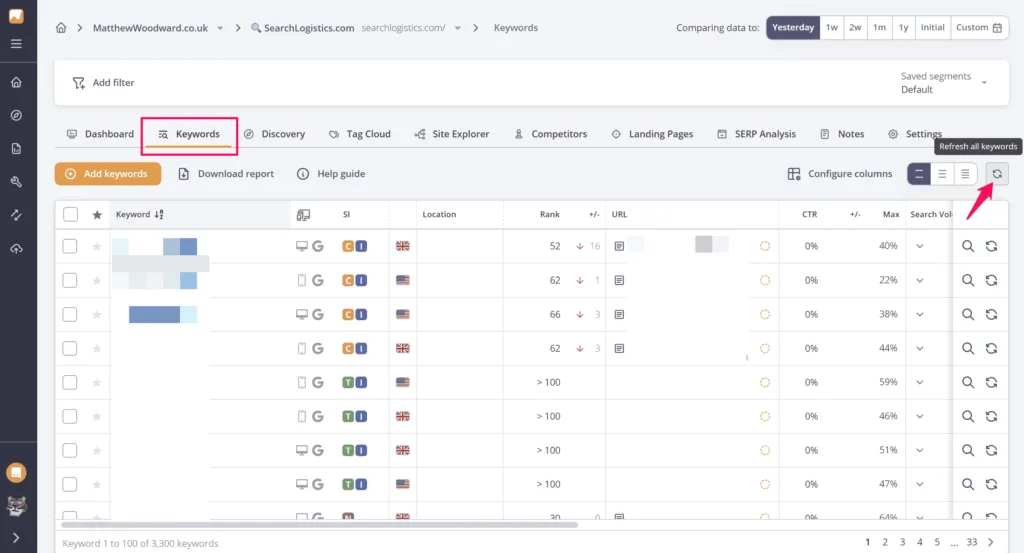
AccuRanker is a specialist rank tracking and SERP analysis tool known for speed, accuracy, and real-time keyword updates. While many SEO tools offer rank tracking as one of many features (as we explained when discussing STAT Search Analytics), AccuRanker has built its entire platform around providing users with the fastest and most accurate ranking data possible.
Features
AccuRanker is built for speed. It offers on-demand and daily rank updates with fast refresh times, so you can pull fresh data whenever you need it, rather than waiting for the tool to update on its own accord.
Accuracy is one of AccuRanker’s biggest strengths. The platform is known for precise, pixel-level SERP tracking, giving you confidence that the rankings you’re seeing reflect exactly where your pages appear.
Beyond standard organic positions, AccuRanker also tracks a wide range of SERP features like:
- Featured snippets
- People Also Ask results
- Local packs
- Shopping listings
This gives you a more complete view of how your brand shows up in the SERPs.
Share of voice metrics roll individual rankings up into a clearer view of overall visibility. This makes it easier to understand market presence across keyword sets and competitors, rather than getting lost in the day-to-day details of ranking changes.
Advanced segmentation and tagging allow you to group keywords by:
- Intent
- Page type
- Location
- Custom logic
Which is especially useful when managing large keyword sets across multiple products or teams.
Competitor tracking is built in, making it easy to see where your SERP competitors are gaining or losing visibility alongside your own performance.
International and local tracking support monitoring across countries, regions, cities, and devices, giving you consistent coverage whether you’re operating globally or focusing on specific markets.
Historical ranking data helps you distinguish between short-term volatility and “actual” performance shifts, making trend analysis and decision-making easier.
AccuRanker also has integrations with:
- Google Analytics
- Google Search Console
- And a flexible API and export options
That makes it easy to connect ranking data to traffic, conversions, and any internal reporting systems you use.
Pricing
- Professional: From $249 per month for 2,000 keywords. The price increases between 2,000 and 10,000 keywords.
- Expert: From $849 per month for 10,000 keywords. The price increases between 10,000 and 25,000 keywords.
- Enterprise: Custom pricing for more than 25,000 keywords.
Reviews
Platform | Rating |
G2 | 4.8/5 |
Capterra | 4.9/5 |
Software Advice | 4.9/5 |
Who is AccuRanker best for?
Enterprise SEO teams that care deeply about ranking accuracy and speed. AccuRanker will be particularly useful for teams where reliable, real-time ranking data plays a key role in decision-making, and where the speed of fresh data can affect how quickly you respond to ranking changes or competitive threats.
18. Advanced Web Ranking

Advanced Web Ranking (AWR) is a specialist rank tracking and SEO reporting platform that’s built for:
- Accurate keyword monitoring
- Flexible segmentation
- Large-scale reporting
AWR has established itself as a very reliable choice for teams that need precise ranking data combined with powerful reporting capabilities to communicate performance to stakeholders.
Features
Advanced Web Ranking focuses on reliable, accurate rank tracking across:
- Search engines
- Devices
- Locations
- Languages
Its infrastructure is built to give you consistent data across all these dimensions, so performance decisions aren’t based on “noisy” or unreliable rankings.
The update frequency is flexible, allowing you to choose daily, weekly, or on-demand refreshes based on your needs and budget. This makes it easier to balance your data freshness with the cost of the tool, especially (for enterprise sites) when tracking large keyword sets.
Alongside your traditional rankings, AWR tracks key SERP features such as:
- Featured snippets
- Local packs
- Images
- Vide results
This helps you understand how your visibility extends beyond standard blue links.
Share of voice and visibility metrics combine individual rankings into market-level insights, making it easier for you to assess your overall presence across keyword sets and competitors without your data being muddied by day-to-day keyword fluctuations.
Advanced segmentation lets you organize keywords by:
- Tags
- Intent
- Landing pages
- Markets
- Custom dimensions
This is especially useful for enterprise teams that need to analyze performance across business units or focus on specific parts of a large keyword list.
Competitor tracking is built in at scale, allowing you to benchmark visibility against rivals across your full keyword set.
Historical data and trend analysis provide a longer-term view of performance, helping you spot seasonality and meaningful trends and measure sustained SEO impact over time.
And, as with some of the other tools we’ve listed, AWR offers integrations, API access, and multi-account management, making it well-suited for agencies and large teams. It allows ranking data to feed into your internal dashboards while keeping multiple sites or clients organized.
Pricing
- Pro: $139 per month. This includes 7,000 keywords, unlimited projects and users, local and mobile rankings, SERP feature tracking, shareable reports, and AI visibility metrics.
- Agency: $279 per month. This includes 14,500 keywords, all Pro features plus 1-hour update frequency, localized metrics, custom dashboards, a Looker Studio integration, and a developer API.
- Enterprise: $699 per month. This includes 35,500 keywords, all Agency features plus cross-project reporting, advanced integrations (BigQuery), custom scheduled updates, CSV exports, and enhanced support.
- Enterprise Plus: $980+ per month. This includes approx. 50,000 keywords, all Enterprise features plus keyword research add-ons, custom SLAs/MSAs, SSO, dedicated account manager, and bespoke billing.
Reviews
Platform | Rating |
G2 | 4.3/5 |
Capterra | 4.8/5 |
Software Advice | 4.8/5 |
Who is Advanced Web Ranking best for?
Advanced Web Ranking is probably better suited to SEO teams that want precise rank tracking and strong flexibility in ranking reporting. AWR is particularly well-suited for organizations that need to communicate rankingperformance clearly to stakeholders, and for large agencies handling multiple clients who need multi-account workflows.
Best for content optimization
19. AirOps
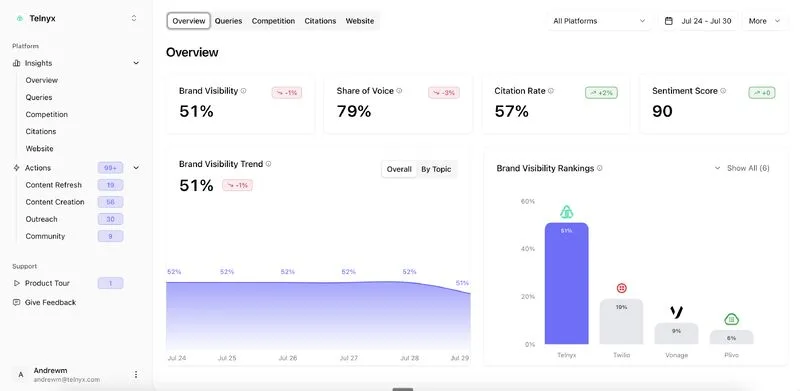
AirOps is a no-code/low-code AI workflow and content platform used mainly for marketing, SEO, and content teams to:
- Plan
- Produce
- Optimize
- Refresh
Content at scale. With a growing emphasis on visibility in both traditional and AI-based search, AirOps helps enterprise teams build systematic, repeatable content processes powered by AI.
Features
AirOps is built around repeatable, AI-powered workflows rather than one-off content generation. Its Workflow Builder lets teams design standardized processes that can be reused consistently, making content production more scalable and predictable.
Of course, most teams don’t blindly trust AI, so human approval steps can be added throughout these workflows, ensuring that editors or subject matter experts review outputs before anything goes live. This keeps quality and accuracy top of mind, even when AI handles most of the initial work.
Deep Research Briefs provide writers with structured briefs based on:
- Search intent
- SERP patterns
- Competitor context
This gives content teams a clearer strategic starting point, rather than relying on guesswork.
AirOps also supports content refresh workflows, helping teams systematically review and update existing pages at scale to prevent content decay and maintain performance over time.
Brand voice rules and knowledge base grounding help ensure outputs stay on-brand and factually accurate. By anchoring AI generation to internal documents and other trusted sources, the platform reduces hallucinations (a common problem with AI) and produces content aligned with real business context.
For scale (which will be a key feature for large enterprise sites), batch runs allow the same workflow to be applied across large lists of:
- Keywords
- URLs
- Products
Reusable building blocks make this easier by letting teams save and reuse proven prompt logic across different workflows.
There are also integrations and different flexible data inputs that allow AirOps to pull information from across your marketing stack, ensuring content workflows are informed by real data rather than operating in isolation.
Pricing
AirOps doesn’t publish its pricing on its website, but based on available information:
- Solo: $200 per month.
- Pro: $2,000 per month.
- Enterprise: Custom pricing (as is common with top-tier plans on other platforms).
Reviews
Platform | Rating |
G2 | 4.6/5 |
Capterra | N/A |
Software Advice | N/A |
Who is AirOps best for?
AirOps is best for enterprise SEO teams that want/need to scale content production with repeatable processes. It’s going to be particularly valuable for organizations that need to create or refresh large volumes of content systematically while maintaining quality control through human oversight and brand consistency.
20. Surfer SEO
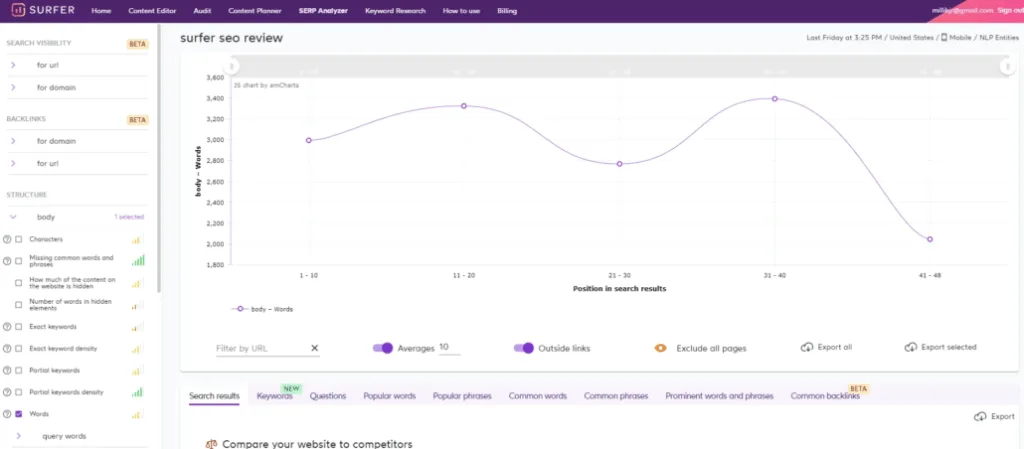
Surfer SEO is a content optimization and on-page SEO platform focused on data-driven content creation. By analyzing what’s actually ranking in search results, Surfer helps content teams understand what it takes to compete for target keywords and provides specific, actionable guidance to improve on-page optimization.
Features
Surfer is designed to help teams create and optimize content based on what’s already working in the SERPs. Its Content Editor provides real-time recommendations around:
- Structure
- Headings
- Terms
- Length
By analyzing your draft against top-ranking pages as you write.
The SERP Analyzer supports this by breaking down what high-performing pages have in common for a given keyword, removing much of the guesswork about what Google appears to reward.
Keyword research and clustering help you uncover related terms and group them into meaningful topic clusters, encouraging broader topical coverage rather than isolated keyword targeting.
Surfer’s Content Audit shifts the focus to existing pages, finding underperforming content and prioritizing updates so you can systematically improve what’s already published instead of just publishing new pages.
The Content Planner ties this together by helping you map out pillar content and supporting articles, making it easier to build topical authority in a structured way.
An AI writing assistant is built directly into the editor, allowing you to generate or expand content using guidance informed by live SERP data, rather than generic prompts.
On-page scoring benchmarks your content against competitors, giving teams a clear optimization target and a simple way to track progress.
There are also integrations with tools like Google Docs and WordPress, along with collaboration features for writers and editors, making it easy to include Surfer in existing workflows.
Pricing
- Essential: $99 per month. Entry-level access to Content Editor and core optimization features.
- Scale: $219 per month, approximately. This includes higher limits, content audits, and expanded keyword research.
- Enterprise: This starts from $999 per month.
Reviews
Platform | Rating |
G2 | 4.8/5 |
Capterra | 4.9/5 |
Software Advice | 4.9/5 |
Who is Surfer SEO best for?
SEO and content teams who want to sharpen up their on-page optimization using SERP data. Surfer is particularly valuable for organizations that want to move beyond intuition and optimize content based on what’s actually working in search results for their target keywords.
21. Clearscope

Clearscope is a content optimization and keyword relevance platform designed to help teams create high-quality, search-competitive content. With a focus on balancing SEO performance with editorial quality, Clearscope has become popular among content teams that refuse to compromise on writing standards while still wanting to rank well.
Features
Clearscope’s content editor provides real-time optimization guidance alongside a simple “A-F” grade based on top-ranking pages, making it easy to see where your content stands and what’s needed to improve it.
Keyword and topic discovery surfaces both primary terms and semantically related concepts, helping writers cover topics fully without resorting to keyword stuffing. The emphasis is on relevance and depth, not volume.
SERP-based analysis benchmarks your content against what’s already ranking, highlighting gaps in coverage so pages can be comprehensive without becoming unfocused or bloated.
Readability and structure guidance ensure optimization doesn’t come at the expense of editorial quality. Clearscope is particularly strong here, encouraging content that works for search engines while still reading naturally for humans.
Content audits extend this approach to existing pages, identifying specific areas where topic coverage is lacking and where updates are most likely to move the needle.
The Google Docs integration allows writers to create and optimise content without leaving their usual workflow, reducing friction and maintaining momentum.
Collaboration features make it easy to share reports and recommendations across writers, editors, and stakeholders, ensuring everyone is aligned on what “good” looks like.
Overall, Clearscope’s clean, focused interface reflects its philosophy: prioritise content quality and clarity over endless configuration and complexity.
Pricing
- Essentials: $129 per month. Everything you need to get started optimizing content. Includes 20 AI Tracked Topics, 20 monthly Topic Explorations, 20 monthly AI Drafts, and 50 Content Inventory Pages.
- Business: $399 per month. Advanced functionality for productive content teams. Includes 50 AI Tracked Topics, 50 monthly Topic Explorations, 20 monthly AI Drafts, 300 Content Inventory Pages, and a Dedicated Account Manager.
- Enterprise: Custom pricing. Custom solutions for businesses that produce content at scale. Includes everything in Business, plus custom credits, custom agreements, crawler whitelisting, and Single Sign-On (SSO).
Reviews
Platform | Rating |
G2 | 4.9/5 |
Capterra | 4.9/5 |
Software Advice | N/A |
Who is Clearscope best for?
Clearscope is best for editorially driven SEO and content teams that prioritize:
- Content quality
- Relevance
- Brand voice
Clearscope is particularly well-suited for organizations where maintaining high editorial standards is non-negotiable but ranking competitively in search is still an important business goal.
22. MarketMuse

MarketMuse is a content intelligence and strategy platform that’s been designed to help teams build topical authority and drive long-term organic growth. Rather than focusing on individual keyword optimization, MarketMuse takes a topic-centred approach, helping you understand how comprehensively you’re covering subject areas and where strategic content investments will have the biggest impact.
Features
MarketMuse is built around topic modelling and authority analysis rather than keyword optimization. It maps topics, subtopics, and entity relationships to assess how thoroughly you’ve covered a subject compared to what’s possible on the market.
Content inventory and gap analysis give you a bird’s-eye view of your existing content, highlighting gaps, overlaps, and areas where your competitors have stronger topical coverage. This makes it easier to see where your authority is strong and where it needs some work.
Content optimization and scoring focus on depth and relevance, not just keyword usage. Scores reflect how comprehensively a page addresses a topic, encouraging substance over surface-level optimization.
MarketMuse also generates detailed content briefs that outline:
- Structure
- Subtopics
- Questions to address
Giving writers clear guidance on what “good coverage” actually looks like for a topic.
Content planning and prioritization help teams decide what to create, update, or consolidate based on quantified opportunities, allowing resources to be allocated where they’re most likely to succeed.
Competitive content analysis adds context by showing how your topical authority compares to competitors and where specific gaps need to be closed to compete more effectively.
AI writing assistance supports content creation aligned to these topic models and briefs, helping teams produce content that meets the required depth and coverage standards.
Finally, portfolio-level insights provide a high-level view of authority and performance across entire sites or sections, which is particularly valuable for enterprise teams managing large content estates.
Pricing
MarketMuse does not publicly publish pricing on its website. There is a free plan, with standard SaaS tiering above it for paid plans.
Reviews
Platform | Rating |
G2 | 4.6/5 |
Capterra | 4.9/5 |
Software Advice | 4.9/5 |
Who is MarketMuse best for?
Content-led SEO teams that want to build topical authority rather than chase individual keywords. MarketMuse is particularly useful for organizations with long-term content strategies where establishing comprehensive coverage of important topics is more important than quick wins on isolated search terms.
Summary
Look… This list isnt exhaustive. The enterprise SEO tool landscape is massive and it changes and evolves constantly. However, we hope this guide gives enterprise teams the information they need to evaluate which tools are the right fit for their specific:
- Needs
- Workflows
- Organizational priorities
In our experience, most enterprise SEO operations will need at least one of the all-in-one tools covered here. Platforms like Ahrefs, Semrush, Moz, or SE Ranking, that provide broad coverage across multiple SEO disciplines. These tools form a solid foundation for:
- Keyword research
- Competitor analysis
- General SEO management
However, you’ll often find that all-in-one tools aren’t enough on their own. Enterprise teams typically layer in more specialist tools for deeper analysis in specific areas. That might mean adding SEOTesting for structured SEO experimentation and getting more actionable insights from Google Search Console data. It could also involve bringing in one of the dedicated crawlers, like Screaming Frog, Sitebulb, Lumar, or Botify, for comprehensive technical auditing and monitoring. And for teams serious about content performance, specialized content optimization tools like Surfer SEO, Clearscope, or MarketMuse can provide the depth of analysis and guidance you need.
The right combination of tools depends on:
- Your team’s size
- Technical capabilities
- Content volume
As well as where SEO sits within your broader marketing strategy.
Start with your most pressing needs, and build your stack from there.
Want to turn Search Console data into measurable SEO wins?
SEOTesting is built to make Google Search Console data actionable, so you can test changes, report outcomes, and prioritize what work to do next. Whether you’re running time-based tests, split tests, or LLM experiments, SEOTesting helps you prove the impact of your SEO work with structured, data-backed testing workflows.
Try SEOTesting free for 14 days. The trial is fully functional, doesn’t require a credit card, and lets you add up to 30 sites. After the trial, plans are month-to-month with no long-term contract, so you can cancel anytime.
Testimonials
-

"Can totally recommend! It’s not only full of reports to easily identify low hanging fruit opportunities but also, the most straightforward platform to help run SEO tests"
Aleyda Solis, Intl SEO Consultant, Speaker & Author.
-

"SEOTesting.com has become one of my go-to SEO tools because it does so much with all the valuable data hidden in Google Search Console. It's the only thing that gives us the ability to use that data for keyword tracking, SEO tests, and quality testing."
Ruben Gamez, DocSketch